The best AI agent for data analysis is the one that matches where your data lives and who asks the questions. For research statistics and publication figures, start with PlotStudio AI. For spreadsheets and quick charts, Julius AI and Powerdrill AI are the lighter options. If your company already runs Power BI or Tableau, use their built-in agents. Teams on Snowflake or Databricks should look at the warehouse-native agents. Engineers who want full control can build their own with LangChain and AutoGen. A good pick runs real code on real data, shows its steps, and keeps context across follow-up questions.
Searching for this topic is frustrating because nearly every tool calls itself an agent. Many are chatbots with a chart button. You need to know which ones plan, execute, and check their work, what they cost, and whether they fit your data. This article covers seven tools, explains how these agents work, compares them in one table, and helps you decide whether to buy or build.
A disclosure first: PlotStudio AI is our product. It comes first because it fits the research use case closely, and I say plainly where it does not fit. Prices are listed as published at the time of writing, and they change often, so confirm them before you buy.
How an AI agent for data analysis works
An AI agent for data analysis takes a plain-language question, decides which steps answer it, runs them against your data, and checks the result before reporting back. The agent part is the planning, execution, and checking. A chatbot only replies.
What separates an agent from a chatbot
You see the difference when you ask a follow-up question or hand over a messy file. A chatbot answers one prompt at a time. An agent breaks the question into steps, reads the output of each step, and recovers from errors without you rewriting the prompt.
| Capability | Chatbot on a spreadsheet | Data analysis AI agent |
|---|---|---|
| Plans multiple steps | No, answers one prompt | Yes, splits the question into steps |
| Runs code or SQL | Sometimes | Yes, and reads the output |
| Fixes its own errors | Rarely | Retries after failed runs |
| Keeps context | Within one chat | Across follow-ups, sometimes across sessions |
| Shows its work | Often only the answer | Code, steps, assumptions |
General assistants such as ChatGPT can run code on an uploaded file, so the answer to "can ChatGPT do data analysis" is yes for a one-off file. What you usually get less of is a persistent workspace and control over the method.
The loop an agent runs on your data
Most data analysis agents repeat the same five-step loop:
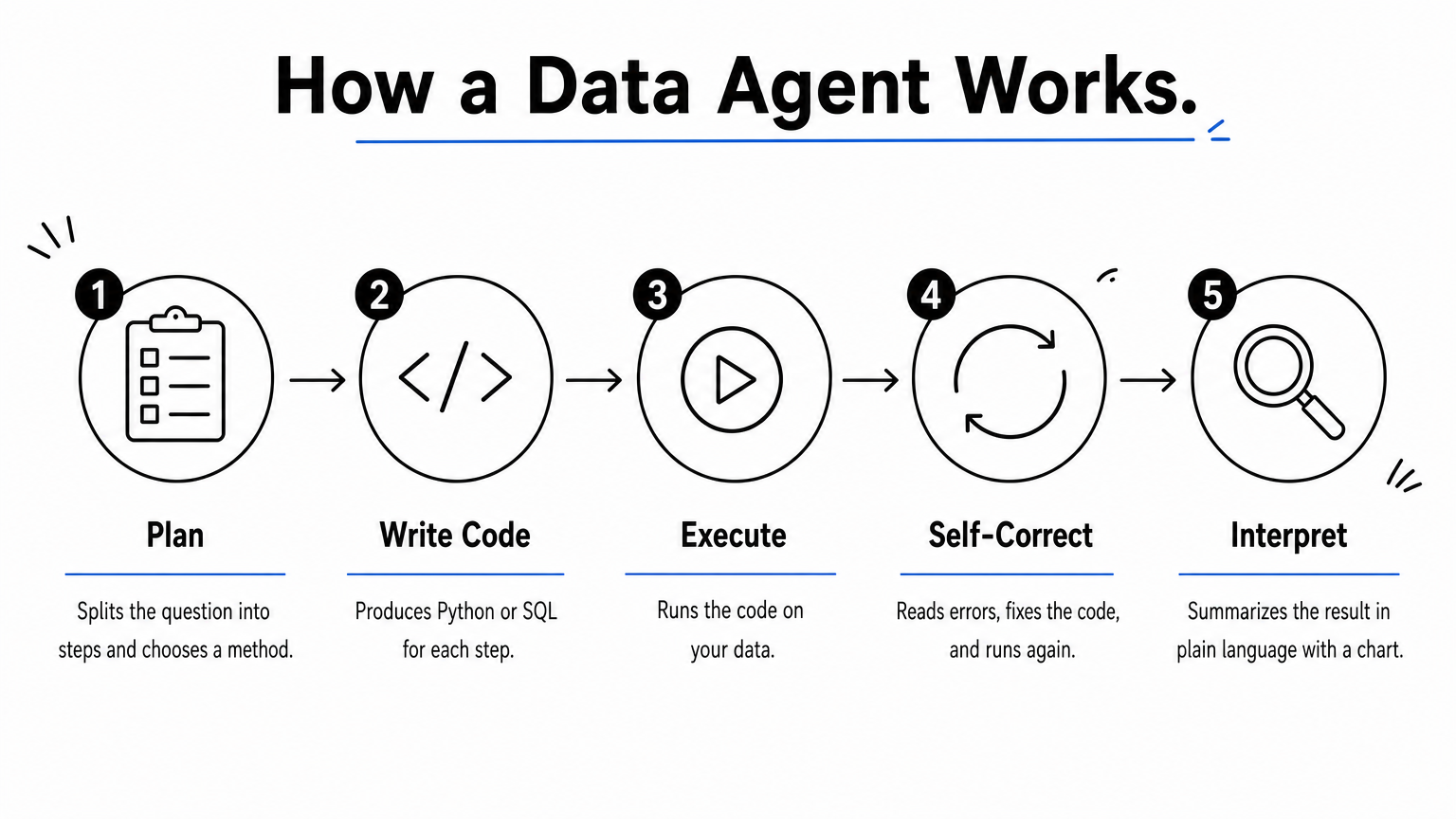
- Plan: split the question into steps and choose a method.
- Write code: produce Python or SQL for each step.
- Execute: run the code on your data.
- Self-correct: read errors, fix the code, run again.
- Interpret: summarize the result in plain language with a chart or table.
The tools below differ in where this loop runs, how much of it you can see, and what data it can reach. Those three differences drive the choice.
A real agent shows its code and its steps, so you can check an answer instead of trusting it.
1. PlotStudio AI: research analysis and figures
What it does

PlotStudio AI is a desktop workspace where specialized AI agents plan the investigation, write Python, execute it, and self-correct, then interpret the results. You upload a dataset and ask questions in plain English. On upload it scores data quality as Clean, Usable, or Needs Cleaning and writes a cleaning plan. Each question produces a permanent analysis page with tables, charts, statistical tests, and interpretation, and later questions build on earlier pages.
The feature that matters most for research is Verification Mode. You can review the plan before it runs, edit the methodology, and approve methods and assumptions before any code executes.
PlotStudio shows its plan before it runs, so you approve the method instead of auditing it afterward.
- Domain methods: it auto-detects your field or lets you pick up to 2 of 12 specializations, and applies methods such as Cox proportional hazards, IV/2SLS, and GARCH.
- Edit safety: every change in Verification Mode shows a diff summary, and you can undo it in one click.
- Exports: PDF reports with embedded charts, tables, and LaTeX equations, or a Jupyter notebook that reproduces the results with Run All.
- Privacy: analysis runs on your machine, and AI calls go from your computer straight to the model provider. PlotStudio's servers do not receive dataset contents.
Who it suits
PlotStudio fits academic and clinical researchers, graduate students, epidemiologists, and economists who need defensible statistics and publication-style figures without writing every script. Experienced analysts can inspect the generated code and control the methodology.
It is not a dashboard builder, and it does not embed analytics inside a customer-facing product. It complements Stata, R, and SPSS rather than matching every specialized feature. You remain responsible for the method and for journal formatting rules. If you work with clinical or IRB-governed data, check your institution's privacy requirements before you upload anything.
Pricing and limits
You can start free, then pay either for managed usage or for your own API key.
- Free Trial: 30 credits, no credit card, no API key.
- Managed Credits: $69.99/month with 300 credits and no API key.
- Bring Your Own Key: $39.99/month with your own OpenAI API key and no markup on tokens.
- Academic plans, after approval: $29.99/month managed or $14.99/month BYOK.
- Enterprise: a 4-week pilot for 3 to 10 analysts at $500, credited toward an annual contract. AI calls route to your own Azure AI Foundry deployment.
A graduate student on Academic BYOK pays $14.99 × 12 = $179.88 a year, plus their own API usage.
2. Julius AI: spreadsheet analysis for individuals
What it does

Julius AI is built around uploading a file and asking questions. It reads CSVs, Excel sheets, and Google Sheets, then builds charts, pivot tables, and summaries. It handles follow-ups such as "compare last month to this month." Setup takes minutes because there is nothing to integrate. Higher tiers add connectors for Postgres, BigQuery, and Snowflake, plus custom agents and scheduled reports.
Julius trades depth for speed: it is the fastest way from a spreadsheet to a chart, not a full analytical workspace.
Who it suits
It suits freelancers, consultants, students, and small teams who live in spreadsheets and want to skip SQL. A marketer who needs a one-off breakdown of campaign data is a good example.
It is a poor fit for large organizations that need deep database integration or heavily customized multi-step agent workflows. Its charts are also simpler than what Tableau or Power BI produce. For research work, you will want more control over statistical methods than a general spreadsheet assistant offers.
Pricing and limits
Published plans have been:
- Free: 15 messages per month, no credit card.
- Pro: $45/month with unlimited messages and more memory.
- Business: $450/month with 3 editor seats, advanced connectors, and custom agents.
- Enterprise: custom pricing with SSO and audit logs.
Plan details change often, so confirm them on the pricing page before you commit.
3. Powerdrill AI: low-cost file analysis and reports
What it does
Powerdrill AI lets business users ask questions over uploaded files without learning SQL. You can upload Excel, CSV, and PDF files. It explores the data, suggests follow-up questions, and generates reports or presentations. It also supports time-series forecasting with Prophet and ARIMA, plus batch analysis across many files.
Powerdrill's strength is low cost and speed on files, not control over how the agent reasons.
Who it suits
It fits operations and sales teams, and startups without a data team, who need quick answers from spreadsheets and documents. Because it explains its analysis steps, a non-technical manager can follow how a number was produced.
Developers who want to orchestrate their own agents will find it limiting, since prompt control is minimal. Accuracy can also drop with loosely structured data or vague questions, and its visualizations are simpler than those in dedicated BI tools. Treat its output as a first pass on messy inputs.
Pricing and limits
Pricing is among the lowest in this category:
- Free: limited workspace and basic models.
- Basic: $3.90/month with better models.
- Plus: $9.90/month with forecasting and presentations.
- Pro: $29.90/month with unlimited reports, database jobs, and ML models.
Team and dedicated cloud editions add API access and isolated deployments for organizations with security requirements.
4. Power BI with Copilot: for Microsoft shops
What it does
Copilot brings generative AI into Power BI. You ask questions in natural language, and it generates reports, dashboards, and summaries. It sits inside the Microsoft stack, so it connects naturally to Excel, Teams, and Azure. Governance and security come from Microsoft's enterprise controls, which matters when many people share the same datasets.
If your company already lives in Microsoft 365, Copilot is the lowest-friction AI agent you can adopt.
Who it suits
It suits organizations that already use Power BI and Microsoft 365 and want business managers to get instant dashboards without filing requests to analysts.
It is a weak choice if you run another BI stack, because you are tied to Microsoft licensing. It is also less customizable than open-source agents, and its AI features are still evolving. It reports on data you have already modeled, so it will not clean a messy research dataset for you.
Pricing and limits
The base licenses are inexpensive, but Copilot is not included at the entry tier.
- Power BI Pro: $14 per user per month, billed annually.
- Premium Per User: $24 per user per month, billed annually.
- Copilot: available through Microsoft Fabric capacity, not on Free or Pro alone.
A team of 10 on Pro pays 10 × $14 = $140 a month, but that does not switch Copilot on by itself. Budget for Fabric capacity as well, and expect costs to rise with scale. See Microsoft's Power BI page for current licensing.
5. Tableau Pulse: governed insights at enterprise scale
What it does
Tableau Pulse adds generative AI to an existing Tableau deployment. It answers natural-language questions and runs anomaly detection, forecasting, and trend alerts. Insights arrive where people already work, in dashboards, Slack, or email. Role-based access control and audit logs come built in, which is why regulated industries consider it.
Pulse makes sense only if Tableau is already your system of record, because the AI sits on top of that investment.
Who it suits
It suits large organizations on Tableau that want secure, governed AI and automated alerts for leadership teams replacing manual dashboard checks.
Startups and small teams should skip it. It requires Tableau setup and licensing, onboarding is more involved than with lightweight tools, and you get limited room to customize the agent. Researchers analyzing a single dataset will find it heavy for the job.
Pricing and limits
Tableau licenses are per user per month:
- Creator: $75.
- Explorer: $42.
- Viewer: $15.
Take a team of 1 Creator, 4 Explorers, and 15 Viewers. That is $75 + (4 × $42) + (15 × $15) = $75 + $168 + $225 = $468 a month in licenses. Pulse comes on top of a Tableau license, and enterprise deals are usually negotiated, so ask your account team what the AI features add to that total.
6. Snowflake Cortex and Databricks Genie
What it does
These are warehouse-native agents. They run inside your data platform, so data does not move to an outside AI tool. Snowflake's agent features combine SQL with AI reasoning for live querying, forecasting, and anomaly detection. Databricks Genie gives natural-language access to tables in the Databricks environment. Because everything stays where the data lives, security review is simpler.
Warehouse-native agents trade a friendly interface for tight data control.
Who it suits
They suit data engineering and data science teams already on Snowflake or Databricks, and companies handling sensitive or regulated data that cannot leave the platform.
They are less suited to business users. The end-user experience is minimal, and context options are narrower than in other tools: Snowflake Cortex lacks dbt integration, and Databricks Genie lacks a semantic layer. Without technical skills in SQL and warehousing, you will struggle to get reliable answers.
Pricing and limits
Pricing follows consumption rather than a seat fee. On Snowflake, AI agent costs depend on the queries and compute you use, with no fixed add-on fee. Light use stays cheap. Heavy pipelines can become expensive quickly. Ask your account team for current terms for your edition, because consumption pricing differs by contract. These agents also assume your data is already in the warehouse, so a loose CSV on your laptop is not their use case.
7. LangChain and AutoGen: build your own agent
What it does
LangChain and AutoGen are open-source frameworks for engineers who want to define workflows, tools, and logic from scratch. AutoGen supports multi-agent orchestration, where agents pass work to each other. You can connect any language model, database, or API. That means you can build an agent that reasons over your own sources and returns structured results.
Building gives you maximum control, and you pay for it in engineering time and your own governance work.
Who it suits
It suits engineering-led teams building proprietary analytics features, and data teams that need full control over orchestration. If your agent must live inside your own product, this route is realistic.
It does not suit analysts who want answers today. You get no out-of-the-box dashboards or reports, and compliance, access control, and evaluation are yours to build. Expect a steeper learning curve than with any hosted tool in this list.
Pricing and limits
The frameworks themselves are free. The real cost is everything around them:
- Open source: free at the framework level.
- LangChain hosted platform: a free tier, with paid plans starting at $39 per seat per month plus usage.
- Model APIs: billed by your provider based on usage.
- Infrastructure: hosting, orchestration, and monitoring.
Budget engineering time for maintenance as well, because agents need ongoing evaluation as models and data change.
How to choose the right AI agent for data analysis
Choose by data location, user skill, and need for control, then test the shortlist on your own files. The best AI agent for data analysis is whichever one answers your real questions correctly and shows how it got there.
Compare the seven side by side
| Tool | Best for | Data it reads | Entry price |
|---|---|---|---|
| PlotStudio AI | Research statistics and figures | CSV, Excel, structured research data | Free trial (30 credits); $39.99/month BYOK |
| Julius AI | Individual spreadsheet analysis | CSV, Excel, Google Sheets | Free (15 messages); Pro $45/month |
| Powerdrill AI | Fast file analysis and reports | Excel, CSV, PDFs | Free; Basic $3.90/month |
| Power BI with Copilot | Microsoft-based teams | Power BI datasets | Pro $14/user/month; Copilot needs Fabric capacity |
| Tableau Pulse | Governed enterprise insights | Tableau data sources | Viewer license $15/user/month; Pulse extra |
| Snowflake Cortex, Databricks Genie | Teams on those warehouses | Warehouse tables | Usage-based |
| LangChain and AutoGen | Custom-built agents | Anything you connect | Free framework; hosted from $39/seat/month |
Build or buy
Buy when your question is common and your data is ordinary. Build when the agent must run inside your own product or follow rules no vendor supports. If you want to try building, Google's Data Analyst Agent codelab walks through a working agent with its Agent Development Kit. It is a good way to learn what orchestration involves before you commit engineers.
Test any agent on your own data
Run the same five checks on every shortlisted tool, using a file you already understand:
- Ask a question whose answer you know, and see whether it matches.
- Ask a follow-up that depends on the first answer.
- Upload a file with missing values and see how the agent handles them.
- Open the code or steps and confirm the method fits your data.
- Check where your data goes, and whether that satisfies your institution or employer.
Test every agent on a question you can already answer, because that is the only reliable accuracy check.
Pick the agent that fits your data
The seven tools above split cleanly by use. Spreadsheet agents give speed, BI agents give governance, warehouse agents keep data in place, and frameworks give control. For research, the deciding factor is whether you can see and approve the method behind every result, because an answer you cannot inspect is not one you can defend.
If your work is statistics and publication figures, try PlotStudio AI on the free plan with 30 credits and no credit card. Upload a dataset you already know, ask a question in plain English, and check the plan and code against your own judgment.