The Best Julius AI Alternative in 2026: A Side-by-Side Test
- If you’re looking for a Julius AI alternative that actually produces analysis, not a chatbot summary — PlotStudio AI is the one we’d pick. It documented cleaning, defined an explicit comparison group, ran proportional tests, caveated by sample size, and ended with an actionable strategy. Julius listed counts of what appeared in the group — no cleaning, no comparison, no caveats.
- Before you ask a single question, PlotStudio already:— scored the data (Clean / Usable / Needs Cleaning)— classified missingness (MNAR, MAR, MCAR per column)— wrote an executive summary of the dataset— rendered a full column explorer with distributions and correlationsJulius showed an empty chat.
- Because Julius never ran a comparison, it missed a counterintuitive finding PlotStudio surfaced: fences are actually less common in the outlier group than in the rest. Counts don’t tell you that. Comparisons do.
- PlotStudio’s Quick Analysis mode matches Julius on speed — so swapping Julius for PlotStudio doesn’t cost you the “upload and ask” ergonomics.
Julius was tested on its free tier — Julius 1.1 Lite. To give Julius the benefit of the doubt, we downgraded PlotStudio too: instead of running our Deep Reasoning mode, we used our weaker Standard Reasoning. Julius got the weakest PlotStudio we have.
If you’re searching for a Julius AI alternative, you’re almost certainly not looking for another chatbot. You’re looking for a tool whose output holds up when someone asks “how did you get to that number?”
This article is that tool, tested on the record. We gave Julius AI and PlotStudio AI the exact same CSV and the exact same question — and what came back wasn’t just different answers. It was two fundamentally different kinds of output. One tool produced an analysis. The other produced a summary. That distinction is the whole reason people search for Julius AI alternatives in the first place.
Why People Look for Julius AI Alternatives
Julius AI is fast and produces clean-looking output. For a quick exploratory question you’ll follow up on yourself, that’s often enough. But the search volume for “julius ai alternatives” tells a different story — and in our experience talking to users, it almost always comes down to one of these five problems:
- The output isn’t auditable. Julius doesn’t document its data cleaning. A stakeholder asks “how did you arrive at 37?” and there’s no paper trail.
- No comparison groups. Julius returns counts — “11 homes have multiple fireplaces” — not findings. Without a comparison, you can’t know if that number is meaningful.
- No sample-size caveats. Julius makes confident claims out of tiny subgroups. For a defensible report, that’s a problem.
- Cloud upload. For sensitive or regulated CSVs, uploading to a SaaS tool is a non-starter.
- Chatbot framing, not analyst framing. Julius reads like a well-written blog post. A real report reads like a research document — with sections, methodology, and caveats.
The rest of this article is a head-to-head test built around those five problems. We picked PlotStudio AI as the Julius AI alternative because it’s the one we built, and because it’s specifically designed around those five gaps. (See also our broader perspective on agentic analytics and the future of the data analyst role.)
How We Tested
Dataset: Ames Housing Dataset — 1,460 residential home sales with 81 features including quality ratings, square footage, neighborhood, and sale price.
The question:
“Which houses with below-average overall quality still command top quartile sale prices, and what unusual features do they have?”
Both tools received the same CSV. Both received the same question. Both were run at the same time. Here’s what happened.
What Happens Before You Ask a Question
The first difference between Julius and the alternative shows up before either tool has answered a single question.
Julius AI: Waits for You to Ask
Julius AI accepted the upload and waited for a question. Clean interface, fast to get going. That’s it. No profiling, no quality assessment, no column-level intelligence — just a chat window and a cursor.
PlotStudio AI: Already Working
PlotStudio AI didn’t wait. Within 35 seconds of upload, before a single question was asked, it had streamed two complete documents to the screen: a Data Cleaning Assessment and an Executive Summary with Analytical Value Assessment.
This is the thing Julius doesn’t do. Here’s a compact view of what actually appeared on the screen in those 35 seconds:
| Document | Section | What PlotStudio delivered on the Ames dataset | Julius |
|---|---|---|---|
| Cleaning | Overall Assessment | “Usable but not fully clean” — 6.62% missing, no dupes, Id intact, dtypes correct. | Not generated |
| Cleaning | Missingness Analysis | 11 columns classified: PoolQC 99.5% MNAR, LotFrontage 17.7% MAR, Electrical 0.1% MCAR, etc. | Not generated |
| Cleaning | Columns of Interest | Every flagged column with a one-line reason and recommended handling. | Not generated |
| Cleaning | Data Cleaning Actions | 11 actions with priority + column + rationale (9 recommended, 2 critical). | Not generated |
| Cleaning | Completion Guarantee | Executing the plan brings the dataset to “Clean” status, no critical loss. | Not generated |
| Summary | Overview | Cross-sectional, 81 columns, individual home sales. | Not generated |
| Summary | Temporal Coverage | 2006–2010, year + month granularity, no gaps, non-longitudinal. | Not generated |
| Summary | Column Categories | 6 themes: Location, Structure, Interior, Basement/Garage, Outdoor, Transaction. | Not generated |
| Summary | Scope & Limits | Residential only, one locality, no demographics, no coordinates. | Not generated |
| Analytical Value | Important Columns | 15 high-signal columns named with why each matters. | Not generated |
| Analytical Value | Interpretation Gotchas | 5 pitfalls: missing-as-absent, skew, multicollinearity, dominant categories, short window. | Not generated |
| Analytical Value | Audience Framing | Who cares, what language, what charts, and what NOT to present. | Not generated |
| Analytical Value | Story Angles | 3 hypotheses: Quality vs. Size, Neighborhood × SaleCondition, Remodel × Kitchen offset. | Not generated |
Thirteen sections. Real column names. Specific numbers. Before you asked a single question. Julius, by contrast, showed you the raw CSV in a table viewer and waited.
One test of any Julius AI alternative is what the tool does before you prompt it. A chatbot waits. An analyst profiles. PlotStudio is built around the analyst pattern.
Analysis vs. Summary: The Real Difference
Here are both reports side-by-side — the answers before the breakdown. Scroll through each, then keep reading for exactly where the analysis falls apart.
If you skim the two PDFs, the first thing you notice is how different they feel. One reads like a research report. The other reads like a blog post.
That’s not stylistic. It’s structural. Julius AI produced a summary. PlotStudio AI produced an analysis. Those are two different things — and the gap between them is exactly why a Julius AI alternative exists as a category in the first place.
What a Summary Looks Like
Julius’s 5-page output reads like a well-written observation. It opens with a narrative (“The answer reveals 37 homes that defy expectations...”), tallies the most common neighborhoods, lists features that appeared frequently in the group (11 homes had multiple fireplaces, 8 had big living areas), spotlights a few extreme examples, and closes with four bullet points under “Key Takeaways.”
Every number in the report is a count. There is no comparison group. There is no documented cleaning step. There are no caveats. The recommendation at the end — “Quality scores alone are an incomplete picture of home value” — is a restatement of the question.
What an Analysis Looks Like
PlotStudio’s 7-page output is structured the way a data scientist would structure a report. Each section has a job, and the output earns every conclusion with a method you can follow:
| Section | What it does |
|---|---|
| Groundwork — Analytical Sample Defined | Documents cleaning: dropped rows with missing MasVnrArea/Electrical, recoded MNAR categoricals as None. 1,460 → 1,451 homes. |
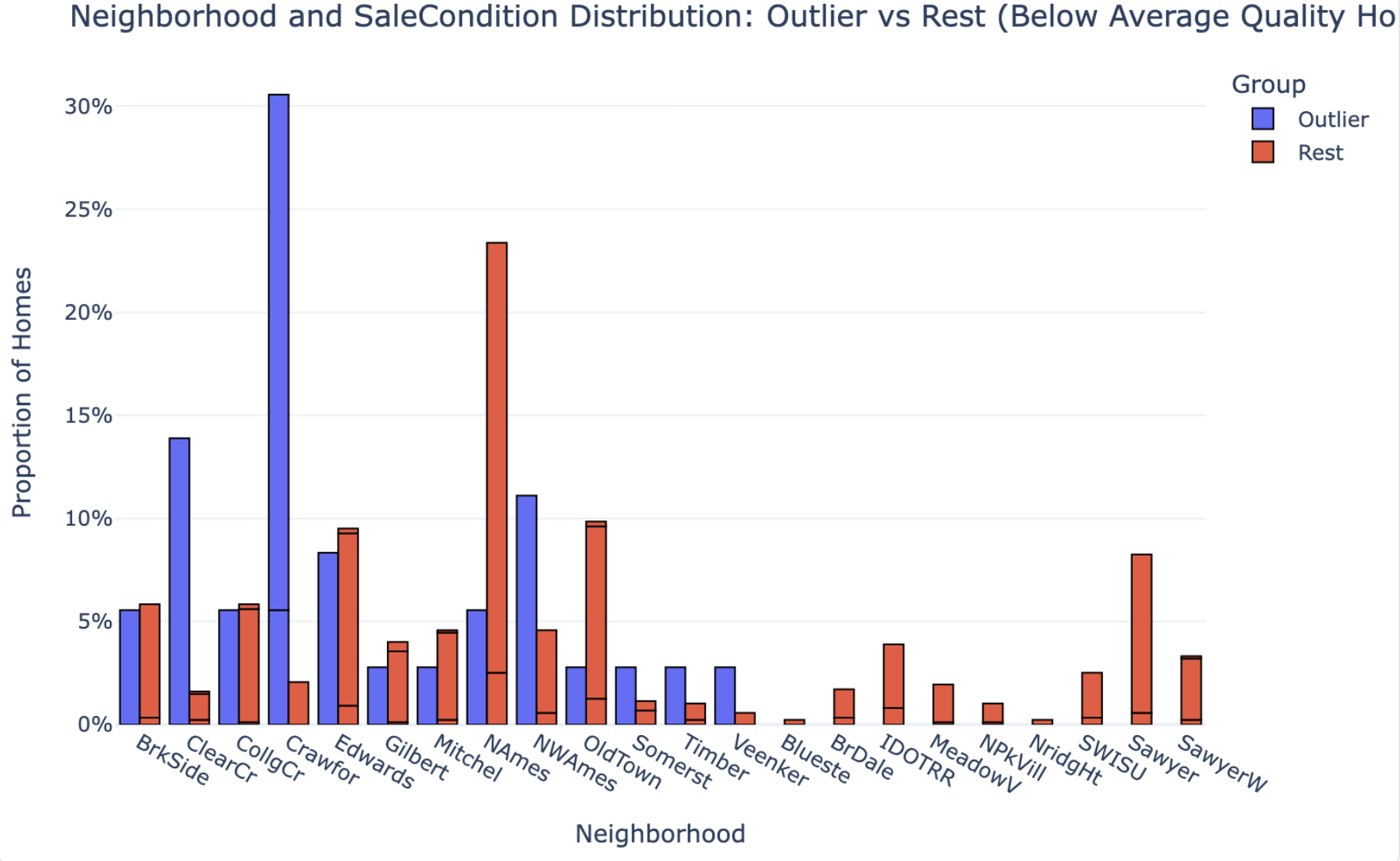
| Group Definitions | Explicitly defines two groups: 36 outliers (below-mean quality + top-quartile price) vs. 873 comparison homes (below-mean quality, rest of the price range). |
| Key Patterns & Observations | Runs proportional comparisons on 8 features, box-plot distribution comparisons on 5 size features, and neighborhood distributions — outliers vs. comparison group. |
| Interpretation & Implications | Translates the statistical evidence into a causal story: what drives the price premium, what amplifies it, and what doesn’t matter. |
| Caveats | Flags that n=36 is too small for granular neighborhood claims. Notes timing is a multiplier, not a primary cause. |
| Strategy Recommendation | Concrete actionable guidance for investors/sellers: where to deploy capital (finished space, post-2000 remodels, 2+ car garages) vs. what not to chase. |
A summary tells you what’s in the group. An analysis tells you why it’s in the group and what to do about it. Julius delivered the first. The Julius AI alternative we tested delivered the second.
The 37 vs. 36 Gap Is Evidence of the Difference
The two tools didn’t even agree on how many outlier homes exist in the dataset. Julius found 37. PlotStudio found 36. Same CSV, same question — but one tool worked on raw data and the other worked on a cleaned analytical sample:
- PlotStudio filled MNAR (Missing Not at Random) categorical fields — fields where missingness means absence, like pools or alleys — with an explicit
Nonecategory - Dropped rows with missing
MasVnrAreaorElectricalvalues - Arrived at a clean analytical sample of 1,451 homes, down from 1,460
Julius went straight from upload to output. If it cleaned anything, it didn’t say so. And that’s the point: the one-home discrepancy isn’t the problem. The problem is that you can’t tell which number to trust — because only one of the two tools showed its work.
Depth of Comparison: Observations vs. Findings
This is where the analytical gap becomes most visible — and where the case for a Julius AI alternative gets strongest.
Julius AI: Counts Without Context
Julius AI identified features that appeared frequently in outlier homes. For example:
- 11 homes had large second floors
- 11 homes had multiple fireplaces
- 8 homes had big above-grade living areas
These are observations. They tell you what’s in the group. But they don’t tell you whether those features are unusual — because Julius never compared the outliers to the rest of the dataset.
PlotStudio AI: Proper Group Comparison
PlotStudio AI ran a proper group comparison — the 36 outliers against the 873 other below-average-quality homes — and reported actual proportions:
| Feature | Outlier % | Non-Outlier % |
|---|---|---|
| GarageCars ≥ 2 | 94.4% | 51.3% |
| Basement Quality Good/Excellent | 52.8% | 26.7% |
| Recent Remodel (≥ 2000) | 38.9% | 20.0% |
| Garage Finished Interior | 61.1% | 32.9% |
| Pool | 2.8% | 0.2% |
| Fence | 16.7% | 26.2% |
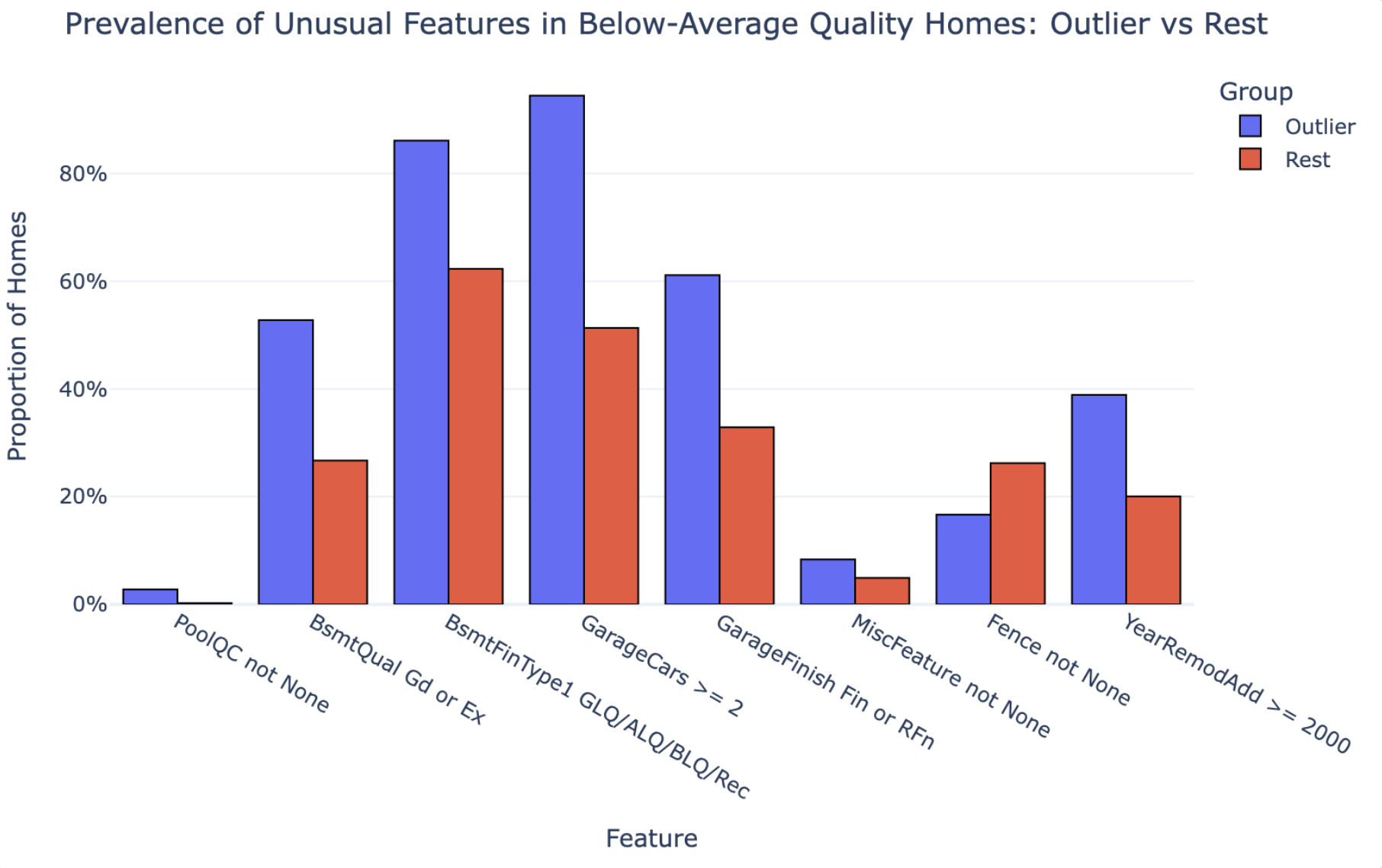
The difference in analytical approach is fundamental. Julius can tell you “11 homes have multiple fireplaces.” PlotStudio can tell you whether fireplaces actually distinguish outliers from non-outliers. Those are not the same thing.
The first is a count. The second is a finding. If the output is going to inform a decision, you need findings, not counts — and that’s exactly what you’re looking for in a Julius AI alternative.
What Julius Missed
Every tool makes trade-offs. Here’s what Julius specifically failed to surface — the gaps a proper Julius AI alternative needs to close.
- The comparison group. Without benchmarking outlier features against the rest of the below-average-quality homes, you can’t know which features actually drive premium pricing vs. which just happen to be present.
- Data cleaning transparency. No documentation of what was done to the data before analysis.
- The neighborhood claim was unverified. Julius called neighborhood the “strongest card” — but never tested that statistically. It’s an assertion, not a finding.
- No sample-size caveats. Julius made confident neighborhood claims with 37 homes. With that small a subset, neighborhood-level conclusions should be caveated, not stated outright.
- Counterintuitive findings. PlotStudio found that fences are actually less common in outlier homes than in the rest of the group (16.7% vs. 26.2%). Julius never reached this — because it never ran the comparison.
Output Quality: Side-by-Side
| Metric | Julius AI | PlotStudio AI (the alternative) |
|---|---|---|
| Time to complete | ~1–2 min | 3m 31s |
| Pages | 5 | 7 |
| Charts | 1 | 3 |
| Data cleaning documented | ❌ | ✅ |
| Comparison group defined | ❌ | ✅ |
| Proportional statistics | ❌ | ✅ |
| Counterintuitive findings surfaced | ❌ | ✅ (fences) |
| Sample size caveats | ❌ | ✅ |
| Reproducible / auditable | ❌ | ✅ |
| Jupyter notebook export | ❌ | ✅ |
| Runs locally (private data) | ❌ | ✅ |
| Actionable implications | Generic | Specific |
The Final Recommendation: Generic vs. Actionable
Both tools ended with a conclusion. Here’s the difference.
Julius AI Concluded:
“Quality scores alone are an incomplete picture of home value.”
True. But this is something any real estate professional already knows. It’s a restatement of the question, not an answer to it.
PlotStudio AI Concluded:
For investors, appraisers, or sellers dealing with structurally middling properties, the data suggests a clear strategy: focus capital on finished space and visible modernization — finished basements, 2+ car garages, post-2000 remodels — rather than trying to move the overall quality rating itself.
This is a recommendation you can act on. That’s the difference between analysis and insight — and the single biggest reason to swap Julius for an alternative.
Verdict: The Julius AI Alternative to Use
If the only thing you cared about was speed, Julius AI is fast and produces clean-looking output. But the moment the output matters — when a client, a manager, or a decision is riding on it — the gaps become serious:
- No data cleaning documentation means you can’t defend your numbers
- No comparison group means you can’t know what’s actually significant
- No sample size caveats means overconfidence in findings that don’t support it
Here’s the part worth underlining: swapping Julius for an alternative doesn’t mean giving up speed. PlotStudio AI ships with three analysis modes you toggle per question — so it matches Julius’s speed when you want a quick answer, and goes deeper when you need a defensible report.
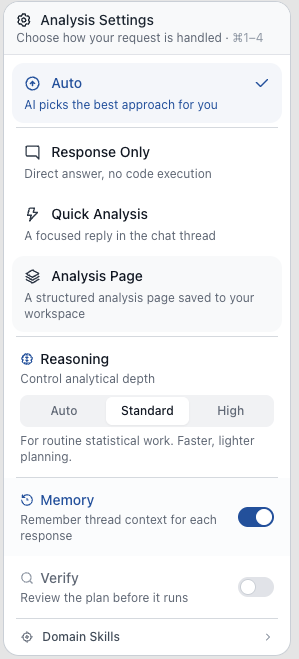
Response Only
Instant text answer, no code — for a quick read on the data or a follow-up on a prior analysis.
Quick Analysis
Single code run with chart and stats in seconds. This is where the Julius AI alternative matches Julius on speed.
Planned Analysis
Multi-step investigation with a written plan, cleaning, group comparisons, and a full report. The mode we used in this test.
So the honest recommendation isn’t “Julius for speed, PlotStudio for rigor.” It’s: use the alternative. Pick the depth per question. Julius-style fast when that’s what the question needs, and let it go deeper when the output has to hold up to scrutiny.
The Takeaway
If you zoom out past the tool comparison, this test is really a reminder of what separates analysis from summary — and what a real Julius AI alternative needs to deliver:
- Strong analysis starts before the question. Profiling the data — quality, missingness, distributions, correlations — is a core analyst step, not an optional preamble.
- Real analysis requires cleaning, defined comparison groups, and statistical testing. Without all three, you’re summarizing surface patterns. A list of what’s in the group is not a finding.
- Defensible, actionable insight with clear methodology and caveats is the bar. Anyone can list counts; what’s rare is a report that tells you why the pattern exists, what you should do about it, and where the claim stops being safe.
Julius’s output skipped all three. The alternative was structured around them. That’s the difference — and that’s why the same dataset and the same question produced two fundamentally different kinds of answer.
Try the Julius AI alternative tested here
Desktop app. Runs locally. Free trial — no credit card required.