Alteryx Alternatives for Academic Researchers: 2026 Guide

For academic researchers working with IRB-governed, HIPAA-sensitive, or GDPR-restricted data, the best Alteryx alternatives are Plotstudio (local execution, preregistered analysis plans, full reproducibility packages), KNIME (free desktop visual workflows with code export), and R/Python + Git (maximum methodological transparency and community trust). Alteryx itself remains a capable data prep platform, but its cloud-dependent licensing model and proprietary visual logic create real friction for privacy-first, reproducible research.
Each option serves a different constraint profile. Plotstudio is purpose-built for researchers who need agentic analysis, on-device data processing, and exportable audit trails without writing every line of code themselves. KNIME suits teams comfortable with visual workflow design who need a free desktop option, though production deployment requires paid tiers and additional engineering. R/Python + Git gives the deepest methodological control and the strongest peer-review credibility, at the cost of a steep learning curve. The sections below cover a comparison table, selection criteria, a migration checklist, and why Plotstudio is the recommended option for privacy-first workflows.

Table of Contents
- Which Alteryx alternatives hold up for academic research?
- How do you choose the right alternative for your research?
- How to migrate from Alteryx to a research-grade platform
- Why Plotstudio fits academic, privacy-sensitive, reproducible research
- Key Takeaways
- The case for prioritizing process over platform
- Plotstudio research partnerships: local execution, no data compromise
- Useful sources for reproducible, privacy-first research
Which Alteryx alternatives hold up for academic research?
Many tools excel in one dimension — visualization, data prep, or ML — but fail to unify advanced statistics, governance, and reproducible outputs in a single workflow. For academic use, that gap matters more than it does in a business intelligence context.
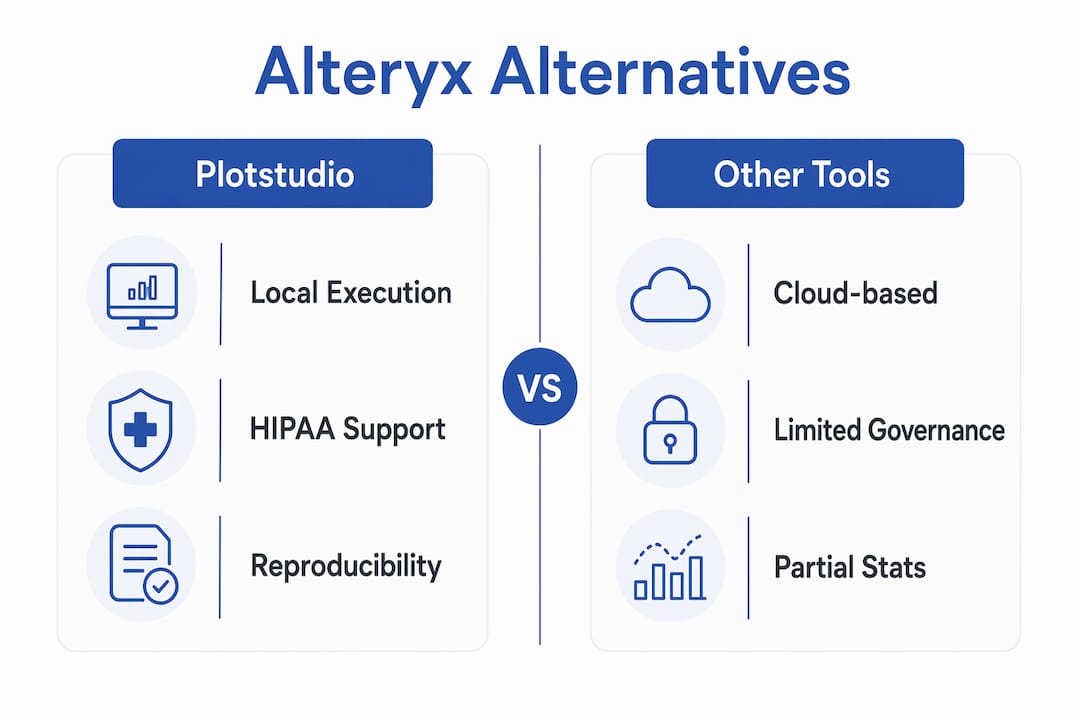
| Dimension | Plotstudio | Alteryx | KNIME | R/Python + Git |
|---|---|---|---|---|
| Research-grade reproducibility | Preregistered analysis plans, annotated notebooks, audit trail | Limited; no native preregistration | Code export available; no preregistration | Full: RMarkdown, Jupyter, version control |
| Privacy & data locality | Local only; data never leaves device | Cloud-dependent licensing; data egress risk | Desktop local; cloud optional | Local by default |
| Advanced academic stats | Survival, Cox, mixed-effects, ANOVA, multiple-comparison correction | Regression, basic ML; limited survival/mixed-effects | Extensive via R/Python nodes | Unlimited via packages |
| Logic representation | Audited, version-controlled code | Proprietary visual canvas | Visual canvas + optional code export | Transparent source code |
| Deployment & IT integration | Desktop, on-prem, Azure AD SSO | Cloud/desktop hybrid; enterprise SSO | Desktop; server requires paid tier | Any environment |
| Licensing / cost | Subscription; research partnership credits available | High per-seat licensing | Free desktop; paid for server/governance | Free (open source) |
| Learning curve | Low-moderate (AI-guided) | Moderate | Moderate | High |
| Extensibility | Skills, R/Python packages, agentic workflows | Marketplace add-ons | R/Python integration | Unlimited packages |
| Export & publication outputs | Annotated notebooks, PDF reports, searchable analysis pages | PDF/Excel reports; no notebook export | Workflow export; limited publication artifacts | Full: notebooks, HTML, PDF, LaTeX |
Plotstudio
Plotstudio is the strongest fit for researchers who handle sensitive data and need defensible, reproducible outputs without managing every line of code. Analysis runs entirely on the researcher’s device, satisfying IRB and HIPAA data-locality requirements. The preregistered analysis plan — reviewed and approved before any code executes — functions as both an audit trail and a preregistration artifact. For agentic analytics that produce publication-ready results, it is the most direct path.
- Privacy model: local execution only; no cloud upload of raw data
- Reproducibility artifacts: annotated Jupyter/RMarkdown notebooks, PDF methods reports, searchable analysis pages
- Deployment: desktop, on-prem, Azure enterprise with AD SSO
- Cost: subscription with research partnership credits for academic teams
Alteryx
Alteryx is a mature data prep and analytics platform with a large enterprise user base. Its visual canvas is approachable for non-coders, but the proprietary workflow logic creates reproducibility problems: logic locked inside a visual canvas is harder to audit, version-control, or submit as supplemental methodology. For IRB-sensitive projects, the cloud-dependent licensing model introduces data egress risk that many institutions cannot accept.
- Privacy model: cloud-dependent; local-only operation is not the default
- Reproducibility artifacts: PDF/Excel outputs; no native notebook export
- Deployment: cloud/desktop hybrid; enterprise SSO available
- Cost: high per-seat licensing; total cost of ownership includes engineering translation overhead
KNIME
KNIME’s free desktop edition makes it accessible for labs with tight budgets. Its node-based canvas supports R and Python integration, and workflows can be exported as code. The production deployment gap is real: KNIME Server and governance features require paid tiers and engineering oversight, which adds hidden cost for teams that need IRB-compliant deployment.
- Privacy model: local by default on desktop; cloud deployment optional
- Reproducibility artifacts: workflow export; code export via R/Python nodes
- Deployment: desktop free; server/governance requires paid tier
- Cost: free desktop; paid server tiers for production
R/Python + Git
The gold standard for methodological transparency. RMarkdown and Jupyter notebooks produce fully reproducible documents, Git provides version control, and the package ecosystems cover every statistical method academic research requires. The tradeoff is time: building and maintaining reproducible pipelines from scratch demands significant programming skill and discipline-specific configuration.
- Privacy model: fully local; researcher controls all data movement
- Reproducibility artifacts: RMarkdown, Jupyter, HTML/PDF/LaTeX output, Git history
- Deployment: any environment; no vendor dependency
- Cost: free; cost is researcher time and infrastructure
How do you choose the right alternative for your research?
Standard enterprise buyer checklists emphasize dashboards and scale. Academic selection criteria run on a different axis: privacy, reproducibility artifacts, and statistical coverage. The decisive criteria, in priority order:
- Local execution: can the tool run analysis entirely on researcher-controlled infrastructure, with no raw data leaving the device?
- Code export and audit trail: does every analysis produce version-controlled, human-readable code a reviewer can inspect?
- Preregistration support: can you lock analysis methods and success criteria before data is touched?
- Advanced statistical methods: does the platform natively support survival analysis, mixed-effects models, Cox proportional hazards, and multiple-comparison correction?
- IRB/HIPAA compatibility: does the vendor provide documentation of local execution and data-locality guarantees?
- Git/CI integration: can outputs be committed to a version-controlled repository automatically?
- Deployment fit: does the tool work within your institution’s IT environment (on-prem, Azure, air-gapped)?
Vendor questions to ask during evaluation:
- “Can you provide written documentation that raw data never leaves the device during local execution?”
- “Does the platform export analysis code in an open format (Python, R) that runs independently of your software?”
- “Is there a preregistration or analysis-plan locking feature, and is it logged with a timestamp?”
- “What is your HIPAA Business Associate Agreement process for institutional deployments?”
- “Can we run a trial with synthetic sensitive data and verify zero cloud egress in network logs?”
Red flags that disqualify a tool for privacy-sensitive research:
- No code export; logic lives only inside a proprietary visual canvas
- Mandatory cloud upload of raw data before analysis can run
- No audit log or analysis-plan locking feature
- Visual-only workflow representation with no version-controlled code artifact
- Vendor cannot provide IRB/HIPAA data-locality documentation
How to migrate from Alteryx to a research-grade platform
The most common mistake is swapping one desktop-first tool for another without addressing the underlying reproducibility bottlenecks. A structured migration prevents that.
- Inventory existing workflows. List every Alteryx workflow, its data inputs, outputs, and the statistical methods it applies.
- Classify data sensitivity. Tag each workflow by IRB status, HIPAA applicability, and data-locality requirements.
- Map inputs, outputs, and metrics. Document expected output values, model coefficients, and preprocessing steps for each workflow.
- Select parity tests. Define numerical tolerances (e.g., coefficient values matching to four decimal places, identical p-values for hypothesis tests) before running the new platform.
- Run side-by-side validation. Execute both platforms on the same dataset; compare outputs against acceptance criteria.
- Capture canonical notebooks and reports. Once parity is confirmed, export annotated notebooks and PDF reports as the canonical reproducibility record.
- Commit everything to version control. Push transformation scripts, analysis plans, and outputs to Git before decommissioning Alteryx workflows.
Risk mitigation during migration:
- Use synthetic or anonymized data for all parity testing; never use live patient or participant data in a new, unvalidated environment
- Run a staged migration: low-sensitivity workflows first, IRB-sensitive workflows only after IT sign-off
- Document the data transformation steps in the new platform before any analysis runs, not after
- Involve your IRB coordinator and institutional IT security team in acceptance testing for sensitive datasets
- Budget for engineering translation time; hidden re-engineering costs are the most underestimated line item in any workflow migration
Why Plotstudio fits academic, privacy-sensitive, reproducible research
For IRB-governed or patient-level data, local execution is not a preference — it is a hard requirement. Plotstudio is built around that constraint from the ground up.
Core features for academic researchers:
- Local execution: analysis runs entirely on the researcher’s machine; raw data never touches a remote server
- Preregistered analysis plans: every analysis is gated behind a plan the researcher reviews and approves before code runs, creating a timestamped audit trail that functions as preregistration evidence
- Skills: researchers encode discipline-specific methods, statistical thresholds, and reporting conventions once; every subsequent analysis follows that methodology automatically
- Native R and Python: survival analysis, Cox proportional hazards, mixed-effects models, ANOVA, multiple-comparison correction — the methods academic work actually requires
- PII detection and anonymization: built-in tooling for data scrubbing before any analysis runs
- Enterprise deployment: on-prem and Azure with Active Directory SSO for institutional IT integration
Reproducibility outputs that map directly to academic deliverables:
- Annotated Jupyter or RMarkdown notebooks (supplemental materials, methods appendix)
- PDF methods-and-results reports (grant applications, thesis chapters)
- Permanent searchable analysis pages with full audit trail (peer review, supervisor sign-off)
Pro Tip: Before your IRB submission, run a network-traffic audit during a Plotstudio trial session with synthetic data. Confirm zero outbound connections to external servers. That log becomes part of your IRB data-security documentation.
Plotstudio’s enterprise architecture supports HIPAA-compatible deployments and provides compliance documentation for institutional review.
Key Takeaways
For privacy-first academic research, the platform that combines local execution, preregistered analysis plans, and exportable reproducibility artifacts is the one that survives IRB and peer review scrutiny.
| Point | Details |
|---|---|
| Local execution is non-negotiable | IRB/HIPAA-sensitive data cannot be uploaded to cloud-only tools; verify data locality before committing. |
| Code export beats visual canvases | Audited, version-controlled code is the only reproducibility artifact reviewers and IRB coordinators can inspect. |
| Preregistration locks methodology | Locking analysis plans before data is touched prevents post-hoc adjustment and satisfies open-science standards. |
| Migration requires parity testing | Define numerical tolerances and run side-by-side validation before decommissioning any existing workflow. |
| Plotstudio for research teams | Plotstudio combines local execution, Skills-based discipline workflows, and full reproducibility packages for IRB-compliant research. |
The case for prioritizing process over platform
There is a tendency in academic computing to treat a platform switch as the solution to reproducibility problems. It rarely is. The tool matters, but the process matters more. A researcher who migrates from Alteryx to a code-exporting platform and then runs analyses without locking an analysis plan first has not actually improved reproducibility — they have just changed the color of the problem.
The shortlist here reflects a genuine hierarchy. R/Python + Git remains the peer-review gold standard because the methodology is fully transparent and vendor-independent. For researchers who have the programming depth and the time, that path is hard to argue against. KNIME is a reasonable middle ground for teams that need a visual interface and can accept the production deployment overhead. Plotstudio is the right choice when the research team needs research-grade outputs without the engineering burden — particularly when data sensitivity makes local execution mandatory and the team cannot afford to spend weeks configuring a reproducible pipeline from scratch.
The one recommendation that applies across all three: involve your IRB coordinator and institutional IT security team before you finalize any platform choice, not after. The compliance conversation is faster when the tool already has the documentation ready.
Plotstudio research partnerships: local execution, no data compromise
If your research involves IRB-governed, HIPAA-sensitive, or GDPR-restricted data, Plotstudio’s local execution model is the clearest path to a compliant, reproducible workflow. Analysis runs on your machine. Your data stays there.
Academic teams and individual researchers can apply for research partnership credits — priority access and free credits for qualifying projects, including those with IRB or HIPAA constraints. The enterprise deployment page covers architecture documentation, Azure AD SSO configuration, and compliance materials your IT security team will need for institutional sign-off. If you want to see how the platform maps to your specific deliverables — annotated notebooks, PDF reports, preregistration artifacts — the advanced analysis alternative page walks through each output type in detail. Request access, run a trial with synthetic data, and verify local execution in your network logs before your next IRB submission.
Useful sources for reproducible, privacy-first research
- Gartner Peer Insights: Alteryx Alternatives — Verified enterprise buyer reviews comparing data preparation platforms; useful for understanding how Alteryx stacks up on integration, deployment, and support before you finalize a replacement.
- Prophecy: Top Alternatives to Alteryx Desktop — Covers production deployment gaps and hidden engineering costs; read this before estimating migration effort for any visual-workflow replacement.
- Savant Labs: Alteryx vs. Competitors — Detailed breakdown of KNIME’s free vs. paid tiers and where desktop-first tools fall short for governance-heavy deployments.
- FindAnomaly: Alteryx Alternatives 2026 — Explains why standard enterprise buyer checklists miss the academic reproducibility axis; useful framing for building your own evaluation rubric.
- Plotstudio Enterprise & Compliance Docs — Architecture documentation for local execution, Azure deployment, and HIPAA-compatible configurations; share with your institutional IT security team during evaluation.
- Plotstudio Research Partners Program — Details on trial credits and priority access for academic and IRB-governed projects; the starting point for any research team evaluating Plotstudio.