Privacy first, IRB ready automated reporting workflows for research

A research-grade automated reporting workflow must run on infrastructure you control, gate every analysis behind a plan you approved before code executes, capture provenance and environment data without manual intervention, and export a reproducibility package that a stranger could rerun. Miss any one of these four guarantees and the output is a nice chart, not a defensible result. The sections below turn each guarantee into a checklist you can actually implement.
TL;DR:
- To ensure true reproducibility, data, code, environment, and provenance must be captured automatically at each analysis run, not manually assembled later.
- Analysis plans should be approved before code execution, with clear documentation of methods, assumptions, and success criteria to meet institutional and journal requirements.
- Pipelines should be designed to run on local machines with strict data security measures, avoiding cloud processing unless formally approved and assessed for IRB compliance.
- Regular structural and functional audits are essential to verify metadata completeness and confirm that outputs can be regenerated identically in clean environments.
- Automated, citable publication of reproducibility artifacts requires generating persistent identifiers, detailed metadata, and versioned datasets to prevent information loss from version drift.
Table of Contents
- Why Automated Reporting Workflows for Research Differ From BI Automation
- Core Technical Components an Automated Pipeline Must Emit
- How to Build a Pre-Registered, Reproducible Reporting Pipeline
- Putting the Checklist Into Practice With Plotstudio
- How to Verify and Audit a Pipeline Before Submission
- Connecting Automated Reporting to Academic Databases and Repositories
- Best Practices for Scheduling and Triggering Automated Runs
- Handling Errors and Exceptions Without Breaking the Audit Trail
- Documentation Standards That Make a Workflow Reproducible
- Secure Transmission and Storage Inside the Automated Pipeline
- Adoption Trade-offs Labs Actually Face
- Plotstudio: A Research-Grade Option Worth Trying
- Sources
- FAQ
Why Automated Reporting Workflows for Research Differ From BI Automation
Business dashboards refresh KPIs on a schedule and email a PDF to stakeholders. That is not what happens in a lab, and treating the two as interchangeable is where most automation efforts go wrong.
Academic outputs answer to institutions that BI tools were never built to satisfy. An Institutional Review Board typically requires documented protections for identifiable data across its full lifecycle, and adopting a new data-handling technology, including a cloud analytics tool, often triggers a formal protocol amendment before you can use it. Journals have followed a parallel path: a prose-only “data available upon request” statement no longer satisfies most reproducibility policies, which now expect a machine-readable record of code, a captured environment, and a durable citable identity for both outputs and inputs.
Three constraints follow directly from this:
- Cloud-first BI platforms route your data through third-party servers, which usually forces an institutional security review you did not plan for.
- Reviewers want executable artifacts, not just a methods paragraph describing what you did.
- Any change to your analysis pipeline after data collection begins can require re-approval, so the workflow has to be stable and documented from day one.
Core Technical Components an Automated Pipeline Must Emit
Reviewers and IRBs do not want to be told your analysis is reproducible. They want the artifacts that prove it, generated automatically, not assembled by hand the night before a deadline.
Pro Tip: If you find yourself manually copying a git hash into a README the day before submission, your pipeline is not actually automating provenance. It is automating the analysis and leaving the paperwork to you.
Best-practice guidance for scientific workflows treats data, code, prompts, and outputs as first-class versioned artifacts, each carrying immutable provenance captured at execution time rather than reconstructed afterward. In practice, that means every run should log:
- The exact git commit or code version that produced the output.
- A container ID or environment fingerprint tied to that run.
- Input artifact identifiers, so you know which dataset version fed the analysis.
- All parameters and random seeds used, since an unpinned seed makes a result unreproducible by definition.
- Timestamp and runtime duration, useful for both audit trails and grant reporting.
Environment capture is the piece labs skip most often. A container image, an renv.lock file for R, a requirements.txt for Python, or a session_info.log all serve the same purpose: locking down exactly which software versions produced your numbers. Documentation guidance from the DLCM reproducibility project is blunt about this: without precise software and parameter metadata, a dataset can be perfectly findable and completely uninterpretable.
Data handling adds another layer: encryption at rest, identifiers stored separately from analytic data, and access controls that log who touched what. A complete reproducibility package then bundles a README, annotated notebooks, a MANIFEST file with checksums for every output, a figure-to-table crosswalk, and citable export formats.
How to Build a Pre-Registered, Reproducible Reporting Pipeline
Sequence matters here. Build the guardrails before you touch data, not after.
Start before a single line of analysis code runs. Write an analysis plan that states your methods, assumptions, and success criteria, then get it approved by a supervisor or co-investigator. This functions as your pre-registration: it is the document you point to later when someone asks whether you decided your hypothesis test before or after seeing the results.
Project layout comes next, and it deserves more care than most labs give it:
- Keep raw, sensitive data out of version control entirely. Track code and metadata; store data on institutionally approved, access-controlled storage.
- Split your private analysis workspace from the public replication repository from the start, rather than trying to scrub one into the other later.
- Add an
AGENTS.mdfile alongside your README. Standardized templates like these, along the lines of what the ENCORE reproducibility framework recommends, cut the setup tax that makes researchers avoid packaging replication materials until the last possible moment.
For orchestration, adopt a pipeline manager that supports checkpoints and content-hash caching, such as Make, Snakemake, or DVC, so a failed run three steps in doesn’t force a full re-execution. Containerize the environment or commit a lockfile, and record the environment identifier alongside every export, not just the final one.
Finish each run by auto-generating a manifest with checksums, annotated notebooks, an output crosswalk, and a short release-readiness report. That last artifact is what turns “I think this is done” into something you can hand to a supervisor.
Putting the Checklist Into Practice With Plotstudio
Every item above sounds reasonable in the abstract. The harder question is what it looks like when you actually sit down to run an analysis, and this is where the architecture of the tool you use starts to matter as much as your intentions.
Local execution is the piece that solves the IRB problem outright. When analysis runs on your own machine instead of a vendor’s cloud, patient-level or otherwise identifiable data never leaves the device, which avoids the institutional security review typically required for cloud-hosted analytics tools. That is the specific gap Plotstudio was built to close for IRB-governed and GDPR special-category data.
Analysis-plan gating is the second piece, and it maps directly onto pre-registration. Plotstudio requires a researcher to review and approve an analysis plan, methods, assumptions, and success criteria stated up front, before any code executes. That approved plan becomes your audit trail, not an afterthought written to satisfy a reviewer’s request.
The third piece is discipline-specific enforcement. Plotstudio’s Skills let a lab encode its own required steps, statistical thresholds, and forbidden shortcuts once, so every subsequent analysis follows the same methodology instead of drifting toward whatever a generic default suggests.
What comes out the other end:
- Annotated notebooks and PDF reports that walk a reviewer through the logic, not just the output.
- Permanent, searchable analysis pages a supervisor or collaborator can trace independently.
- Native support for the methods academic work actually needs, including survival analysis, Cox proportional hazards, mixed-effects models, and multiple-comparison correction, run in R or Python.
How to Verify and Audit a Pipeline Before Submission
Two separate checks catch two separate failure modes, and running only one of them is how labs get burned. Structural checks catch missing metadata; functional checks catch a pipeline that looks complete but silently depends on a step nobody documented, a distinction worth building into your review process rather than treating as optional.
- Structural pass: Confirm a lockfile or container definition exists; random seeds are pinned; no file paths are absolute; the manifest checksums match output files; and an environment identifier is recorded.
- Functional pass: Clone the repository into a clean environment and rerun it with a single command. Confirm regenerated figures and tables match the manuscript, and note runtime and memory usage.
- Readiness report: Summarize results, list critical issues with severity, and provide concrete action items. This report is for supervisors or journal submission.
Skipping the functional pass is the most common cause of failures when others try to reproduce your package.
Connecting Automated Reporting to Academic Databases and Repositories
A reproducibility package that lives only on your laptop protects nobody after you graduate or move labs. The OSIRIS consensus checklist treats citable, accessible datasets and code as a minimum requirement, not a nice-to-have, and that requirement points directly at where your outputs need to end up.
Persistent identifiers are the connective tissue. A DOI from a repository like Zenodo or an institutional data archive turns your dataset and code into something a paper can cite permanently, immune to a broken lab website five years later. Automated workflows should generate this handoff as a build step: package the reproducibility bundle, push it to the repository’s API or deposit interface, and capture the returned DOI back into your manuscript’s data availability statement automatically, rather than pasting one in by hand and hoping it stays accurate through revisions.
Metadata standards matter as much as the deposit itself. Repositories like Dataverse, OSF, and domain-specific archives (GenBank, ICPSR, and others depending on your field) each expect specific metadata schemas, and a workflow that auto-populates author ORCID IDs, funding identifiers, and licensing terms at export time saves you from the version of a Wednesday afternoon nobody wants: fixing metadata across six files by hand right before a grant deadline.
Where this breaks down most often is version drift. If your analysis changes after the initial deposit, an automated pipeline should mint a new version with its own identifier rather than silently overwriting the old one, preserving the exact artifact any published citation actually points to.
Best Practices for Scheduling and Triggering Automated Runs
Not every analysis needs to run on a clock, and treating one that shouldn’t like one that should is a fast way to burn compute and confuse collaborators about which output is current.
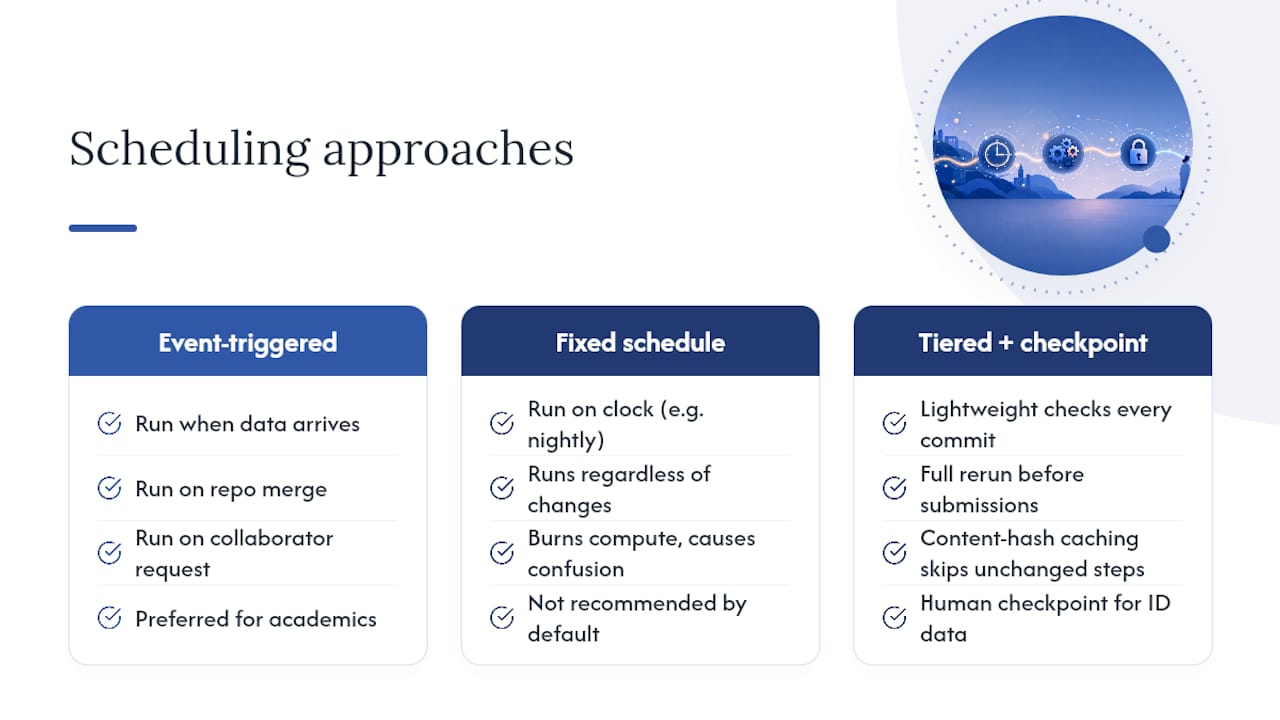
Event-triggered execution fits most academic contexts better than fixed schedules. Trigger a rerun when new data lands in an approved storage location, when a code change is merged into your analysis repository, or when a collaborator requests a specific comparison, rather than firing the full pipeline nightly regardless of whether anything changed.
Checkpointing changes the calculus on how often you can afford to run things. A pipeline manager with content-hash caching, the same DVC or Snakemake setup mentioned earlier, will skip any step whose inputs haven’t changed since the last successful run. That turns a full reanalysis from a multi-hour commitment into a five-minute confirmation that nothing moved, which makes frequent verification runs practical instead of something you avoid.
Separate your trigger tiers by consequence. A lightweight structural check, confirming the environment still resolves and the data schema hasn’t shifted, can run on every commit. The full functional reproduction, the clean-environment rerun described earlier, belongs on a slower cadence: before a manuscript submission, before a grant report, or when a coauthor requests it, not automatically on every minor edit.
Build in a human checkpoint before any run that would touch identifiable data or overwrite a previously approved output. Automation should accelerate the routine work. It should never quietly rerun the exact step your IRB protocol says requires a documented decision each time.
Handling Errors and Exceptions Without Breaking the Audit Trail
A pipeline that fails silently is worse than one that fails loudly, because a silent failure produces a wrong number that looks exactly like a right one.
Fail fast and fail specifically. When a step errors out, the pipeline should stop rather than substitute a default value or skip ahead, and the error message should name the exact file, parameter, or dependency version involved. A generic “analysis failed” log entry helps nobody troubleshooting six weeks later.
Common failure modes are predictable once you’ve seen them a few times: unpinned package versions that silently update and change output, absolute file paths that break the moment code runs on a different machine, missing random seeds that make a result unreproducible even by the person who generated it, and sensitive data accidentally swept into version control. Reproducibility audits consistently flag these same four issues as the most common source of a broken replication attempt.
Log every retry and every manual override as its own event, not as an edit to the original record. If a step fails, gets fixed, and reruns successfully, your provenance record should show all three events in sequence, not just the final clean output. A reviewer or IRB auditor asking “what actually happened here” deserves the real sequence, not a tidied-up version of it.
Build a dead-letter path for exceptions that don’t resolve automatically: route them to a log a human actually checks, rather than a silent skip that lets an incomplete analysis pass as finished. The goal is a pipeline that surfaces its own problems instead of one that quietly produces confident-looking output from broken inputs.
Documentation Standards That Make a Workflow Reproducible
Documentation is the artifact most likely to get written last and matter most when someone else has to pick up your work.
A README alone rarely covers what a reviewer or a new lab member actually needs. Pair it with an AGENTS.md file, which spells out procedural details explicitly enough for both a human and an AI-assisted tool to follow without guessing. Templates built this way are designed specifically to reduce the chance of an omitted step, the exact gap that turns a two-year-old analysis into an afternoon of forensic reconstruction.
Your documentation set should specify, at minimum: the exact software versions and how they were captured, every parameter and its justification, the data provenance chain from raw file to final table, and a plain-language description of any deviation from your original analysis plan. That last item matters more than researchers usually assume; the OSIRIS consensus checklist treats tracking deviations from a pre-registered plan as a core reproducibility requirement, not an optional confession.
Version your documentation alongside your code, not separately. A README that describes an analysis pipeline from three revisions ago is actively misleading, and it is worse than no documentation at all because it looks authoritative.
Secure Transmission and Storage Inside the Automated Pipeline
Every automated handoff, between your raw data store, your compute environment, and your output repository, is a point where sensitive information can leak if the pipeline wasn’t built with that boundary in mind.
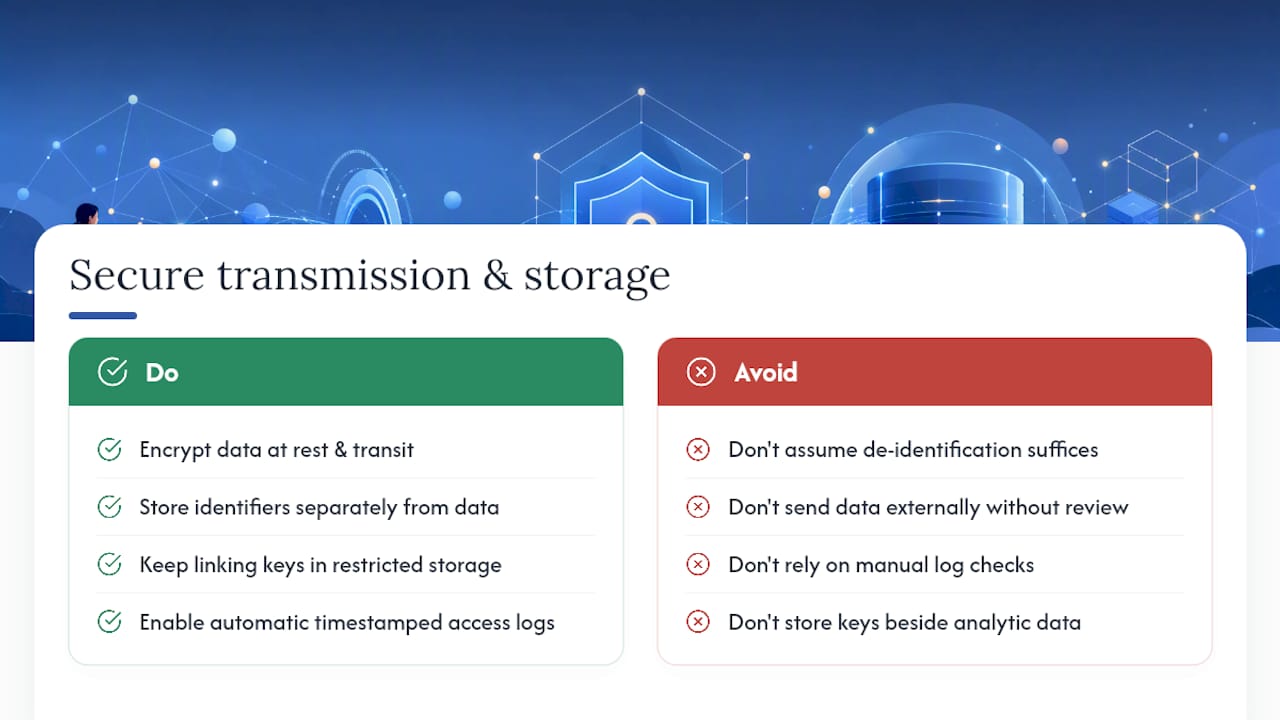
Encrypt data at rest and in transit as a default, not a configuration option someone has to remember to switch on. IRB guidance is explicit that electronic data security spans the full lifecycle of a dataset, from initial storage through every downstream copy your pipeline creates, and that includes password-protected devices and verified restricted access, not just a single encrypted folder.
Separate identifiers from analytic data at the storage layer, with any linking key held in a distinct, access-controlled location. De-identification alone is often treated by IRBs as insufficient protection on its own, since re-identification risk has to be evaluated for the specific dataset, not assumed away by removing a name column.
Any automated step that would move data to a third-party service, a cloud compute instance, an external API, a hosted notebook environment, generally requires its own institutional IT security assessment and frequently a formal IRB amendment before it can go live. This is precisely why local execution changes the compliance calculation: when the pipeline never transmits data off the researcher’s own machine, that entire external review requirement disappears from the workflow.
Access logs should be automatic, not something a lab administrator checks manually. Every read, write, and export in the pipeline should generate a timestamped record of who or what triggered it, giving you the paper trail an IRB audit or a data breach investigation will eventually ask for.
Adoption Trade-offs Labs Actually Face
Most labs don’t reject reproducible automation on principle. They reject the up-front time cost, and that’s a fair objection if nobody addresses it directly.
The fix is incremental, not wholesale. Start with templates and an AGENTS.md from day one rather than retrofitting them later, encode your lab’s specific conventions once as reusable Skills, and fold supervisor sign-off directly into the analysis-plan approval step instead of treating it as separate paperwork. Pilot the full workflow on one study before rolling it out lab-wide. Momentum, not mandate, is what actually gets a reproducibility practice to stick.
— Aymen
Plotstudio: A Research-Grade Option Worth Trying
If the checklist above sounds like a lot to assemble by hand, that’s because it is, unless the platform you’re using generates most of it automatically. Some platforms process data locally on your own machine, which means IRB-governed, GDPR special-category, or otherwise sensitive datasets never touch a cloud server. Many research-grade tools require an analysis plan to be reviewed and approved before any code runs, serving as a pre-registration record. Some platforms let labs encode their own statistical thresholds and reporting conventions, support running R and Python natively, and cover methods like Cox proportional hazards and mixed-effects models.
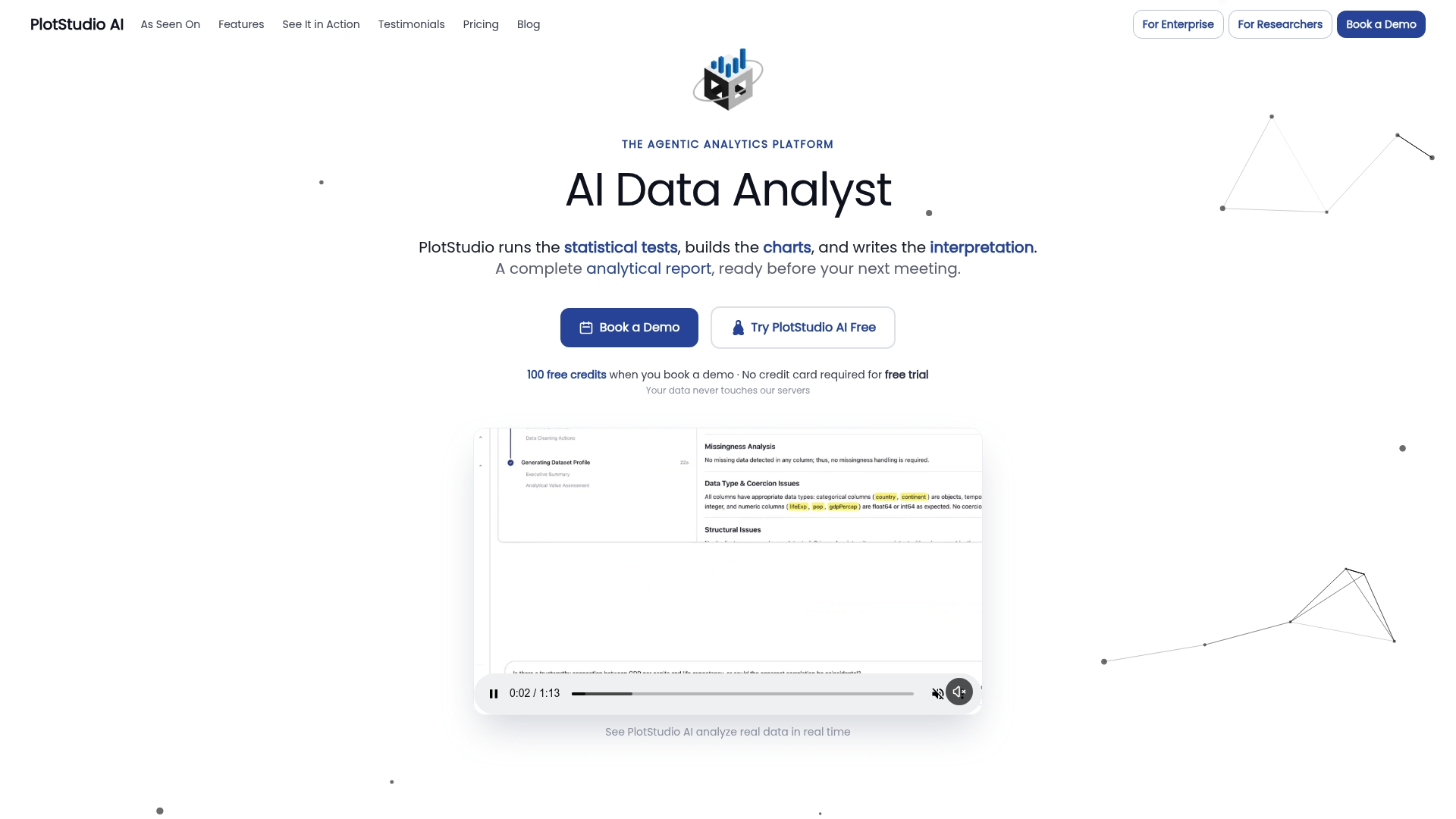
What comes out the other end is exactly what a reviewer, supervisor, or grant officer wants to see: annotated notebooks, PDF reports, and permanent searchable analysis pages that trace precisely how a result was produced. If you want a closer look at the specific feature set built for this, the advanced data analysis alternative page walks through local processing, plan gating, and reproducibility exports in detail. Start a trial to run one real dataset through the workflow, or reach out about institutional deployment if you’re evaluating this for a full lab.
Sources
Before you commit to a toolchain, cross-check it against your own institution’s IRB and IT security policies, which take priority over any general guidance here. For the framework itself, consult CASRAI’s reproducibility infrastructure guidance, UCSF’s electronic data security page, the ENCORE replication-package templates, and the OSIRIS/PLOS consensus checklist.
- Reproducibility infrastructure: workflows, containers, and code sharing | CASRAI
- Electronic data security | Human Research Protection Program (UCSF)
- ENCORE: Enhancing transparency and reproducibility in computational projects (PMC)
- Consensus core items for reproducibility (PLOS Biology / OSIRIS)
FAQ
Can I Use Cloud-Based Tools for IRB-Governed Data?
Generally no, without a formal institutional IT security assessment and often a protocol amendment first, since most IRBs require documented, encrypted, access-controlled handling across the data’s full lifecycle. Local processing tools sidestep this review entirely because the data never leaves your device.
What Belongs in a Reproducibility Package?
At minimum: a README, annotated notebooks, an environment record (container or lockfile), a MANIFEST file with checksums, a figure-to-table crosswalk, and citable exports with a persistent identifier. Some research analytics platforms generate these reproducibility artifacts as part of their standard export.
How Should Identifiers Be Handled in an Automated Pipeline?
Store identifiers separately from analytic data, with any linking key in a distinct, access-controlled location, since de-identification alone often isn’t sufficient protection against re-identification risk. Encrypt both at rest and in transit throughout the pipeline.
Is Pre-Registration Required for Automated Reporting Workflows?
It’s not universally mandated, but a researcher-approved analysis plan stating methods, assumptions, and success criteria before code runs functions as pre-registration and gives you an audit trail reviewers increasingly expect. Certain platforms build the analysis plan approval step directly into the workflow rather than treating it as separate paperwork.
What’s the Difference Between Structural and Functional Verification?
A structural check confirms metadata like lockfiles, pinned seeds, and manifest checksums are present; a functional check reruns the entire pipeline from a clean environment to confirm the outputs actually regenerate. Both are necessary because each one catches failures the other misses.