Privacy First Azure Analytics Deployment for Academic IT

Deploy PlotStudio on Azure using infrastructure as code and a CI/CD pipeline with approval gates, route traffic through private endpoints or a locked-down VNet, and stage the rollout blue-green or through staging slots before cutover. RBAC and Azure Policy enforce who touches what. That pattern matters here specifically because PlotStudio never sends data off the researcher’s machine and gates every analysis behind an approved plan, so the Azure layer only needs to protect infrastructure and access, not the research data itself.
TL;DR:
- Deploy PlotStudio on Azure using infrastructure as code with identical templates for staging and production to ensure reproducibility and consistency.
- Use multi-stage pipelines with manual approval gates, staging environments, and traffic shifting through load balancers or feature flags before full cutover.
- Implement least-privilege RBAC for all roles and prefer private endpoints over VNet injection to minimize attack surface and simplify network security.
- Conduct thorough smoke tests, monitor resource utilization, and run rollback drills with documented playbooks before going live.
- Verify local-only execution, restrict access to APIs and keys, and test reproducibility exports with challenging datasets to ensure security and audit readiness.
Table of Contents
- What Are the Azure Prerequisites for an Analytics Deployment?
- How Should You Structure the Deployment Pipeline?
- What Security and Governance Controls Does an Academic Deployment Need?
- What Validation and Rollback Steps Protect a Live Deployment?
- How Do You Verify PlotStudio Itself After Deployment?
- Pre-Deployment Checklist Before You Schedule Cutover
- Why This Approach Fits Academic Research IT
- Getting PlotStudio Running on Your Institution’s Azure Environment
- Primary Sources for This Deployment Guide
- Sources
- FAQ
What Are the Azure Prerequisites for an Analytics Deployment?
Before touching a deployment pipeline, get the Azure scaffolding right. Most institutional deployments stall not because the platform is complicated, but because subscription boundaries, service principals, or network models were never agreed on before the first pipeline run.
Start with subscription and resource group structure. A research computing team typically separates staging and production into different resource groups, sometimes different subscriptions entirely, with naming conventions that map to department or grant codes for cost tracking later.
From there, prepare:
- A dedicated service principal for pipeline automation, scoped to least-privilege RBAC roles rather than Contributor on the whole subscription.
- A decision on networking model: private endpoints for simpler point-to-point service connectivity, or VNet injection if the institution already runs a hub-and-spoke topology and needs subnet delegation.
- Network security groups (NSGs) drafted in advance, since retrofitting them after go-live tends to cause outages.
- Compute and storage sizing based on expected dataset volume and concurrent researcher sessions, with a temporary scale-up window planned for the install itself.
Microsoft’s own guidance on mission-critical deployment and testing treats clear data ownership and least-privilege RBAC as foundational, not optional add-ons bolted on after launch.
How Should You Structure the Deployment Pipeline?
The reproducible pattern that works for PlotStudio on Azure mirrors what Microsoft recommends for any mission-critical workload: author once, deploy the same artifact everywhere, and never let staging and production drift apart.
- Author environment templates in Bicep or Terraform. Whichever you pick, staging and production must be built from the identical template, parameterized only for environment-specific values like resource names and sizing.
- Build the pipeline in Azure Pipelines or GitHub Actions with multi-stage workflows and manual approval gates between staging and production. Store the build artifact once and promote that same artifact through each stage rather than rebuilding for production.
- Deploy to a parallel (blue) environment, run it alongside the current (green) production instance, and only then shift traffic gradually using a load balancer or feature flags rather than an instant cutover.
- Automate smoke tests against the blue environment before any traffic switch, and define a rollback point in the pipeline definition itself, not as a manual afterthought.
This is the same blue-green logic Microsoft lays out in its safe deployment practices guidance, and it pairs naturally with the deployment slot model described in Azure App Service’s deployment best practices, which recommends staging and production run from the same artifact to avoid downtime.
Pro Tip: Keep your IaC repository and your CI pipeline definitions in the same version control history as your PlotStudio configuration files. When an auditor asks how a specific environment was built six months ago, you want one commit history to point to, not three.
What Security and Governance Controls Does an Academic Deployment Need?
Institutional review boards and grant compliance officers rarely ask about your cloud architecture directly, but they will ask how you know only authorized people touched the data pipeline, and how you know the network wasn’t left open. Azure gives you the tools to answer both questions with evidence rather than assurances.
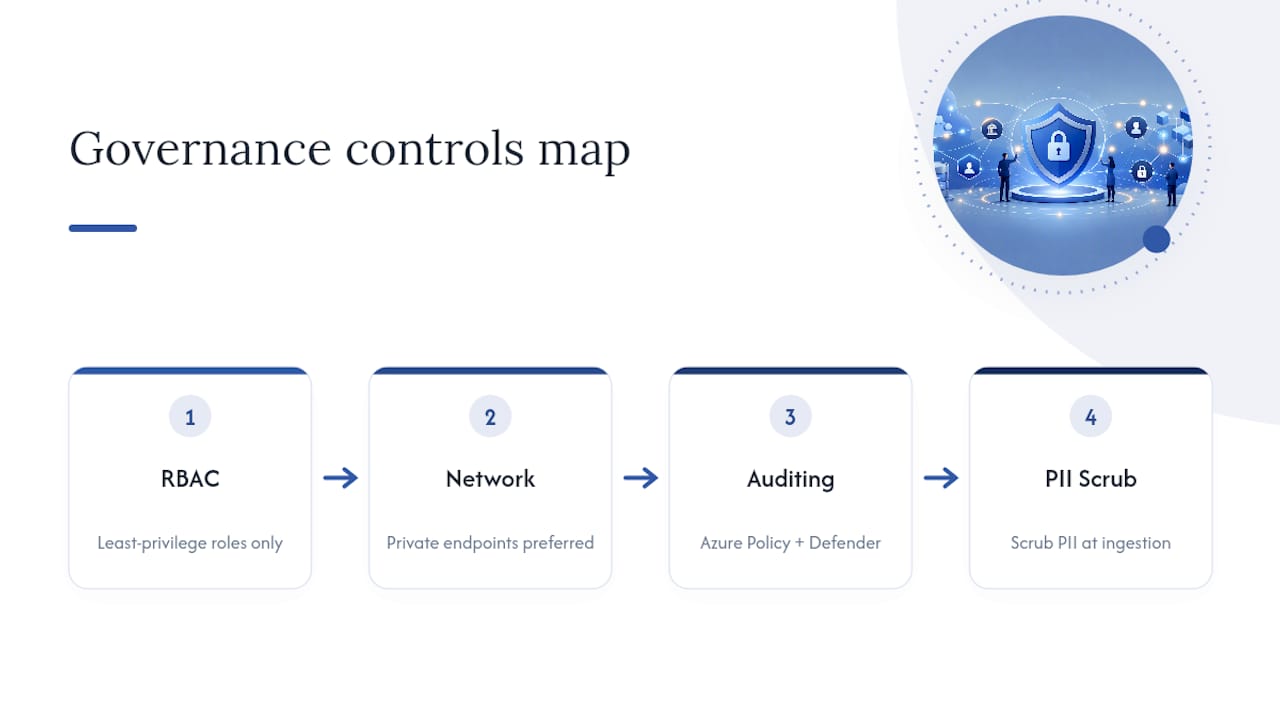
RBAC comes first. Every deployment role, from pipeline service principal to the research IT admin, should carry only the permissions that role needs, with clear documentation of who owns what. This is precisely the separation-of-duties model Microsoft calls out in its mission-critical workload guidance.
Network exposure is the second lever. Private endpoints are the simpler, lower-maintenance choice for most institutions; VNet injection makes sense only if you’re already running a hub-and-spoke network and need subnet delegation for other workloads. Microsoft’s security baseline for analytics services recommends private endpoints specifically because they reduce the attack surface compared with broader network injection.
Azure Policy and Microsoft Defender for Cloud close the loop by continuously auditing configuration against your baseline and flagging deviations before they become incidents, a combination Microsoft’s own security baseline documentation treats as standard for analytics workloads. On the data side, scrubbing PII at ingestion rather than downstream reduces the risk of accidental persistence, a practice that also simplifies compliance verification for IRB and GDPR reviewers. PlotStudio’s own approach to data ethics in analytics covers ownership and PII handling in more depth if your governance committee wants specifics before sign-off.
What Validation and Rollback Steps Protect a Live Deployment?
A deployment that hasn’t been rehearsed to fail gracefully isn’t ready for research data, even data that never leaves the researcher’s machine. The infrastructure around PlotStudio still needs the same discipline any production system gets.
- Run smoke tests against API endpoints, database connectivity, and a handful of sample R and Python analyses using non-sensitive test data before promoting to production.
- Configure monitoring through Application Insights and Azure Monitor, with health probes and alerts tuned to error rate spikes and CPU or memory saturation, not just uptime.
- Keep the previous (blue or green) environment live during cutover, use database point-in-time restore as a safety net, and run rollback drills as a normal part of release cycles, not an emergency-only procedure.
- Watch resource utilization during the deployment window itself. Analytics workloads spike hard during install; temporarily scaling up compute avoids timeout failures that have nothing to do with the application and everything to do with under-provisioned infrastructure.
Documented rollback playbooks tied directly to your IaC artifacts mean a revert is a pipeline run, not a scramble.
How Do You Verify PlotStudio Itself After Deployment?
Once the Azure scaffolding is live, the verification shifts to PlotStudio’s own configuration, and this is the step teams most often skip because it feels like a formality after the infrastructure work.
Confirm local-only execution is actually enforced, not just configured. Check the network egress rules on the compute environment and verify there’s no path, intentional or accidental, for research data to leave the researcher’s device during analysis.
- Lock down service principals and API keys tied to enterprise features like Bring Your Own Key or Managed Credits, scoped to least-privilege exactly like your deployment automation accounts.
- Confirm analysis-plan gating is functioning: a researcher should not be able to run code before a plan is reviewed and approved.
- Load and test any lab-specific Skills your researchers have encoded, and confirm both R and Python runtimes execute cleanly in the deployed environment.
- Run a full reproducibility export cycle, annotated notebook, PDF report, and searchable analysis page, and verify the storage location for those artifacts carries the same access restrictions as the rest of the environment.
Pro Tip: Test reproducibility exports with a deliberately messy dataset, missing values, mixed types, a few outliers. If the annotated notebook and PDF report still trace cleanly back to the approved analysis plan, you know the audit trail holds up under real research conditions, not just a clean demo dataset.
PlotStudio’s technical guide to local data processing walks through the egress verification piece in more detail if your security team wants to independently confirm the claim rather than take configuration screens at face value.
Pre-Deployment Checklist Before You Schedule Cutover
Before locking in a deployment date, confirm every item below is genuinely done, not “mostly done.”
- IaC templates finalized and committed to version control; service principal created with RBAC scoped and documented.
- Staging environment provisioned, smoke tests passed against a test dataset, monitoring and alert thresholds confirmed live.
- Deployment window scheduled with a blue-green cutover or slot swap plan, metrics dashboard open during the switch, and old environment kept warm for rollback.
- Research IT leadership, data governance officers, and lab administrators notified, with explicit sign-off criteria agreed before traffic switches.
If any of these four is still pending, push the date. A rushed cutover is where rollback drills stop being theoretical.
Why This Approach Fits Academic Research IT
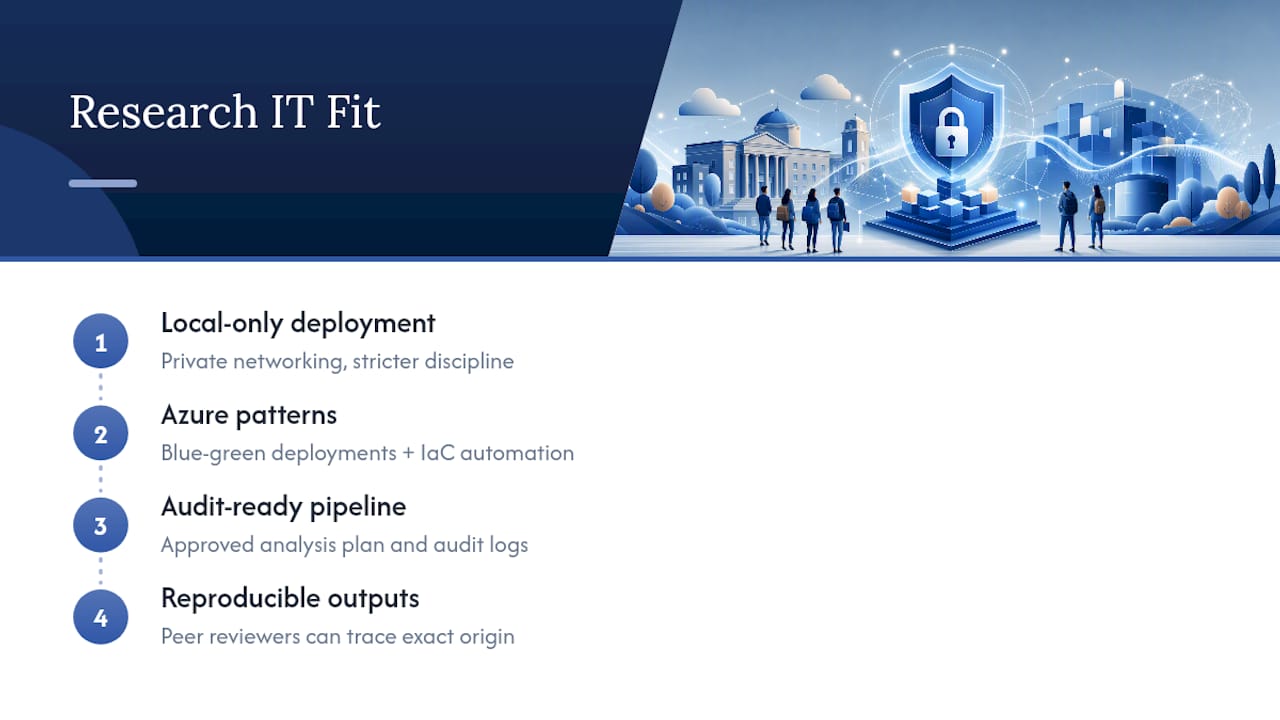
The tradeoff here is worth naming directly: local-only processing and private networking add deployment discipline that a plug-and-play cloud tool doesn’t demand. Azure’s blue-green patterns and IaC discipline exist precisely to make that discipline manageable rather than burdensome.
What convinces me this is the right sequence for research computing specifically is the reproducibility payoff. An approved analysis plan combined with an audit-ready pipeline means a peer reviewer or supervisor can trace a result to its exact origin, which is a harder guarantee than most cloud analytics setups even attempt.
— Aymen
Getting PlotStudio Running on Your Institution’s Azure Environment
Most cloud analytics tools ask you to trust that your data is handled responsibly somewhere on their servers. PlotStudio skips that trust exercise entirely because the analysis runs on infrastructure your own team controls, with every step gated behind a plan your researchers actually approve before code executes.
For institutions ready to move past evaluation, PlotStudio offers a Bring Your Own Key plan built around academic control over credentials and compliance, alongside Managed Credits for teams who’d rather not manage key infrastructure themselves. Enterprise deployments typically start with a $500 one-time pilot fee covering technical onboarding and deployment support, a practical way to validate the Azure setup described above before committing to a full rollout. Full plan details, including monthly and annual pricing, are listed on the pricing page. If your team is ready to scope a pilot, reach out through the enterprise page to start the technical onboarding conversation.
Primary Sources for This Deployment Guide
- Mission-critical deployment and testing guidance — Microsoft Azure Well-Architected Framework
- Safe deployment practices — Microsoft Azure Well-Architected Framework
- App Service deployment best practices — Microsoft Learn
- Analytics security baseline — Microsoft Learn
- Cloud-native deployment patterns — Cloud Adoption Framework
Sources
- Deployment and testing for mission-critical workloads on Azure - Microsoft Azure Well-Architected Framework | Microsoft Learn
- Architecture strategies for safe deployment practices - Microsoft Azure Well-Architected Framework | Microsoft Learn
- Deployment best practices - Azure App Service | Microsoft Learn
- Azure security baseline for Azure Data Explorer | Microsoft Learn
FAQ
What Is the Recommended Azure Analytics Deployment Pattern for PlotStudio?
Deploy through infrastructure as code with a CI/CD pipeline that includes approval gates, then stage the rollout blue-green or through App Service deployment slots before switching production traffic. Pair this with private endpoints for network access and RBAC scoped to least-privilege for every automation account, following the pattern Microsoft outlines for safe deployment practices.
Does PlotStudio Send Research Data to Azure or the Cloud?
No. PlotStudio’s analysis engine runs locally on the researcher’s own machine, and the Azure deployment covers infrastructure, access control, and enterprise features rather than data processing itself. This is why institutions handling IRB-governed or GDPR special-category data can deploy on Azure without the data ever leaving the device.
What Network Model Should We Use, Private Endpoints or VNet Injection?
Private endpoints are the simpler and generally preferred option for most analytics deployments, since they reduce network exposure without requiring a full hub-and-spoke topology. VNet injection makes sense only if your institution already runs that network model and needs subnet delegation, a distinction Microsoft’s security baseline guidance addresses directly.
How Do We Test Rollback Before a Real Incident Happens?
Keep the previous environment live during cutover, use database point-in-time restore as a safety net, and run scheduled rollback drills as a routine part of your release cycle rather than an emergency-only procedure. Documented rollback playbooks tied to your infrastructure-as-code artifacts, as recommended in cloud-native deployment guidance, let teams revert with a pipeline run instead of a manual scramble.