How to Generate Executive Summaries That Drive Decisions

The fastest reliable method to generate executive summaries is to state your recommendation first, support it with three quantified facts, and close with a concrete next step — all within one page. Most professionals overcomplicate this. The actual workflow is five moves: extract the document’s core objective, pull the three data points that prove your case, convert those into a recommendation-led paragraph, add a next-steps line, then cut anything that doesn’t serve a decision. Here is a copy-ready template you can drop in immediately:
For an AI-assisted draft, paste this prompt into your tool of choice: “Write a one-page executive summary for the following report. Lead with the recommendation. Support it with three specific metrics from the text. End with next steps. Audience: [investor / board / internal team]. Tone: direct and professional.”
Every executive summary you write must include at minimum:
- The recommendation — a clear, prescriptive statement of what should happen
- Two to three supporting metrics — specific figures that justify the recommendation
- Next steps — who does what, and by when
Key Takeaways
A decision-ready executive summary leads with the recommendation, supports it with three verified metrics, and closes with a named next step — everything else is optional.
| Point | Details |
|---|---|
| Recommendation comes first | Open every summary with what should happen, not with background or context. |
| Structure has five parts | Introduction, solution, value/impact, key findings, and next steps cover every audience’s needs. |
| AI drafts require verification | Cross-check every figure against the source document before sending to any senior audience. |
| Audience determines emphasis | Investors want milestones and advantage; boards want KPIs and governance; internal teams want status and decisions. |
| Plotstudio for audited summaries | For sensitive or research-grade reports, Plotstudio’s local execution and reproducibility packages keep every figure traceable. |
Table of Contents
- What is an executive summary, and when should you write one?
- What are the canonical parts of an executive summary?
- How do you distill a long report into a decision-ready summary?
- Reusable templates and short executive summary examples
- How do AI tools help you generate and verify executive summaries?
- How do you make a research summary defensible and reproducible?
- What mistakes do writers make in executive summaries?
- Your one-page checklist and five copy-ready AI prompts
- When does AI automation beat manual polish, and when doesn’t it?
- Plotstudio produces defensible, private executive summaries for data-heavy reports
- Sources
What is an executive summary, and when should you write one?
An executive summary is a brief document directed at top-level managers or decision-makers that presents essential information quickly, without requiring them to read the full report. Per Diligent’s guidance, it runs typically 1 to 2 pages and condenses the problem, solution, value, and conclusion into a format built for fast decisions. Business plans sometimes run longer, but the principle stays the same: give the reader everything they need to act, nothing they don’t.
You need one whenever the primary reader is too senior or too time-constrained to read the full document. That covers business plans, investor memos, board reports, project kickoffs, research briefs, and the lead slide of a high-stakes presentation. The U.S. Small Business Administration makes the point plainly: the summary’s objective dictates its focus, and that focus shifts significantly by audience.
| Audience | Primary concern | What to emphasize |
|---|---|---|
| Investors | Return and risk | Problem solved, proprietary advantage, milestones, management track record |
| Board of directors | Governance and performance | KPIs vs. targets, risk exposure, strategic alignment, resource asks |
| Internal leadership | Execution and accountability | Project status, blockers, decisions needed, owner assignments |
A single static summary rarely serves all three audiences well. The most effective approach is to write audience-specific variants — the core facts stay the same, but the framing and emphasis shift to match what each reader is accountable for.
What are the canonical parts of an executive summary?
Asana’s template guidance identifies five standard sections that appear in well-structured executive summaries across industries. Each part has a specific job, and skipping one usually produces a summary that describes rather than recommends.
-
Introduction / problem statement. One to two sentences that name the situation requiring a decision. Example phrase: “Q3 customer churn reached 14%, exceeding the 8% threshold set in the annual operating plan.” Prioritize the metric that signals urgency.
-
Proposed solution / recommendation. The prescriptive core of the document. State what you recommend and why it is the right move. Example: “We recommend deploying a proactive retention program targeting the 30-day post-onboarding window.” Never describe options here without picking one.
-
Value and impact. Quantify the benefit and acknowledge the cost or risk. A cost-benefit line and a risk note belong here. Example: “Projected to reduce churn by 4 percentage points, recovering approximately $2.1M in annual recurring revenue at a program cost of $340K.”
-
Key findings and data. Two to four bullet points or sentences that supply the evidence behind the recommendation. These are the facts a skeptical reader will challenge, so every figure must be traceable to the full report.
-
Conclusion and next steps. Close with a named action, an owner, and a date. “The retention team will launch a pilot cohort by March 15, with a 60-day review scheduled for May.” Vague closings (“we will continue to monitor”) undermine the whole document.
A 20-page report warrants one tight page; a 100-page business plan may justify two. Placement is fixed: the executive summary goes on the first page after the title page, before the table of contents.
How do you distill a long report into a decision-ready summary?
The process is more systematic than most writers realize. Staring at a 50-page report and trying to write a summary from scratch is where most people lose an hour. A structured extraction pass takes 30–90 minutes for a 20–50 page document and produces a draft that needs editing, not rebuilding.
Work through these four moves in order:
Scan for objectives first. Read the introduction, the conclusion, and every section heading before you read a single body paragraph. You are mapping the report’s architecture, not absorbing its content.
Extract conclusions, not descriptions. Go back through each section and pull only the sentence that states what was found or decided, not the sentences that explain how. Most reports bury their conclusions in the middle of paragraphs.
Prioritize stakeholder-impacting data. From your extracted conclusions, identify the three that most directly affect the reader’s decision or accountability. Convert each into a single sentence with a number attached.
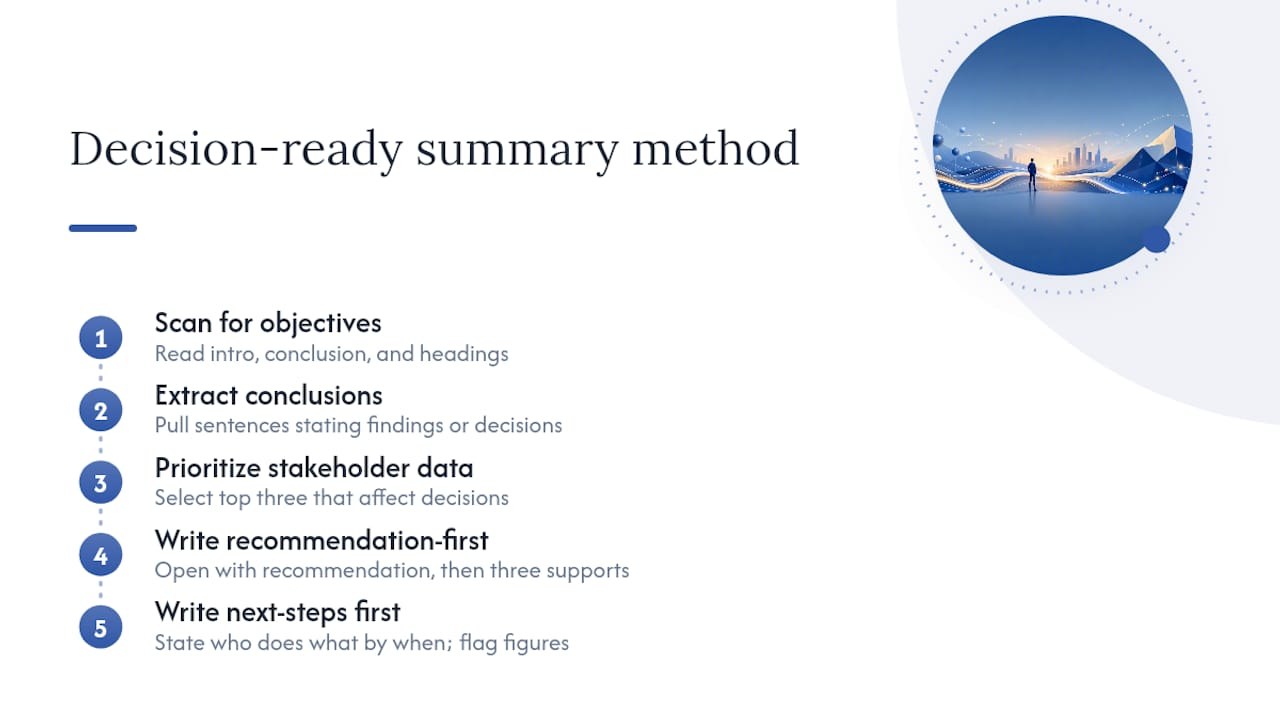
Write recommendation-first, then evidence. Open your draft with the recommendation, follow with the three supporting points, and close with next steps. This is the reverse of how most reports are structured, which is exactly why the summary needs to be written separately.
If the report contains financial models, clinical data, or statistical outputs you cannot independently verify, flag those figures for a subject-matter expert before finalizing the summary. A wrong number in an executive summary carries more reputational risk than a wrong number buried in an appendix.
Pro Tip: Before writing a single word of the summary, write the next-steps line first. If you cannot state who does what by when, the report has not reached a conclusion yet — and no amount of summary writing will fix that.
Reusable templates and short executive summary examples
Two templates cover the majority of use cases. Choose based on your primary audience.
One-paragraph investor template
[Company / Project Name] — Executive Summary [Company] is addressing [specific market problem] affecting [target segment]. Our solution, [product/service], achieves [key metric or differentiator]. To date, we have reached [milestone 1] and [milestone 2], with [revenue/users/contracts] of [figure]. The management team brings [relevant track record]. We are seeking [funding amount / partnership] to [specific use of funds], projecting [outcome] by [date].
One-page board / project template
Project: [Name] | Period: [Q/Year] | Owner: [Name] Situation: [One sentence on the problem or context.] Recommendation: [One sentence on what the board should approve or note.] Key findings: [Three bullet points with figures.] Risks: [One sentence on the primary risk and mitigation.] Next steps: [Action | Owner | Date]
Sample 1: Quarterly operations report
Operations Executive Summary — Q3 Customer support ticket volume rose 22% quarter-over-quarter, driven by a single product defect in the mobile checkout flow. The engineering team resolved the defect on September 8; ticket volume returned to baseline within 11 days. Net Promoter Score recovered from 31 to 44 by period close. We recommend a pre-release QA checkpoint for all checkout-path changes going forward. The product team will implement the checkpoint protocol by October 31.
Sample 2: Investor pitch summary
Series A Executive Summary — [Company Name] The U.S. mid-market logistics sector loses an estimated $18B annually to manual dispatch errors. [Company] reduces dispatch error rates by 67% through real-time route optimization, serving 140 enterprise clients across 12 states. ARR reached $4.2M in Q3, growing 18% quarter-over-quarter. The founding team previously scaled [Prior Company] to acquisition. We are raising $8M to expand the sales team and enter three new verticals by Q4 next year.
Quick editing tips for adapting these samples: replace every bracketed placeholder with a real figure from your data, match the tone to your organization’s voice (formal for regulated industries, direct for tech), and cut any sentence that does not support the recommendation or the ask.
- Investor summaries should lead with the market problem, not the product
- Board summaries should lead with the decision or approval being requested
- Internal summaries should lead with the status and the blocker, if any
How do AI tools help you generate and verify executive summaries?
AI speeds draft creation, but the output requires post-editing and verification before it goes to any senior audience. That is not a caveat — it is the workflow. Employees spend 19% of their workweek searching for information, and a well-structured AI-assisted summary directly cuts that cost by surfacing the right facts in the right order. The value is real; the risk is that AI tools can rewrite figures, drop citations, or smooth over contradictions in the source data.
Prompt design is where most users leave quality on the table. Specifying audience, tone, and length in your prompt produces a materially better draft than a generic “summarize this” instruction. Here are copy-ready prompts for common summary types:
- Investor: “Summarize the following business plan as a one-page investor executive summary. Lead with the market problem and the company’s proprietary advantage. Include three specific metrics. Close with the funding ask and projected use of funds. Tone: confident and data-driven.”
- Board report: “Write a board-level executive summary of the following quarterly report. Open with the key decision or approval needed. Include KPIs vs. targets, the primary risk, and next steps with owners and dates. Tone: formal and concise.”
- Internal update: “Summarize this project status report for internal leadership. Lead with current status (on track / at risk / blocked). List the top three findings and the one decision needed this week. Tone: direct.”
- Research brief: “Write a one-page executive summary of the following research report for a non-specialist audience. State the main finding first, then the methodology in one sentence, then three implications for practice. Avoid jargon.”
- Presentation slide: “Convert the following executive summary into five bullet points for a title slide. Each bullet should be one line, 10 words or fewer. Lead with the recommendation.”
- Risk-focused: “Summarize the following risk assessment as an executive summary. Lead with the highest-priority risk and its financial exposure. List three mitigation actions with owners. Tone: measured and precise.”
After any AI draft, run this verification checklist before sending:
- Cross-check every figure in the summary against the source document
- Confirm that KPIs appear with the same units and time periods as in the original
- Trace every cited finding to a specific section or page in the report
- Read the summary aloud as a skeptical stakeholder — flag any claim that sounds stronger than the data supports
Pro Tip: Paste the AI-generated summary back into a second prompt and ask: “List every factual claim in this summary and identify which ones cannot be verified from the source text.” This red-team pass catches hallucinated figures faster than manual review.
On privacy: public-cloud AI tools process your input on remote servers. For documents containing patient data, financial projections under NDA, or proprietary research, that is a material risk. Plotstudio runs analysis locally on your machine, meaning data never leaves your device — a critical distinction for IRB-governed research, GDPR special-category data, or any report where confidentiality is non-negotiable. For analytics-heavy summaries where the numbers themselves are the product, Plotstudio’s enforced analysis plans and exportable reproducibility packages give you a defensible audit trail that no cloud summarizer can match.
For teams building SaaS or content-driven reports, pairing your summary workflow with analytics for content marketing can surface the KPIs worth featuring before you write a single sentence.
How do you make a research summary defensible and reproducible?
A persuasive executive summary and a reproducible research overview are not the same document. A persuasive summary is optimized for a decision; a reproducible one is optimized for scrutiny. For peer review, grant applications, or any report that will be audited, the summary must preserve traceability to methods, not just conclusions.

The practical difference shows up in three places. First, the key findings section must name the statistical method used, not just the result. Second, every KPI in the summary should map to a specific table or figure in the appendix, with a reference. Third, the conclusion should state the confidence level or effect size, not just the direction of the finding.
Pro Tip: Keep a modular summary repository: write each section (problem, method, finding, implication) as a standalone block. When a reviewer asks for a revised summary with different emphasis, you swap blocks rather than rewriting from scratch. This also makes version control tractable.
| Summary component | What to preserve | What to omit |
|---|---|---|
| Key finding | Method name, sample size, effect size, p-value or CI | Raw data tables, intermediate steps |
| Recommendation | Specific action, projected outcome, confidence level | Exploratory hypotheses not tested |
| Next steps | Named owner, date, success criterion | General aspirations without accountability |
Plotstudio enforces this discipline structurally. Every analysis runs against a pre-approved plan that states methods, assumptions, and success criteria before any code executes. The exported reproducibility package — annotated notebooks, PDF reports, and permanent searchable analysis pages — gives a supervisor or reviewer a complete audit trail from raw data to the summary’s claims. For research teams producing summaries for grant applications or peer review, that traceability is not optional.
What mistakes do writers make in executive summaries?
Most executive summary failures fall into a short list of repeatable errors, each with a direct fix.
-
Describing instead of recommending. The summary reads like a table of contents rather than a decision document. Fix: rewrite the opening sentence as a recommendation with a verb (“We recommend,” “The board should approve,” “The team will implement”).
-
Burying the ask. The funding request, approval needed, or decision point appears in the third paragraph. Fix: move it to sentence two, immediately after the problem statement.
-
Inconsistent metrics. The summary states a 12% growth rate; the report says 11.8%. Fix: run a numbers-check pass where you open the source document and verify every figure in the summary against its original.
-
No next steps. The summary ends with a conclusion but no named action. Fix: add a final line in the format “Action | Owner | Date” before you consider the draft complete.
-
Audience mismatch. An investor summary sent to the board leads with the product roadmap instead of governance metrics. Fix: identify the primary reader before writing and apply the audience table from the definition section above. Retargeting takes five minutes if you have a modular template.
-
Jargon overload. Technical terms that the primary reader does not use daily slow comprehension and signal that the writer did not adapt the document. Fix: read the summary as if you are the reader, not the author. Replace any term the reader would not use in a meeting with a plain equivalent.
Your one-page checklist and five copy-ready AI prompts
A printable checklist keeps the process consistent across writers and documents. Work through these steps in order before marking any summary final.
- Extract — Identify the document’s core objective and the three findings that most directly support or challenge it.
- Prioritize — Rank findings by stakeholder impact. The highest-impact finding goes first.
- Quantify — Attach a specific number to each finding. If no number exists, note that the claim is qualitative.
- Verify — Cross-check every figure against the source. Flag any discrepancy before writing.
- Write recommendation-first — Open with what should happen, not with background or context.
- Add next steps — Name the action, the owner, and the date.
- Cut ruthlessly — Remove any sentence that does not support the recommendation or the ask.
- Read as the audience — Swap your author lens for the reader’s lens. If a sentence would not matter to them, cut it.
- Finalize and version — Save the final version with a date stamp and store it in a named summary repository for future reference.
Five copy-ready prompts for the most common summary types:
- Investor: “Write a one-page investor executive summary from the following text. Lead with the market problem, then the solution’s proprietary advantage, then three metrics, then the ask. Tone: confident.”
- Board: “Summarize the following report for a board of directors. Open with the decision or approval needed. Include KPIs vs. targets, the primary risk, and next steps. Tone: formal.”
- Internal update: “Write an internal executive summary of the following project update. State status (on track / at risk / blocked), top three findings, and the one decision needed. Tone: direct.”
- Research brief: “Summarize the following research report for a non-specialist executive audience. State the main finding first, the method in one sentence, and three practice implications. No jargon.”
- Presentation slide: “Convert the following executive summary into five bullets for a title slide. Each bullet: one line, 10 words max. Lead with the recommendation.”
Store final summary versions in a named folder with a consistent naming convention (e.g., [Project]_ExecSummary_[YYYYMMDD]). When a document is updated, save the new version alongside the original rather than overwriting it. Experienced practitioners keep a modular repository of past summaries and adapt those modules by audience, which cuts rewrite time significantly on recurring reports.
Pro Tip: For recurring reports (quarterly updates, annual reviews), build a summary template with locked structure and variable fields. Fill in the variables each cycle rather than rewriting from scratch. This reduces summary production time and keeps formatting consistent across periods.
When does AI automation beat manual polish, and when doesn’t it?
The honest answer is that AI-first drafts win on speed and lose on judgment. For a 30-page operational report with clean data and a familiar audience, an AI draft plus a 20-minute verification pass produces a summary that is as good as one written manually in 90 minutes. The math favors automation at that scale.
The calculus shifts when the document is analytically complex, the data is sensitive, or the audience is senior enough that a single wrong figure carries real consequences. A board presentation for a publicly traded company, a grant application under peer review, or a clinical research summary for an IRB — these are not documents where a hallucinated percentage is a recoverable error. Manual synthesis, or at minimum a structured extraction workflow with full traceability, is the right call.
Three decision rules: use AI-first when the document is under 50 pages and the data is non-sensitive; use a hybrid approach (AI draft plus expert verification) when the audience is C-suite or board level; use a fully audited local workflow when the data is governed by IRB, GDPR, or NDA constraints. Archived summary repositories and modular templates are the long-term efficiency lever regardless of which mode you choose — they reduce the cognitive load of each new summary and make quality consistent across a team.
Plotstudio produces defensible, private executive summaries for data-heavy reports
For analysts and researchers whose summaries live or die on the numbers behind them, Plotstudio offers something public-cloud summarizers cannot: a fully local workflow where data never leaves your machine, every analysis runs against a pre-approved plan, and the output is a reproducible package that any reviewer can audit.
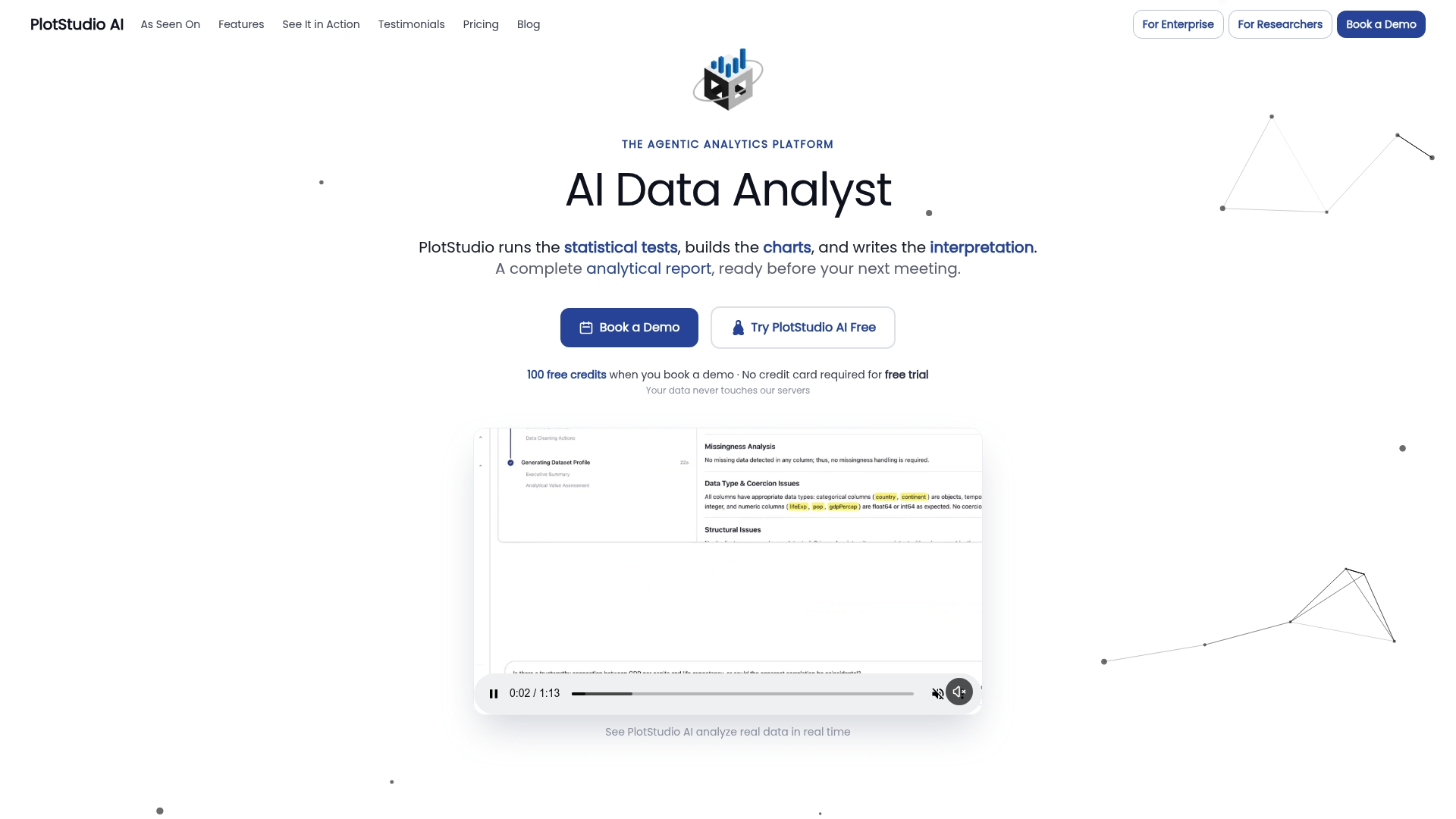
That matters most when the report contains IRB-governed patient data, proprietary financial models, or research outputs destined for peer review. Plotstudio’s AI agents plan, code, execute, and interpret the analysis before a single line of the summary is written, so the figures in your executive summary trace directly to verified, reproducible results rather than to a cloud model’s best guess. The platform exports annotated notebooks and PDF reports that function as a built-in audit trail.
For teams that need enterprise-grade analytics with privacy-first local execution, Plotstudio is the purpose-built option. Visit the advanced data analysis page to see how the reproducibility workflow fits your reporting pipeline, or start a free trial to generate your first audited summary.
Sources
- Executive summary report (Diligent)
- Write an executive summary | U.S. Small Business Administration
- Executive summary examples plus a simple template to write yours fast (Asana)
- Executive Summary | UMGC Effective Writing Center