Generative AI for analytics turns a research question into an investigation. Instead of merely describing a dataset, it can plan analytical steps, write and execute Python, inspect intermediate results, correct errors, and explain the findings. PlotStudio AI applies this approach to research data analysis, helping users move from a plain-language objective to an auditable analysis.
Understanding Generative AI for Analytics
A general chatbot is like a consultant who answers one question at a time. Agentic analytics is closer to an analyst who receives a goal, chooses a route, checks the evidence, and documents the work.
An answer is an output; an analysis is an investigation.
For example, asking "What is the average outcome by treatment?" may produce a number. Asking an agentic system to investigate treatment differences can trigger data profiling, missing-value checks, assumption testing, statistical comparisons, visualizations, and a written interpretation.
This distinction matters when research decisions depend on more than a single response:
- Multi-step investigation connects related analytical tasks.
- Python execution turns suggestions into testable calculations.
- Result inspection helps identify failed assumptions or unexpected outputs.
- Reproducibility preserves code, methods, charts, and findings.
- Methodology visibility lets researchers review how conclusions were produced.
PlotStudio AI is designed for researchers who need to investigate data rather than repeatedly steer a chat conversation. Its Analysis Pages can preserve the analysis narrative, outputs, and generated code in one record. Learn more about AI-powered analytics and research workflows.
General Chatbots vs Agentic Analytics Platforms
The gap between a conversational AI tool and an agentic analytics platform comes down to one thing: does the system investigate, or does it just respond? Here's how the two compare across the capabilities that matter for research-grade analysis.
| Capability | General AI Chatbot | Agentic Analytics Platform |
|---|---|---|
| Multi-step investigation | Usually requires repeated prompts | Plans and coordinates connected steps |
| Python execution | May provide suggested code | Runs code and inspects results |
| Local data privacy | Depends on the deployment | Can support local execution |
| Reproducibility | Often requires manual saving | Preserves methods, code, and outputs |
| Methodology visibility | May be limited to explanations | Exposes analytical reasoning and artifacts |
A chatbot can give you a formula. An agentic platform gives you the full investigation behind it — the cleaning decisions, the assumption checks, the comparison groups, and the caveats. That difference separates a quick answer from a defensible finding.
Generative AI for analytics can support exploratory analysis, statistical testing, and publication preparation, but it does not replace scientific judgment. Researchers still define meaningful questions, assess assumptions, evaluate uncertainty, and decide whether evidence supports a claim.
The following sections explain how this investigative loop works, where it helps, and which safeguards teams should apply.
Generative AI for analytics works less like a calculator and more like a research assistant following an investigation plan. Instead of returning one response, an agentic system defines a goal, writes and runs code, examines evidence, corrects failed steps, and documents the result.
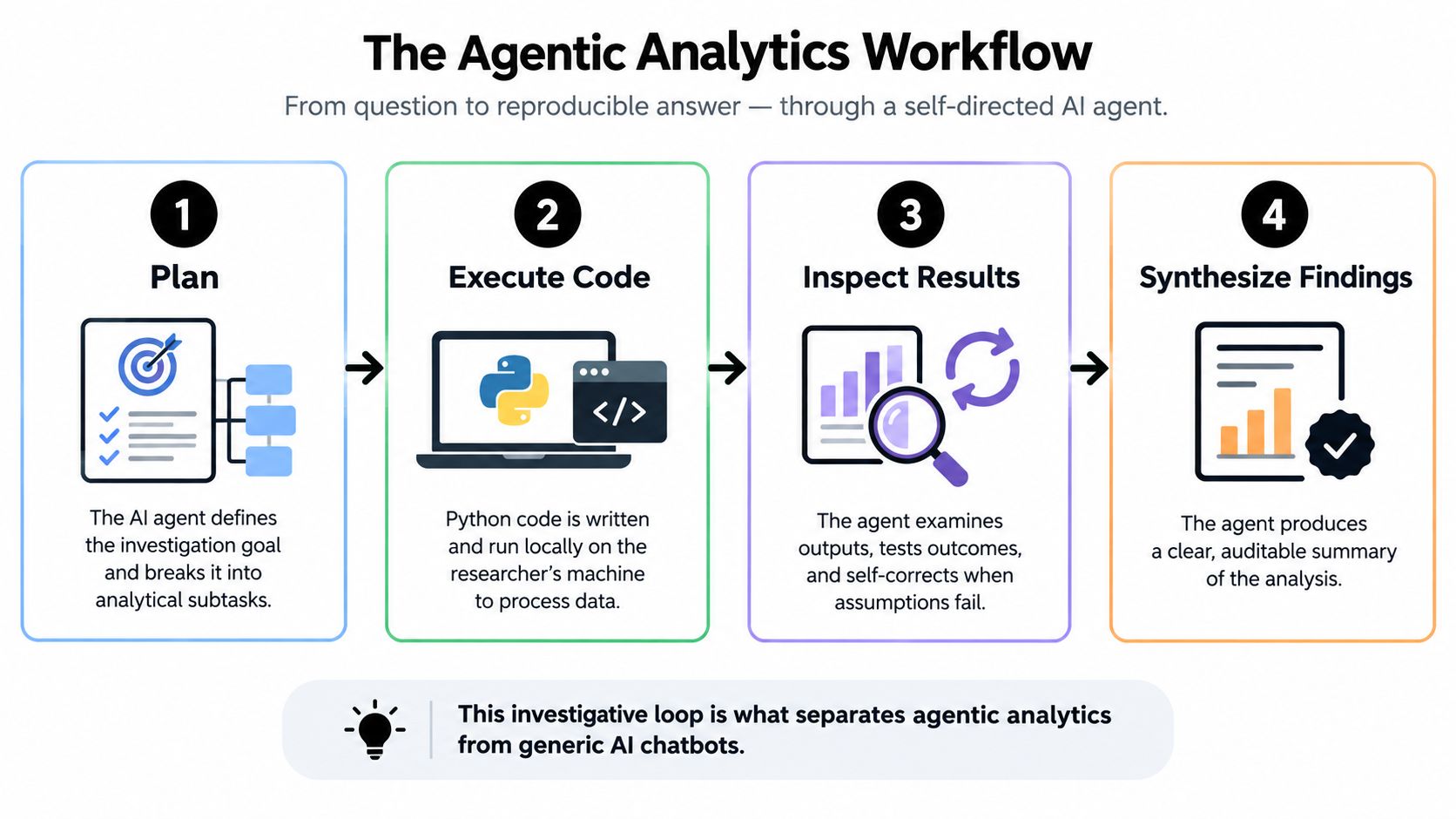
The visualization shows the four connected stages: Plan, Execute Code, Inspect Results, and Synthesize Findings. Its main insight is that agentic analytics is a loop, not a single prompt, because unexpected results can send the system back to an earlier step.
From Question to Investigation
Suppose a researcher asks, "Which treatment improved plant growth across locations?" A simple language model might suggest an ANOVA. An agentic workflow can first inspect column types, identify repeated measurements, check missing values, compare treatment and location structure, then select and justify an appropriate model.
A typical loop includes:
- Plan: break the research objective into analytical subtasks.
- Execute: write and run Python against the uploaded data.
- Inspect: test outputs, assumptions, and errors.
- Revise: change the method when evidence requires it.
- Synthesize: produce charts, statistics, code, and an explanation.
The defining difference is action: an AI agent tests its work instead of merely describing what a researcher could do.
In PlotStudio AI, Plan Mode makes the proposed route visible before execution. Domain skills can guide method selection, while Analysis Pages preserve the plan, code, outputs, and interpretation for later review. Learn more about how AI data agents work.
Why Local Execution Matters
The execution layer is especially important for sensitive research. PlotStudio AI runs Python locally on the researcher's machine, so the data and analytical code remain on that device rather than being uploaded to PlotStudio AI's servers.
That arrangement can support data sovereignty for clinical, social-science, or proprietary datasets, although institutions should still review their own policies, model-provider settings, and consent requirements.
Workspace insights and saved Analysis Pages add continuity. Instead of losing methodological decisions inside a long chat, researchers can revisit prior analyses, compare findings, and inspect the exact artifacts behind a conclusion. This makes the workflow closer to a lab notebook with an active assistant than to an ordinary chatbot.
Generative AI can reduce the hours researchers spend on repetitive technical work, but speed by itself does not make for better science. Evidence from workplace studies suggests that meaningful productivity gains occur when AI assistance is paired with rigorous verification. A Quarterly Journal of Economics study documented a 15% productivity improvement, while a Bank for International Settlements experiment measured 55% higher programmer output.
Separate Output From Quality
Here's the catch: those numbers measure completed work, not automatically stronger conclusions. An analyst who produces more charts or scripts may still choose a weak model, miss gaps in the data, or overstate what an association means.
Faster analysis is useful only when methodological judgment remains in control.
In research settings, generative AI excels at mechanical tasks:
- Writing boilerplate Python for data loading and reshaping
- Creating exploratory charts and summary tables
- Reformatting variables across related files
- Drafting plain-language descriptions of statistical output
But the researcher still decides which question matters, whether the design supports the analysis, and how uncertainty should be communicated. Learn more about AI for academic research.
Measure the Right Productivity Metrics
A useful evaluation tracks far more than minutes saved. Teams should compare:
- Time to first valid result, including data preparation and debugging.
- Review effort, such as the time required to inspect code and assumptions.
- Error rates, including incorrect variables, tests, joins, and interpretations.
- Reproducibility, measured by whether another researcher can rerun the work.
- Researcher capacity, including time returned to hypothesis formation and interpretation.
Consider a longitudinal treatment study. PlotStudio AI might profile the dataset, reshape repeated observations, generate candidate visualizations, and run a planned model. The researcher then inspects the Python, verifies the repeated-measures structure, assesses missingness, and decides whether the estimated effect is scientifically meaningful.
This is where agentic analytics changes the productivity equation. The system reduces mechanical burden across connected steps, while the researcher retains responsibility for hypotheses, confounding, assumptions, effect sizes, confidence intervals, and conclusions.
A practical pilot should compare an AI-assisted workflow against the team's normal process using the same datasets and review standards. Record time, corrections, rejected analyses, and final-quality assessments rather than celebrating output volume alone. Productivity gains are credible when faster work remains auditable, reproducible, and scientifically defensible.
Researchers are adopting generative AI for analytics at a striking pace, but trust hasn't kept up. Wiley's ExplanAItions research found that 84% now use AI for at least one work activity, up from 57%, while 62% turn to it for research or publication tasks, compared with 45% in 2024. Yet 80% have tried general-purpose AI versus only 25% using specialized research tools, and 64% cite inaccuracies or hallucinations as a barrier, up from 51%. Read the full research about these findings.
Why General Tools Dominate
General-purpose systems are easy to access, so researchers naturally start with literature summaries, drafting, or quick calculations. But analytics demands more than fluent prose. A credible result should show the data transformation, statistical method, assumptions, uncertainty, and the code that produced it.
That gap explains why adoption and hesitation coexist. A researcher can appreciate a fast answer while still wondering whether the underlying calculation used the correct grouping, handled missing values appropriately, or confused association with causation.
For research, trust comes from inspectable work, not confident wording.
What Researchers Should Demand
When evaluating an AI tool for research data analysis, look for observable safeguards:
- Methodology visibility, so you can review the selected test and its assumptions.
- Preserved Python code, allowing you to inspect and rerun calculations.
- Local execution, which keeps sensitive data and analysis code on your device.
- Persistent records, so charts, outputs, and decisions don't vanish into a chat thread.
- Reproducible exports, such as notebooks or reports that support peer review.
PlotStudio AI addresses these needs through local Python execution and saved Analysis Pages that pair interpretations with charts, statistics, methodology, and generated code. Researchers can review the work before accepting its conclusions, rather than treating the system as an unquestioned authority.
Turning Adoption Into Responsible Practice
A sensible rollout begins with exploratory profiling and visualization, then introduces confirmatory tests under human review. Teams should record errors, rejected methods, correction time, and whether another analyst can reproduce the final result.
This approach treats AI as a junior analyst with useful speed but limited authority. The researcher stays responsible for defining hypotheses, judging study design, checking confounding, and deciding what evidence supports publication.
For a related discussion of why confidence and reliability can diverge, learn more about the emotional trust gap in AI analytics.
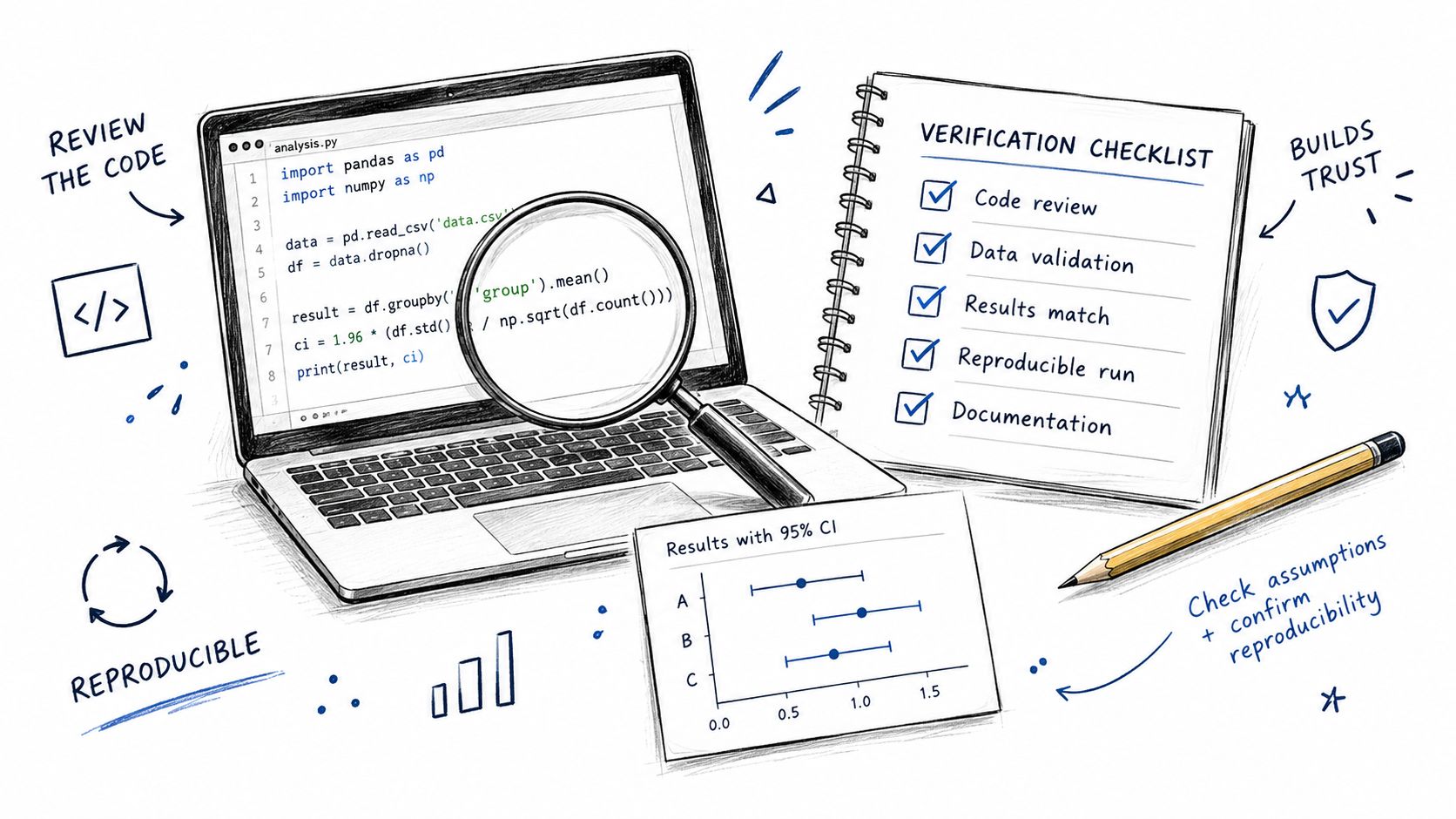
Generative AI for analytics can produce plausible results quickly, but plausibility isn't proof. Treat AI as a junior analyst: it prepares work, while you approve the method, inspect the evidence, and decide whether the conclusion fits the study design.
Check the Method Before the Result
Use Plan Mode to review the proposed investigation before code runs. Confirm that the method matches the data structure, research question, and design.
Check whether the workflow addresses:
- Repeated observations, clustering, or treatment groups
- Missing-data mechanisms and planned imputation
- Model assumptions, confounding, and multiple testing
- Effect sizes and confidence intervals, not only p-values
- Exploratory findings versus confirmatory claims
Scientific judgment belongs with the researcher, even when execution is automated.
Next, inspect generated Python line by line. Verify filters, joins, reference categories, transformations, and sample sizes. A correct-looking chart can still be based on duplicated rows or an unintended exclusion.
Validate Outputs With Independent Checks
For a treatment comparison, ask the system to calculate group means manually, then compare them with the statistical test output. If a reported difference doesn't match the underlying summaries, stop and investigate before interpreting it.
Use domain knowledge as a second diagnostic. A biological effect that contradicts measurement units, a confidence interval that ignores the sample size, or a survival model with impossible event coding deserves review.
A practical validation sequence is:
- Recalculate a key statistic with an independent method.
- Inspect residuals, distributions, and influential observations.
- Repeat the analysis with a reasonable alternative specification.
- Record which results remain stable and which change.
PlotStudio AI keeps generated code and outputs inspectable inside Analysis Pages, while Jupyter and PDF export support review, sharing, and audit trails. For deeper guidance, read this guide to reproducible research analysis.
Preserve the Full Investigation
Don't leave important decisions in a temporary chat window. Save the data preparation steps, analysis plan, code, charts, assumptions, corrections, and final interpretation as one persistent record.
Reproducibility means another researcher can understand what happened and rerun the relevant steps. In practice, that record also makes peer review easier because uncertainty and methodological choices remain visible.
Generative AI for analytics works best when it accelerates checking, not when it bypasses it. Use automation for mechanical work, then apply independent calculations, domain knowledge, and transparent documentation before treating an AI-generated finding as evidence.
When you're working with generative AI for analytics, privacy comes down to one fundamental question: where do the data and code actually run? For clinical records, identifiable surveys, proprietary economic data, or unpublished experiments, local execution keeps everything on the researcher's own machine rather than shipping it off to an external server.

Choose the Right Deployment Model
PlotStudio AI runs a local Python engine on your device, while AI calls go straight from your machine to a SOC 2-certified model provider. Teams can also bring their own API key, or deploy Azure OpenAI inside their own tenant when institutional control and data sovereignty demand it.
The right choice depends on the dataset, consent terms, funder rules, and institutional policy. Privacy review should happen before any data gets uploaded — not after the analysis is already done.
Local execution reduces exposure, but governance still requires approved providers, access controls, retention rules, and human review.
For clinical research, confirm whether identifiable or coded health information can legally be processed by the selected model provider. Social scientists need to examine consent language and re-identification risks. Economists may need to protect confidential firm, household, or administrative records.
Compare Privacy and Auditability
| Dimension | General Cloud AI Tool | Local-Execution Agentic Platform |
|---|---|---|
| Data residency | Depends on provider and settings | Data can remain on the researcher's device |
| Auditability | Often requires manual copying | Can preserve plans, code, outputs, and revisions |
| Institutional control | Provider-dependent | Supports BYOK or tenant-based deployment |
| Compliance review | May be difficult to document | Easier to map execution and access boundaries |
Agentic systems also support governance through analysis logs. A saved Analysis Page preserves the plan, exact Python code, charts, statistical outputs, corrections, and interpretation — creating a real audit trail instead of a disappearing chat history.
Teams building formal policies can consult the Kagool AI playbook for broader governance considerations.
Before selecting a tool, document:
- What data leave the device, if any
- Which provider receives prompts or metadata
- How keys, logs, and exports are controlled
- Whether another researcher can reproduce the analysis
For sensitive work, PlotStudio AI's local execution, inspectable code, Jupyter export, and persistent Analysis Pages provide a practical privacy baseline. Researchers should still obtain institutional approval and verify contractual, regulatory, and consent requirements for each project.
Adopting generative AI for analytics works best as a gradual research workflow, not a switch you turn on across every project. Start with low-risk exploration, then introduce automated preparation and finally approve complete investigations in PlotStudio AI, where plans, Python code, outputs, and findings remain inspectable.
Build Capability in Phases
Begin with exploratory data analysis. Upload a dataset and ask PlotStudio AI to identify variable types, sample sizes, duplicates, missing values, distributions, and unusual observations. This first phase helps your team learn how the system describes evidence before it performs consequential statistical tests.
For example, try:
“Profile this dataset, report data quality issues, identify possible outcome and predictor variables, and recommend visual checks before any hypothesis test.”
Next, allow the system to suggest cleaning and imputation steps, but review each decision. Confirm that missingness is described correctly and that imputation won't erase meaningful subgroup differences.
A practical progression looks like this:
- Profile: understand structure, quality, and relationships.
- Prepare: review cleaning, reshaping, and imputation.
- Investigate: approve a multi-step plan and execute it.
- Reproduce: export the analysis for review or publication.
Use Prompts That Define the Investigation
Specific objectives produce more useful work than requests for “insights.” Ask for observable checks and explain the research context.
- “Compare these files, detect likely join keys, report match rates and cardinality, and flag ambiguous relationships.”
- “Reproduce Figure 2 from this publication using the supplied data, documenting every transformation and difference from the original.”
- “Investigate treatment effects across locations, checking repeated measures, missingness, assumptions, effect sizes, and confidence intervals.”
With Plan Mode, researchers can edit or approve the proposed route before execution. This preserves human oversight while allowing the system to coordinate several analytical steps.
Organize Knowledge for Team Use
Save important work as Analysis Pages instead of leaving it in temporary chats. Use @-mentions to reference earlier analyses, compare results, and build a searchable institutional record.
Teams should also establish review protocols:
- Assign a researcher to verify code, sample sizes, and assumptions.
- Record accepted, rejected, and revised methods.
- Require independent checks for publication claims.
- Train members to distinguish exploratory results from confirmatory evidence.
Autonomy should reduce repetitive work, not remove scientific accountability.
A small pilot lets teams measure time saved, correction effort, reproducibility, and error rates on familiar datasets. Researchers can try PlotStudio AI with 1,000 free credits for researchers, providing a low-commitment way to test agentic analytics on real work.