HIPAA Compliant Analytics for Analysts: Full Checklist

Analytics workflows can be HIPAA-compliant when you apply the Security Rule’s technical safeguards and the Privacy Rule’s minimum-necessary principle to every stage of your pipeline, back them with a signed Business Associate Agreement (BAA), and generate verifiable audit logs for every PHI access event. Three actions come first: run a documented risk assessment before touching any patient data, classify every dataset as PHI, limited dataset, or de-identified, and require a signed BAA plus SOC 2 Type II evidence from any vendor that will process PHI. Plotstudio’s privacy-first, local-processing architecture and immutable analysis pages are built around exactly these controls.
Table of Contents
- Your HIPAA analytics compliance checklist
- What HIPAA actually requires for analytics workflows
- What technical safeguards does HIPAA require for analytics?
- How to handle PHI for analytics: classify, minimize, isolate
- What to require from vendors before moving PHI into their tools
- Step-by-step plan to make analytics HIPAA-compliant
- How to evaluate a desktop or AI analytics tool for HIPAA compliance
- Residual risks that standard controls don’t fully address
- Key Takeaways
- What analytics teams consistently get wrong about HIPAA
- Plotstudio makes privacy-first analytics practical
- Authoritative US sources for deeper reading
Your HIPAA analytics compliance checklist
Use this list as a project-kickoff artifact. Items marked [BLOCKER] must be complete before the first PHI import.
Immediate blockers
- [BLOCKER] Complete and document a formal risk assessment covering data flows, threat vectors, and residual risk.
- [BLOCKER] Get a signed BAA from every vendor or cloud provider that will touch PHI.
- [BLOCKER] Confirm encryption in transit (TLS 1.2+) and at rest (AES-256 or equivalent) with documented key management.
- [BLOCKER] Enable MFA and enforce least-privilege role-based access control (RBAC) on all analytics environments.
- [BLOCKER] Verify that immutable audit logs are active and capture user identity, timestamp, and data accessed.
Ongoing controls
- Maintain a written de-identification policy and document the method (Safe Harbor or Expert Determination) for every dataset.
- Conduct a re-identification risk analysis and record the residual risk estimate in project records.
- Define and enforce output export rules (who can export, in what format, to which destinations).
- Maintain a documented incident response workflow with breach notification timelines.
- Run annual HIPAA training for all analytics team members with role-specific modules.
What HIPAA actually requires for analytics workflows
HIPAA’s two operative rules for analytics are the Privacy Rule and the Security Rule. The Privacy Rule governs permitted uses and disclosures of Protected Health Information (PHI) and mandates the minimum-necessary principle: you may use only the PHI fields actually needed for the analysis. The Security Rule specifies administrative, physical, and technical safeguards for electronic PHI (ePHI).
Three data classes determine how much latitude you have:
- PHI: Any individually identifiable health information linked to a covered entity’s records. Full Security Rule and Privacy Rule controls apply. A signed BAA is required for any vendor touching it.
- Limited dataset: PHI with 16 direct identifiers removed (names, addresses, phone numbers, etc.). Requires a Data Use Agreement (DUA), not a full BAA, but still demands security controls.
- De-identified data: PHI stripped of all 18 Safe Harbor identifiers, or certified by an expert as carrying negligible re-identification risk. No HIPAA restrictions apply to analytics on de-identified data.
Auditability is where most analytics teams fall short. HIPAA requires proof of who accessed what ePHI and when, and that proof must be available on demand for compliance audits.
The BAA is a liability framework, not a checkbox. Beyond the signature, analysts must audit session management and access logs continuously. HIPAA compliance is an ongoing operational state; software must generate proof of who accessed what PHI at any time for compliance reports.
What technical safeguards does HIPAA require for analytics?
The Security Rule’s technical safeguard category covers five control families. Here is how each maps to analytics environments:
| Control | Requirement | Analytics implementation |
|---|---|---|
| Access control | Unique user IDs, emergency access, auto-logoff | RBAC, MFA, session timeouts in analytics tools |
| Audit controls | Hardware/software activity records | Immutable logs: user, timestamp, query, dataset |
| Integrity | Protect ePHI from improper alteration | Checksums, signed outputs, reproducible pipelines |
| Transmission security | Encrypt ePHI in transit | up-to-date encryption protocols for all API calls and data transfers |
| Encryption at rest | Addressable (strongly recommended) | strong encryption with customer-managed keys where feasible |

Beyond these baseline controls, two advanced options are worth knowing. Trusted Execution Environments (TEEs) run analytics inside hardware-isolated enclaves, so even a compromised host OS cannot read the data in use. Projects like MC2 / Opaque SQL extend this to encrypted Spark SQL and secure XGBoost, enabling analytics on data that never decrypts outside the enclave. Differential privacy adds calibrated statistical noise to query outputs, limiting what an adversary can infer from aggregate results.
The tradeoff is real: synthetic data or noise injection reduces re-identification risk but also reduces analytical fidelity. For most compliance analytics, de-identification plus standard encryption is sufficient. TEEs and differential privacy are warranted when the dataset is highly sensitive or the threat model includes insider attacks.
Pro Tip: When evaluating key management, ask whether the vendor supports customer-managed keys (CMK). If the vendor holds the only copy of your encryption keys, a vendor-side breach exposes your PHI regardless of encryption.
How to handle PHI for analytics: classify, minimize, isolate
Follow this sequence at the start of every analytics project that may involve patient data:
- Classify the dataset. Identify every field. Label each as PHI, limited dataset, or de-identified. Use data profiling and PII detection to catch indirect identifiers (quasi-identifiers like ZIP code + age + sex can re-identify individuals).
- Choose the processing environment. Prefer local or desktop processing for PHI when feasible. Local agentic processing means data never traverses a third-party network, which eliminates a significant attack surface. See the cloud vs. local tradeoffs before committing to a hosted environment.
- Apply de-identification or limit the dataset. Remove the 18 Safe Harbor identifiers, or engage an expert to certify residual risk. Document the method and the date.
- Run a re-identification risk analysis. Even after de-identification, auxiliary datasets can enable linkage attacks. Assess the risk formally and record the estimate.
- Define output export rules before running the analysis. Specify who may export results, in what format (PDF, Jupyter Notebook, CSV), and to which destinations. Lock these rules in the project record before any query runs.
Pro Tip: Always document the de-identification technique and the residual re-identification risk estimate in the project record. If a regulator audits you, that documentation is the difference between a corrective action plan and a civil penalty.
What to require from vendors before moving PHI into their tools
Contractual requirements come first. Before any PHI enters a vendor environment, collect:
- Signed BAA with explicit subprocessor list, incident notification timeline (HIPAA requires notification within 60 days of breach discovery), and liability allocation.
- SOC 2 Type II report (or equivalent), reviewed for the controls relevant to your use case. Vendor trust signals typically include end-to-end encryption, audit logging, and a signed BAA as baseline evidence.
- Penetration test summary from the past 12 months, conducted by an independent third party.
- Vulnerability management policy documenting patch cadence and severity SLAs.
Verify, don’t trust. Request a live demonstration of audit log output for a simulated PHI access event. A vendor that cannot show you an immutable, timestamped log entry within minutes of a test query has not actually implemented the control.
Infrastructure controls to confirm: US-hosted processing if your data governance policy requires domestic residency, customer-managed encryption keys, and documented session log retention periods (HIPAA requires a minimum of six years for documentation).
Step-by-step plan to make analytics HIPAA-compliant
Phase 1: Scoping and risk assessment (weeks 0–2) Security and risk team leads a formal risk assessment. Analytics owner maps all data flows and classifies datasets. Legal reviews breach notification language and confirms BAA template. Output: written risk assessment and data flow diagram.
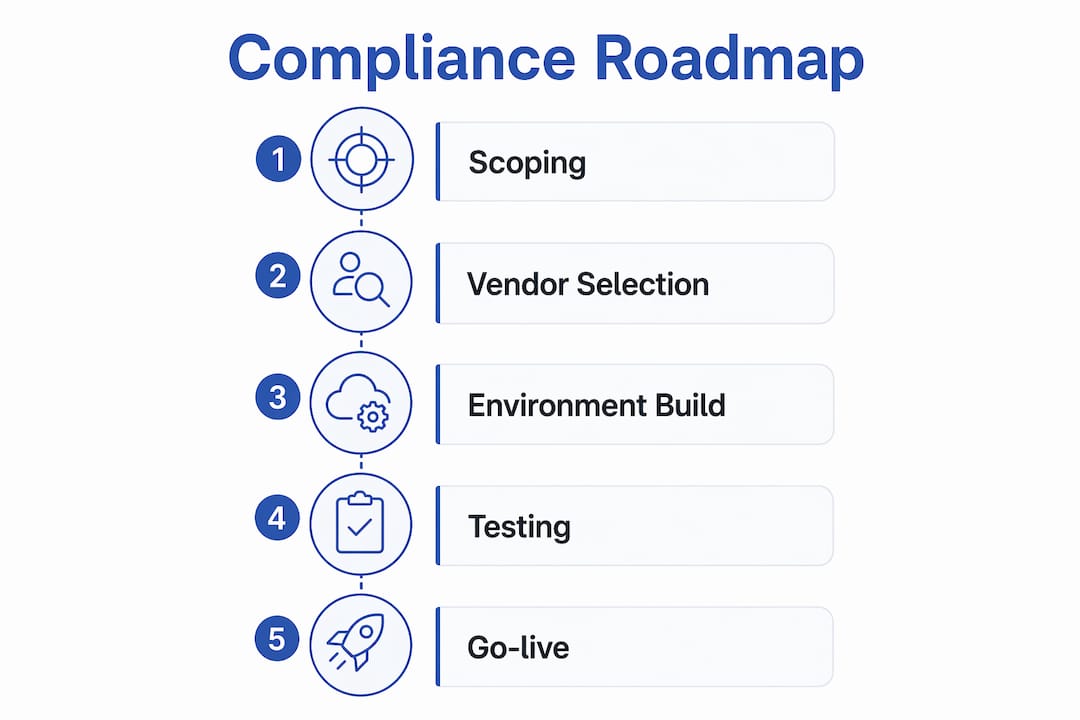
Phase 2: Vendor selection and contracting (weeks 2–6) Collect BAA, SOC 2 Type II, and pen-test evidence from every candidate vendor. Analytics owner and security team review evidence together. Confirm data locality and key management approach. Sign contracts only after evidence review is complete.
Phase 3: Environment build and controls configuration (weeks 4–12) Infrastructure team configures encryption, RBAC, MFA, and audit logging. Analytics owner sets project templates requiring BAA and risk assessment before any PHI import. Test audit log output. A useful governance framing here: before any report is built, ask why this information is needed and what decision it will drive, following the minimum-necessary principle that major analytics governance frameworks endorse.
Phase 4: Testing and audit (weeks 12–16) Simulate PHI import and verify audit entries. Test role-based access by attempting privilege escalation. Confirm that local or agentic processing does not exfiltrate data to unintended endpoints. Document all test results.
Phase 5: Go-live with monitoring Enable continuous monitoring and set alert thresholds for anomalous access patterns. Schedule annual training and quarterly log reviews.
Cost considerations: professional services for secure configuration, seat or credits-based licensing for a HIPAA-capable analytics product, SOC 2 and pen-test fees for vendors, and ongoing monitoring and training. Costs vary significantly by organization size and existing infrastructure maturity.
How to evaluate a desktop or AI analytics tool for HIPAA compliance
Proofs to request from any vendor:
- Signed BAA (request before the demo, not after)
- SOC 2 Type II report with controls relevant to ePHI
- Immutable audit log demo: simulate a PHI access and review the log entry
- Pen-test summary from an independent firm, dated within 12 months
- Subprocessor list and data flow diagram
Functional tests to run yourself:
- Import a synthetic PHI-like dataset and confirm audit entries appear immediately
- Attempt to access data with a lower-privilege role and verify the block
- For local or agentic tools, monitor network traffic during processing to confirm data does not leave the local environment
- Confirm key management behavior: who holds the keys and what happens on key rotation
Red flags that should stop evaluation:
- Vendor cannot demonstrate immutable access logs on request
- Refuses to sign a BAA or delays indefinitely
- Processes PHI outside agreed jurisdictions without disclosure
- No customer-managed key option for encryption at rest
- Audit logs are mutable or stored in the same environment as the data they record
For AI-powered analytics platforms, also verify that agentic workflows do not cache PHI in model context or external memory stores between sessions.
Residual risks that standard controls don’t fully address
Even with encryption, BAAs, and audit logging in place, three residual risks remain in analytics workflows:
| Risk | Likelihood | Impact | Recommended mitigation |
|---|---|---|---|
| Access-pattern leakage | Medium | High | TEEs, noise injection, or oblivious analytics frameworks |
| Re-identification from auxiliary data | Medium | High | Expert re-identification risk analysis; differential privacy for aggregate outputs |
| Agentic model hallucination exposing PHI in outputs | Low–Medium | High | Output gating, PHI detection on generated text, human review of AI-generated reports |
Access-pattern attacks can reveal sensitive attributes even when all stored data and network communications are encrypted. Research on oblivious analytics frameworks demonstrates that noise injection combined with hardware memory isolation can reduce these overheads to a constant factor while maintaining strong obliviousness guarantees. For most healthcare analytics teams, this level of protection is warranted only for highly sensitive workloads; standard encryption plus audit logging covers the majority of use cases.
The PICACHV framework, described in USENIX Security research, shows that formally verified policy enforcement inside TEEs can detect and prevent policy violations in real healthcare analytics tasks, including HIPAA Safe Harbor and NIH All of Us requirements.
Pro Tip: If your analytics workload involves rare disease cohorts, genetic data, or behavioral health records, escalate to a secure computation approach (TEEs or differential privacy) regardless of whether standard controls are already in place. The re-identification risk in small, sensitive cohorts is materially higher.
Key Takeaways
HIPAA-compliant analytics requires a signed BAA, immutable audit logs, and documented risk assessment before any PHI enters an analytics environment.
| Point | Details |
|---|---|
| BAA is a blocker, not a formality | No PHI should enter any tool or environment without a signed, reviewed BAA in place first. |
| Audit logs must be immutable | Logs that can be altered or deleted do not satisfy HIPAA’s auditability requirement; verify this in a live demo. |
| De-identification changes the rules | Properly de-identified data carries no HIPAA restrictions, making it the lowest-risk path for most analytics. |
| Residual risks need advanced controls | Access-pattern leakage and re-identification require TEEs or differential privacy for high-sensitivity workloads. |
| Plotstudio supports privacy-first workflows | Local processing, PII detection, immutable analysis pages, and enterprise Azure deployment align with core HIPAA technical safeguards. |
What analytics teams consistently get wrong about HIPAA
The compliance conversation almost always focuses on the BAA and encryption, and those matter. But the controls teams most often skip are session logging and key rotation cadence. Audit logs that capture login events but not individual query-level access are insufficient for a HIPAA compliance audit. And encryption keys that have never been rotated are, in practice, weaker than the policy claims.
The practical default that makes the biggest difference: build a project template that requires a completed risk assessment and a verified BAA before any analyst can import data. Make it a workflow gate, not a checklist item someone fills out after the fact. The teams that treat compliance as a pre-condition rather than a post-hoc review are the ones that survive audits without corrective action plans.
Plotstudio makes privacy-first analytics practical
Most HIPAA compliance guides describe what you need. Plotstudio is built to deliver it. Its local, desktop-first processing means PHI never leaves your environment to reach a third-party server, which eliminates the largest single attack surface in cloud-based analytics. Built-in PII detection and anonymization flag sensitive fields before analysis runs. Every analysis generates an immutable, searchable record, giving compliance reviewers the audit trail HIPAA requires without manual log assembly. For enterprise teams, Plotstudio supports Azure deployment with customer-controlled keys and role-based access controls configured to your organization’s structure.
The gap between a compliant analytics workflow and a liability is usually a few missing controls, not a full infrastructure rebuild. Start with Plotstudio to see how local agentic analytics fits your compliance requirements, or review the full platform capabilities to map Plotstudio’s features to the controls in this guide.
Authoritative US sources for deeper reading
- Access-pattern attack research (USENIX Security): Weave: Efficient and Expressive Oblivious Analytics at Scale — relevant to the residual risks section; explains how access patterns leak sensitive data even under encryption.
- Formally verified policy enforcement (USENIX Security): PICACHV: Formally Verified Data Use Policy Enforcement — relevant to technical safeguards and advanced mitigations; covers TEE-based policy enforcement for HIPAA Safe Harbor.
- Encrypted analytics and secure computation: MC2 / Opaque SQL project — relevant to technical safeguards; open-source reference for encrypted Spark SQL and secure XGBoost analytics.
- Vendor trust signal baseline: Secure Analytics reference — illustrates the SOC 2 Type II, BAA, and audit log evidence to request from any vendor.
- HIPAA BAA and audit log requirements: HIPAA-compliant analytics reference — covers BAA structure, PHI stripping behaviors, and audit log retention obligations.