The right question isn't which research report generator writes fastest, it's which one produces an inspectable chain from raw data to claim, especially now that the 2025 CONSORT statement uses a 30-item checklist. A research report generator is software that ties a study's question, data, code, and outputs into one auditable record, and that's the standard you should buy against.
What a Research Report Generator Actually Is
Most advice in this category is wrong. Vendors call anything that turns a prompt into polished paragraphs a research report generator, and buyers end up comparing writing speed, templates, and chart styles. None of that tells a reviewer whether the analysis was prespecified, correctly executed, or changed halfway through.
A research report generator, properly defined, is software that links a study's question, data, code, outputs, and narrative into one auditable record. The PDF is only the visible layer. Underneath it sit the dataset version, variable definitions, transformations, statistical models, diagnostics, figures, and the reasoning that connects each claim to evidence.
Think lab notebook plus manuscript, not manuscript alone. A chatbot summary gives you fluent text about numbers you can't easily retrace. A static PDF freezes conclusions while hiding how they were produced. A defensible report preserves both, so a supervisor, collaborator, or journal reviewer can reopen the work and follow it.
Why Defensibility Beats Polish
That distinction matters because reporting standards keep tightening. The 2025 CONSORT statement with its 30-item checklist explicitly requires reporting of important post-commencement changes, unplanned analyses, protocol alignment, and data and code sharing status. A tool that can't surface those items isn't publication-ready, however clean its formatting looks.
Publication-ready shouldn't mean visually finished. It should mean inspectably defensible.
This standard applies beyond clinical trials. If you're building a defensible literature review workflow, you already know the value of showing search decisions and inclusion criteria rather than presenting conclusions alone. Quantitative reporting needs the same discipline, applied to data and code.
My recommendation is simple. Judge every candidate tool by one test. Can an independent researcher, given only its output package, determine what data were used, how variables were constructed, which code produced each figure, and whether the analysis can be rerun? If the answer's no, you're buying a prose polisher, not a research report generator.
Agentic Analytics vs Chatbots for Research Reports
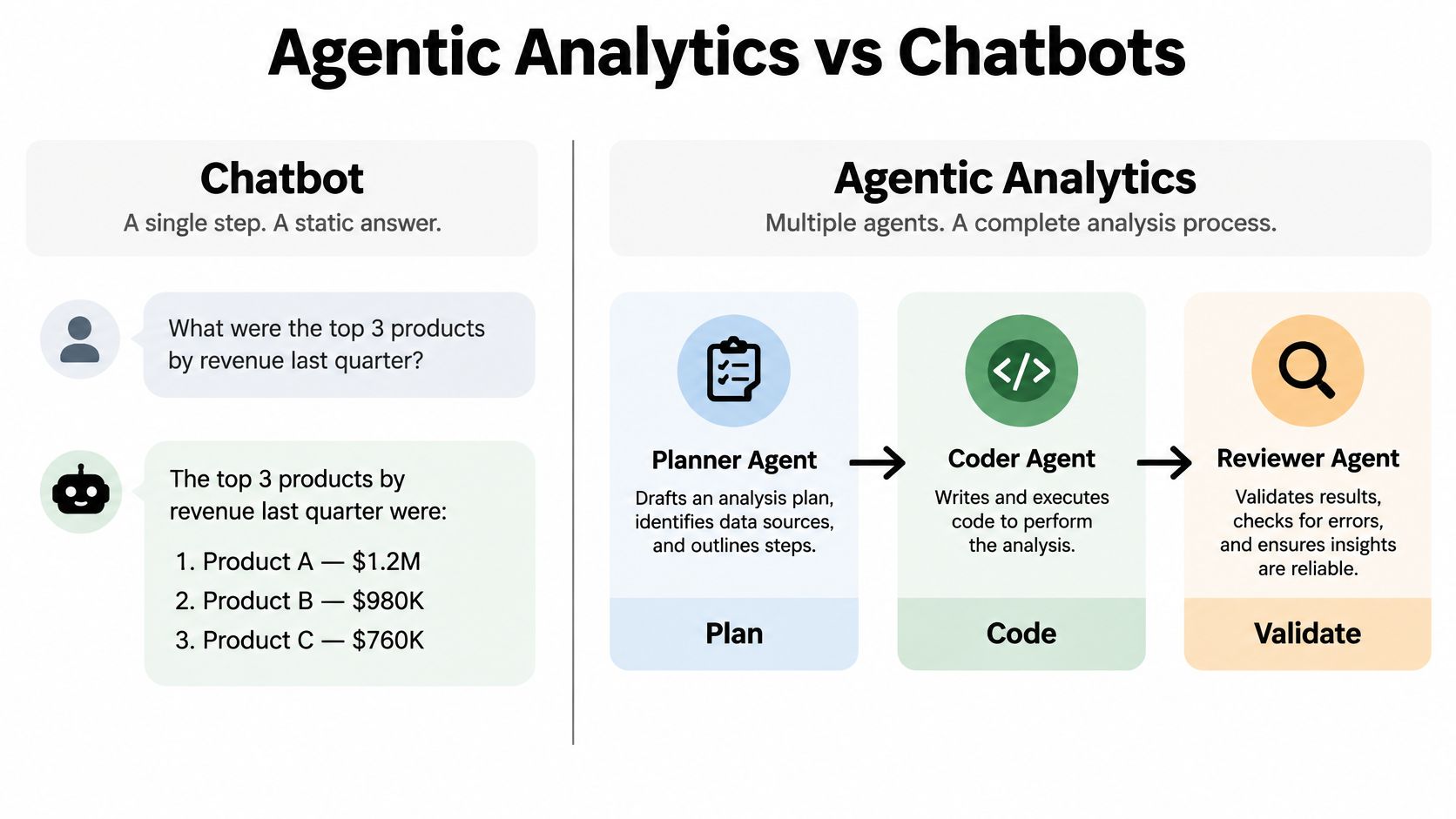
Architecture explains why some tools pass that test and others don't. Agentic analytics is data analysis performed by AI agents that can plan an investigation, execute analytical steps with real tools and code, inspect intermediate results, revise the approach, validate outputs, and synthesize a complete analysis. A chatbot, by contrast, predicts a plausible answer in one pass. Those are different machines producing different artifacts.
The contrast below shows the two workflows side by side.
How the Agentic Loop Works
An agentic pipeline separates jobs that a chatbot collapses into a single response.
- Planner drafts the investigation: It profiles the dataset, proposes methods, and states assumptions before any model runs, which prevents method shopping after results appear.
- Coder writes real Python: The analysis executes against your actual data rather than being described from memory, which prevents invented statistics.
- Inspector reads intermediate outputs: It checks convergence, sample counts, missingness, and diagnostics, then revises the approach when something fails.
- Synthesizer writes last: Narrative claims are generated from verified outputs, so every number in the text traces to a computed result.
Each stage exists to block a specific chatbot failure mode. Chatbots hallucinate coefficients because nothing executes. They lose track of exclusions because nothing persists. They present exploratory findings as confirmatory because no plan was recorded. The plan, execute, inspect loop doesn't make errors impossible, but it makes them visible and correctable.
The Artifact Is the Difference
The deeper point comes from the FAIR principles. As the FAIR Guiding Principles for scientific data management establish, FAIR applies not only to datasets but also to the algorithms, tools, and workflows that generate results. Transparency requires access to the full analytical context, including machine-readable metadata, stable identifiers, explicit transformations, and software dependencies.
An agentic system's output, a linked package of plan, code, outputs, and narrative, approximates that linked research object. A chat transcript doesn't. If you want the longer treatment of this distinction, the explanation of what agentic analytics means lays out the category in full.
My position is direct. For quick questions about a small table, a chatbot is fine. For a report that must survive peer review, choose the architecture that executes and inspects. An answer is an output; an analysis is an investigation, and only one of those belongs in a manuscript.
Core Features to Evaluate Before You Adopt One
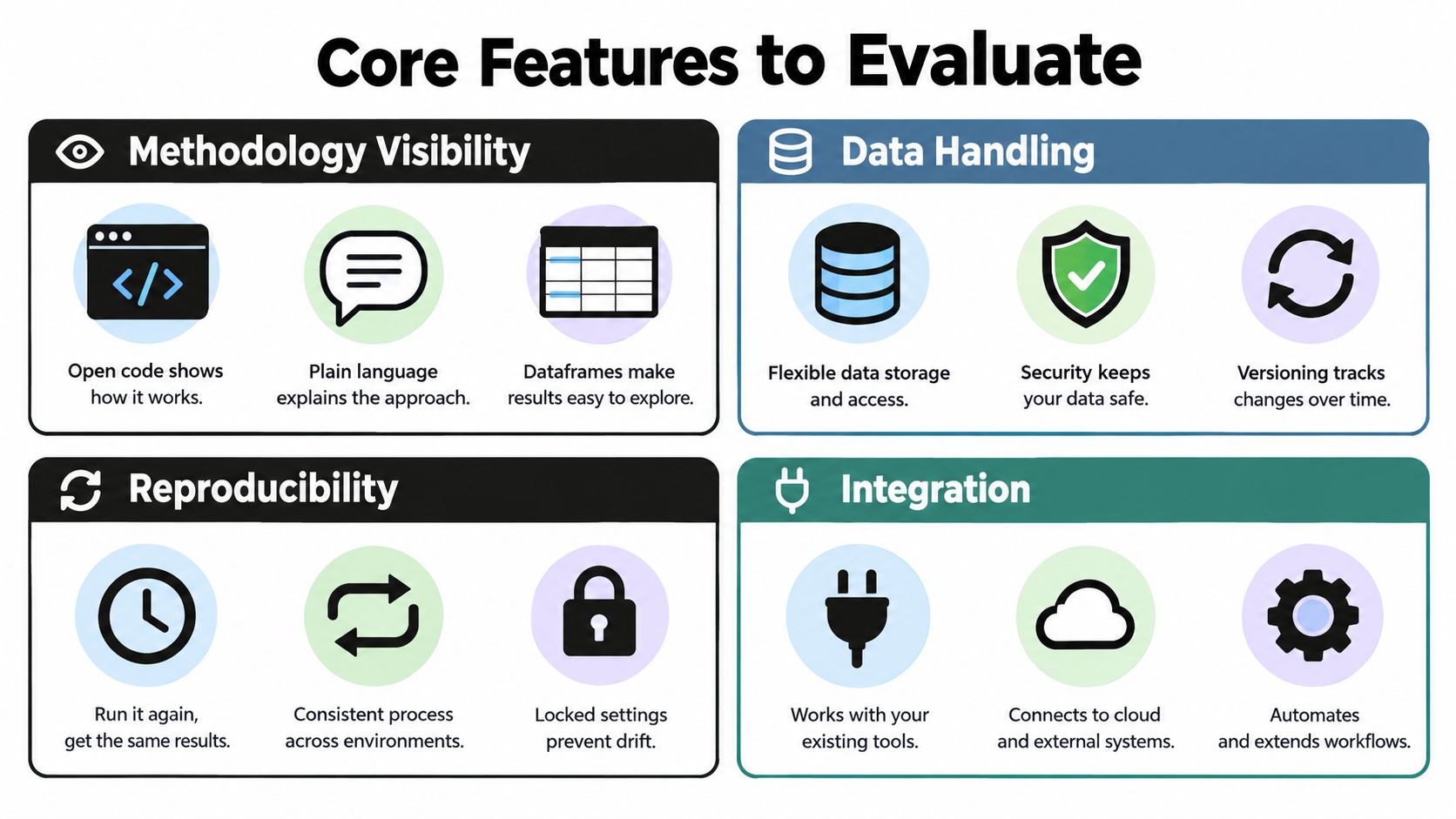
Don't evaluate on demo polish. Evaluate four feature families, and run a concrete test on each during your trial. The grid below summarizes what to look for before you commit a lab or a thesis to any tool.
Methodology Visibility
You need inspectable code, a plain-language rationale for each method choice, and access to intermediate dataframes. If the tool shows only final charts, you can't verify variable construction or catch a bad merge. This matters more than model branding.
Trial test: Pick one number in the generated report and trace it back to the exact code and data rows that produced it. Time yourself. If it takes more than a few minutes, the tool fails.
Data Privacy and Control
Privacy isn't a binary badge. A 2025 survey of 260 university students, staff, and faculty found commercial AI tools were preferred for accuracy and efficiency, while university-developed tools scored higher on ethical standards, transparency, and data privacy, and more than half of respondents were unfamiliar with how their data was used. Architecture alone doesn't create trust. You need plain-language documentation of where data, prompts, code, and outputs travel.
Trial test: Ask the vendor to diagram the data flow for one analysis, including model calls, retention, and whether execution is local, hosted, or tenant-controlled. Vague answers are a disqualifier for clinical, participant, or proprietary data. Controls worth demanding include local Python execution, bring-your-own-key options, and institutional deployment where required.
Planning and Reasoning Controls
Look for a Plan Mode that lets you review and approve the design before execution, plus domain skills that encode field-specific methods. Approval before execution is what separates a prespecified analysis from a fishing expedition the software conducted on your behalf.
Trial test: Reject a proposed method in the plan and substitute your own. Confirm the final report reflects your substitution and records the change.
Reproducibility Artifacts and Completeness Checks
The strongest tools add an evidence-completeness layer aligned with reporting guidelines. The EQUATOR Network reporting guidelines resource defines these guidelines as checklists specifying what authors should describe so readers can understand, replicate, and synthesize the work. Applied to software, that means automatic checks for sample and exclusions, missing-data handling, assumptions, effect sizes, uncertainty measures, sensitivity analyses, and deviations from plan.
Trial test: Export the full package, meaning saved Analysis Pages, Jupyter notebook, and PDF, then hand it to a colleague. If they can't rerun it without emailing you questions, the reproducibility claim is marketing.
Comparing the Leading Research Report Generators
Compare tools on the question from the opening. Which product lets a reviewer retrace the analysis from raw CSV to narrative claim? The table below uses the dimensions that matter for research, and it doesn't pretend one category wins everything. General chatbots are faster for throwaway questions. Traditional BI tools are stronger for governed dashboards. Neither was built for auditable statistical reporting.
Research Report Generator Comparison
| Capability | PlotStudio AI | General AI Chatbots | Traditional BI Tools |
|---|---|---|---|
| Multi-step investigation | Planned, executed, inspected, revised | Single-turn answers, user steers | Fixed queries and dashboards |
| Python execution | Local execution on your machine | Often sandboxed or described only | Limited, usually SQL based |
| Statistical depth | Built for research methods and diagnostics | Variable, depends on prompting | Strong aggregation, weak inference |
| Methodology visibility | Plan, code, and rationale shown | Code sometimes shown, plan rarely | Query logic often buried |
| Reproducibility | Analysis Pages, Jupyter and PDF export | Transcript based, hard to rerun | Dashboard state, not analysis record |
| Persistence | Searchable saved analyses with @-mentions | Chat history scrolls away | Saved dashboards persist |
| Plan Mode | Approve design before execution | Not standard | Not applicable |
| Exportability | PDF report and reproducible notebook | Copy and paste text | PDF and spreadsheet exports |
Read the rows as procurement guidance, not a leaderboard. Methodology visibility and reproducibility are the rows that decide journal defensibility, and they're where category differences are structural rather than cosmetic. A chatbot can be prompted to show code, but it won't reliably record why a method changed mid-analysis. A BI tool will faithfully reproduce a dashboard while telling you nothing about model assumptions.
Persistence deserves more weight than buyers give it. An analysis you can't reopen, reference, and synthesize six months later has to be rebuilt from memory, and rebuilt analyses drift. Saved, searchable Analysis Pages turn individual reports into a cumulative research record, which is how labs work across a project.
For researchers currently using chat-based analysis tools, PlotStudio AI is best understood as a Julius AI alternative for those who care about multi-step analysis, local Python execution, methodology visibility, and reproducibility. That's a positioning statement about priorities, not a claim that chat tools are useless. If your work is exploratory and disposable, chat is cheaper and faster.
If your stack already includes scripting, the overview of Python reporting tools helps place these categories against notebook-based workflows. My recommendation is to shortlist on architecture first and interface second. You'll forgive an imperfect interface. You won't forgive an analysis you can't defend in review.
Two Example Workflows for Real Studies
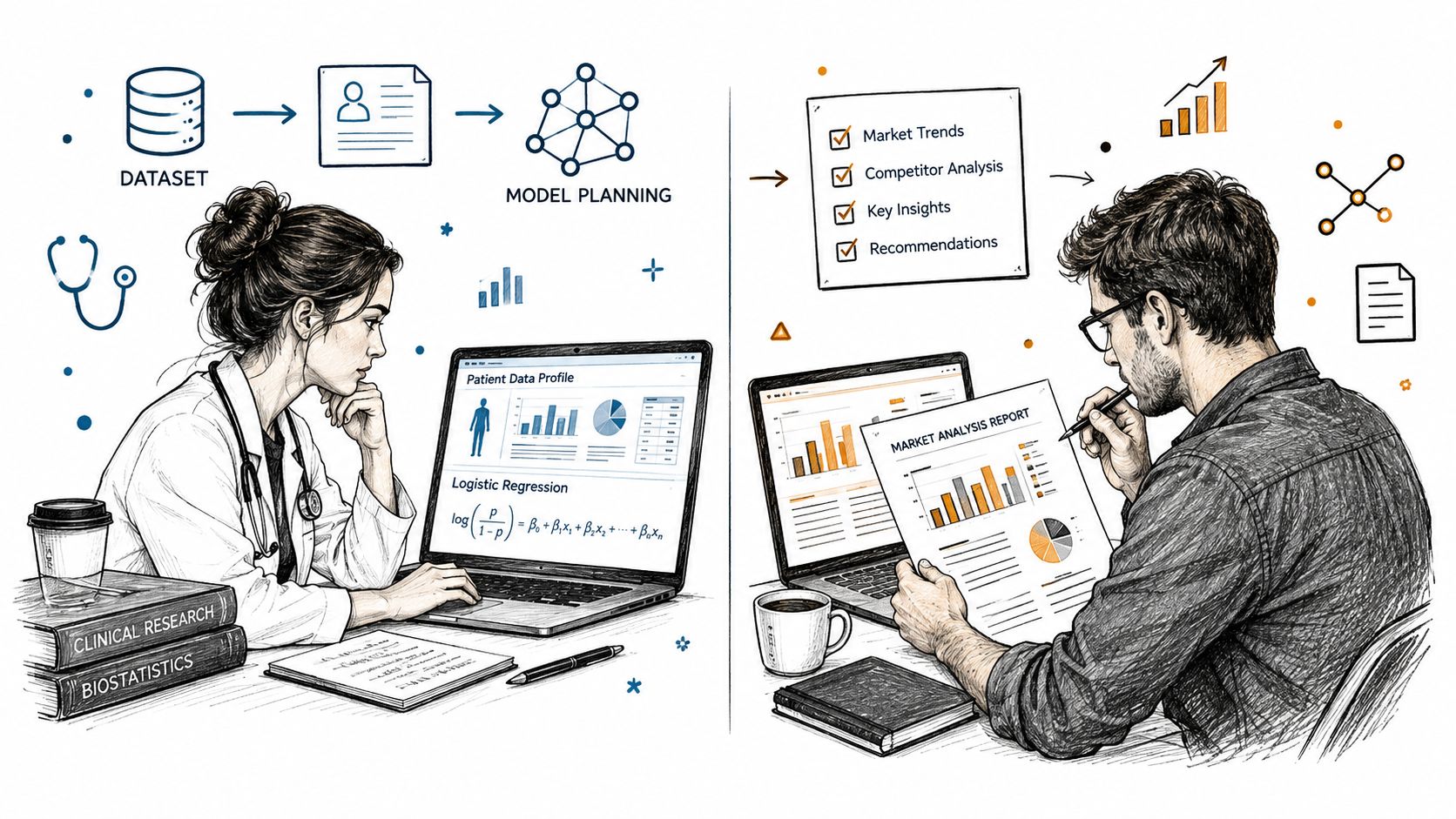
Abstract criteria become concrete when you watch a study move through the pipeline. The image below captures the two settings these workflows come from, clinical data on one side and applied field research on the other.
Clinical Risk-Factor Adjustment
A physician-researcher uploads a cohort dataset and states the objective, estimating an exposure effect adjusted for confounders. The system profiles the data first, flagging missing values and implausible ranges before proposing anything. It then drafts a plan specifying a logistic model, the covariate set, and an explicit missing-data strategy.
The researcher approves the plan, with one edit to the exclusion criteria. Execution runs locally, diagnostics surface alongside coefficients, and the inspector step flags a sparse subgroup that makes one estimate unstable. The final report carries effect sizes with uncertainty measures, the diagnostics, and a methods section structured for guideline reporting, with every claim linked to its output.
What the reviewer sees matters most. Plan, code, plots, statistics, and narrative sit in one saved record, so the sparse subgroup caveat isn't buried in a chat thread. It's attached to the result it qualifies.
Agricultural Genotype Trial
A breeder uploads multi-environment yield data across genotypes and trial sites. The planner recognizes the structure and proposes mixed-effects modelling, treating environment appropriately rather than pooling everything into a flat comparison. Trial-level effects and genotype performance are estimated together, with diagnostics checked before interpretation.
The written output the breeder receives explains which genotypes performed consistently and which excelled only in specific environments. Because the model specification and code are visible, a collaborating biometrician can audit the random-effects structure instead of trusting the prose. That audit step is where weak analyses usually get caught, and it's the step chat tools make hardest.
The short walkthrough below shows the shape of this kind of end-to-end run, from uploaded data to finished report.
Both workflows end in exportable artifacts rather than transcripts. If your institution requires standardized formatting, the guide to professional report templates covers how structured outputs map onto formal documents. Notice what neither workflow promises. The software doesn't decide whether the clinical adjustment set is causally sufficient or whether the trial design supports the breeder's claim. It makes those decisions visible so the right human can judge them.
Practical Tips for Adopting a Research Report Generator
Adoption fails when labs roll a tool out to everyone at once with no evaluation standard. Run it in phases, and let each phase earn the next. The roadmap below shows the sequence I recommend to research groups.
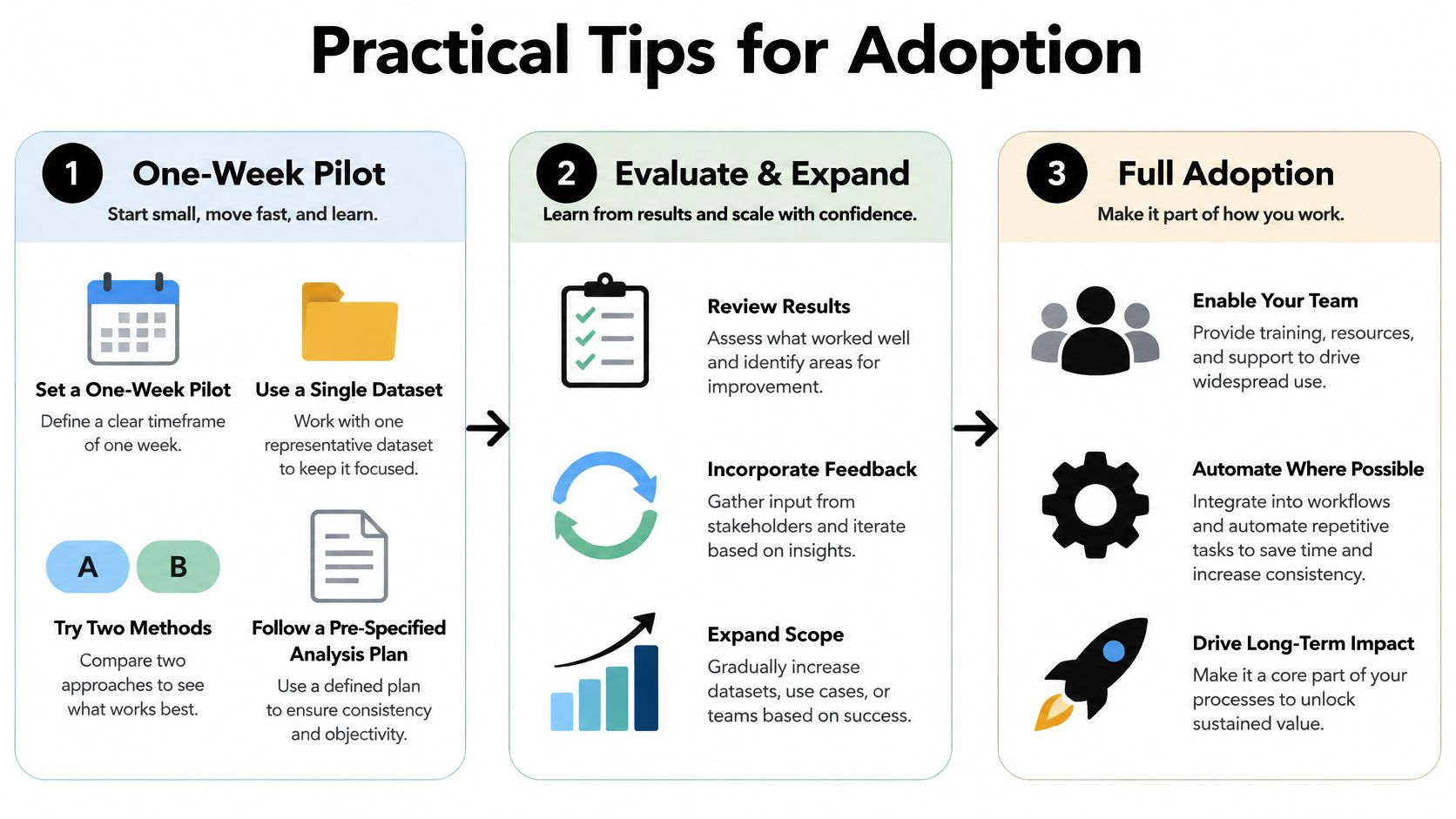
Stage 1 on a One-Week Pilot
Pick one dataset and two methods you already understand well. Prespecify the analysis plan in writing before you open the tool, then run the generator and audit its artifacts against your plan. You're testing traceability, not speed.
- Audit the chain: Confirm every reported statistic traces to code and data.
- Check the gaps: Note whether missing-data handling, assumptions, and uncertainty measures appear without prompting.
- Test the export: Rerun the exported notebook on a clean machine or hand it to a colleague.
Stage 2 on Lab Rollout
Expand only if the pilot artifacts survive audit. Standardize Plan Mode approval for confirmatory work, configure bring-your-own-key or institutional deployment where data sensitivity requires it, and agree on shared Analysis Pages as the lab's record format. This is also where policy pressure becomes concrete rather than theoretical.
The NIH Final Policy for Data Management and Sharing, effective January 25, 2023, requires NIH-funded researchers to submit a data management and sharing plan before an award is made. Tools that preserve analytical steps, code, and derived files help you assemble that defensible record at grant stage, though the policy doesn't mean every dataset can be made public.
Adoption signal: The deployment is working when analyses survive being reopened six months later by someone who didn't run them.
For groups automating recurring analyses, the guide to report automation covers where automation helps and where it erodes oversight. Watch three signals as you scale. Review cycles should shorten because methods are visible upfront. Reviewer follow-ups should drop because completeness checks catch omissions early. And new lab members should be able to learn from saved analyses instead of reconstructing them. If none of those move, you've adopted a faster writing tool, not a research report generator.
Limits AI Report Generators Cannot Remove
Be candid about what this technology doesn't do. AI can't judge whether a causal claim is warranted from an observational design. It can't tell you whether a sensitivity analysis should have been prespecified, and it can't detect whether your dataset measures the construct your report claims it measures.
Awareness of these tools is already high, which makes the limits more important, not less. A 2024 survey of global clinical researchers found 198 respondents, or 87.6% of the sample, were aware of large language models for academic research and publishing. Awareness doesn't establish reliability. Transparent methods, human review, and verifiable outputs still do that work.
Automatic checking has its own ceiling. A completeness layer can flag a missing confidence interval, but it can't know that your exclusion rule introduced selection bias. The discussion of research reproducibility makes the related point that computational reproducibility, obtaining the same results from the same code and data, is necessary but not sufficient for correct science.
Before any generated report goes near a manuscript, clear these checkpoints yourself.
- Design match: Does the method fit the data structure and the question?
- Claim discipline: Are exploratory findings labeled exploratory, with deviations disclosed?
- Construct honesty: Does the narrative claim only what the variables measure?
The tool makes this discipline easier. It cannot enforce it, and no vendor roadmap will change that.
Research Report Generator Questions Worth Answering
What Separates a Research Report Generator From a Chatbot Analytics Tool
Execution and persistence. A research report generator plans, runs real code against your data, inspects outputs, and saves the whole chain as a rerunnable record. A chatbot analytics tool answers questions turn by turn and lets the reasoning scroll away. If you can't export code, data lineage, and the approved plan together, you're using the second category whatever the marketing says.
Can I Use One Safely With Confidential Participant or Patient Data
Yes, under the right architecture, and you should verify rather than assume. Demand local execution or tenant-controlled deployment, bring-your-own-key model choice, and written documentation of where data, prompts, and outputs travel. If a vendor can't produce that data-flow account on request, don't upload sensitive data, regardless of security badges on the homepage.
How Do I Verify an AI-Generated Analysis Used the Right Method
Start from the plan, not the results. Confirm the prespecified design matches what executed, read the code behind one key statistic, and check that assumptions, diagnostics, effect sizes, and uncertainty measures are reported. Then rerun the exported notebook. Agreement between plan, code, and rerun output is your evidence. Anything less is trust without verification.
Where Does PlotStudio AI Fit Alongside SPSS, R, or Stata
It sits in the investigation layer, not as a replacement for your statistical environment. You'd use it to plan, execute, and document multi-step analyses with visible Python, then export a Jupyter notebook or PDF for your existing workflow. Researchers fluent in R or Stata keep those tools for specialized work and gain a faster, auditable path for the analyses that currently live in scattered scripts.
If you're evaluating a research report generator for your own work, run the one-week pilot described above on a dataset you already understand, and judge the artifacts, not the demo. You can download and try PlotStudio AI to run that test, and academic users should check the discounted researcher pricing, which currently includes 1,000 free credits for researchers.