The best free software for qualitative data analysis for most people is Taguette. It is open source, runs on Mac, Windows, and Linux, and handles interview transcripts with almost no setup. Choose QualCoder when you also code audio, video, or images. Choose QDA Miner Lite if you work on Windows and want a traditional coding workbench. Pick RQDA only if you already live in R.
The problem is familiar. NVivo is a paid product, and many free alternatives are Windows-only or awkward to install on a Mac. A tool that traps your codes in a closed format is also a risk if you switch later. This article compares four free and open-source coding tools on what they do, where they fall short, and who they suit. It then shows how to choose between them.
We build PlotStudio AI, a workspace for the numeric side of research, so it is not on this list. It does not code text. If your project mixes interviews with survey data, you will probably pair one of these coding tools with a statistics tool.
1. Taguette
Taguette is the best free choice for coding interviews and other text on a Mac, because it runs as a desktop app or in a browser and takes minutes to learn.

What it does and where it falls short
You import documents, highlight passages, and attach tags. Tags can be nested, so you can build a theme hierarchy for thematic analysis and then pull up every quote under a tag in one view. It reads common formats such as Word, PDF, and plain text, and it exports your highlights and codebook so your work is not locked in.
The limits are real. Taguette handles text only, so you must transcribe audio first. It has no auto-coding and no AI assistance, and it offers no statistics.
Taguette does one job, tagging text, and does it with the least friction of any free tool.
Mac support and best fit
Taguette suits first-time coders and anyone who wants open source qualitative coding software without an installation fight.
- Platforms: macOS, Windows, Linux, and in-browser. The code is public on GitHub.
- Data types: Text documents.
- Best for: Thesis interviews, focus group transcripts, and thematic analysis on a budget. A team can share projects if someone installs it on a server.
2. QualCoder
QualCoder is the best free option when your data is not only text, because it codes text, images, audio, and video in one project.
What it does and where it falls short
QualCoder lets you code transcripts, PDFs, photos, and audio and video clips directly, without transcribing everything first. You can attach case attributes, such as participant age or site, and compare coding across groups. It also supports the REFI-QDA exchange format, so you can move projects to other qualitative tools.
The trade-off is polish. It runs offline on your own computer, and the interface feels more technical than Taguette's. Installation on a Mac takes more steps than a standard app, so follow the current macOS instructions on the project's GitHub page.
QualCoder gives you the most data types for free, and charges you in setup time instead.
Mac support and best fit
QualCoder suits researchers who code multimedia data and are comfortable following install instructions.
- Platforms: Windows, macOS, and Linux.
- Data types: Text, images, audio, and video.
- Best for: Ethnographic fieldwork, recorded interviews, and visual studies where transcription would lose context.
3. QDA Miner Lite
QDA Miner Lite is the strongest free pick for Windows users who want a conventional, desktop-style coding environment.
What it does and where it falls short
Provalis Research offers it as the free version of its paid QDA Miner. You code documents, retrieve coded segments, and use some built-in analysis tools that the lightweight tools lack. That makes it feel closer to commercial software such as NVivo than Taguette does.
It is a trimmed edition, so some features and project capacity are reserved for the paid version. Check the current limits on the Provalis page before you load a full dataset. It is also the one tool here that does not run natively on a Mac.
If you are on a Mac, QDA Miner Lite only makes sense through a Windows virtual machine, and Taguette is simpler.
Mac support and best fit
QDA Miner Lite suits Windows-based students who want a familiar interface and a possible upgrade path.
- Platforms: Windows only. Mac users need Windows in a virtual machine.
- Data types: Mainly text documents.
- Best for: University lab computers, coursework projects, and researchers who may later buy the full edition.
4. RQDA
RQDA is a free coding tool built as an R package, and it is worth choosing only if you already work in R.
What it does and where it falls short
RQDA lets you import text, code it, and manage categories and cases inside the R environment. For someone who does the rest of the analysis in R, that keeps everything in one place and fits reproducible workflows.
The weakness is maintenance. It has seen little active development in years, and its graphical dependencies make installation on current Macs difficult. Treat it as a niche option, not a first choice.
RQDA earns a place on the list for R users, and nobody else should start there.
Mac support and best fit
RQDA suits R-fluent researchers who tolerate a dated tool in exchange for staying in one environment.
- Platforms: Windows, macOS, and Linux through R, with a difficult setup on Mac.
- Data types: Text.
- Best for: Quantitative researchers adding a small qualitative component.
How to choose and what replaces NVivo
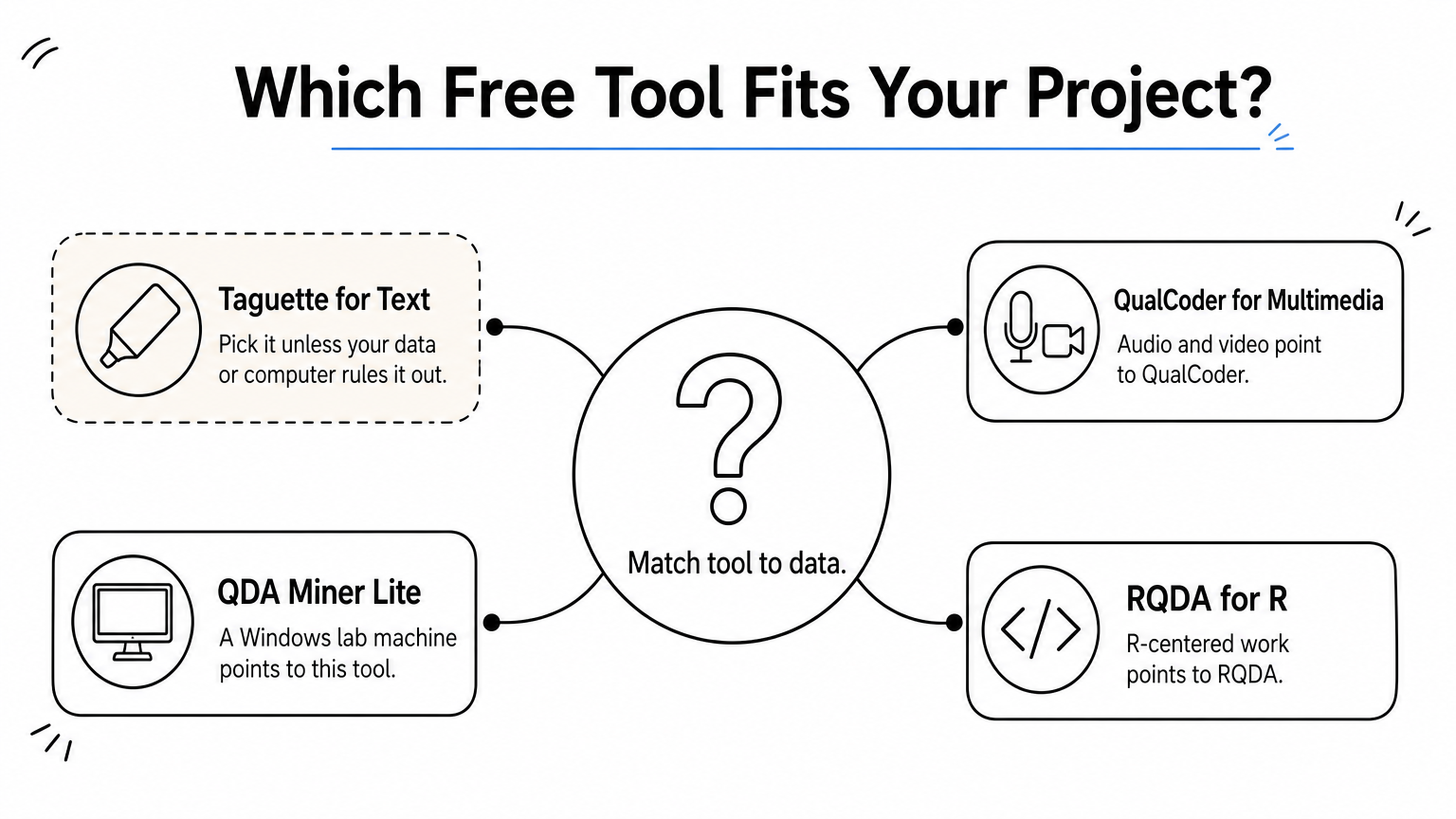
Pick Taguette unless your data or your computer rules it out. Audio and video point to QualCoder. A Windows lab machine points to QDA Miner Lite. R-centered work points to RQDA.
Side-by-side comparison
| Tool | Runs on Mac | Data types | Best for |
|---|---|---|---|
| Taguette | Yes, app or browser | Text documents | Interviews, first projects |
| QualCoder | Yes, manual install | Text, images, audio, video | Multimedia data |
| QDA Miner Lite | No, Windows only | Mainly text | Windows users |
| RQDA | Difficult setup | Text | R users |
Test your pick on two or three transcripts before you commit. Code them, export the codes, and confirm you can open the export elsewhere.
What free tools will not do
Free coding software replaces much of NVivo for basic coding, but not its extras. NVivo is sold by Lumivero, which offers trials rather than a permanent free edition, so a free alternative means one of the tools above, or the NVivo license your university library may already provide.
No tool chooses your themes for you. In thematic analysis, the software organizes quotes and codes, and you decide what they mean. Keep your codebook exported so you can move to another tool if your project outgrows the first one.
Picking one and getting started
Taguette is the default for coding interview and text data on a Mac, QualCoder covers multimedia, QDA Miner Lite fits Windows machines, and RQDA is for R loyalists. Try one on a few transcripts, export your codebook, and keep your options open.
Many studies also have a numeric side, such as survey scales or demographic comparisons. For that part, you can try PlotStudio AI free, with no credit card required, and keep your coding in the tool that suits your text.