The popular advice is to judge Julius AI by how quickly it turns a spreadsheet into a chart. That misses the research question that matters most: can you verify the result, reproduce the workflow, and defend the method later? This Julius AI review finds a capable conversational workspace for exploration, but a less convincing fit for rigorous analysis without independent checking.
The Reality of Chat-Based Data Exploration
A fast chart is an output, not an analysis. A research analysis also requires a defined question, appropriate variables, documented transformations, assumptions, diagnostics, and an interpretation that matches the design of the data. Julius AI is useful because it reduces the friction between a plain-English request and an initial result, but that convenience can hide analytical decisions that a researcher would normally make explicitly.
Independent reviewers describe Julius AI as a conversational data-analysis workspace. It accepts spreadsheet uploads and can connect to live warehouses, then turns natural-language prompts into charts, summaries, regression outputs, and basic tests such as t-tests, chi-square tests, ANOVA, forecasting, and simple machine-learning models. That breadth makes it a practical first-pass environment for quantitative exploration, as documented in this independent Julius AI market-research review.
Where the quick answer helps
For an analyst examining a new dataset, the conversational interface can shorten the path to useful questions:
- Initial profiling: Ask for distributions, missing values, unusual categories, or summary tables.
- Visual exploration: Request a scatterplot, trend chart, comparison, or grouped summary in ordinary language.
- Basic statistical exploration: Ask for a regression, t-test, ANOVA, or forecast, then inspect the generated result.
- Cross-format work: Combine information from spreadsheets, documents, images, PDFs, and text files when the research question spans more than one source.
That workflow is valuable during hypothesis generation. A researcher can quickly notice a possible relationship, identify a suspicious subgroup, or find a variable that needs recoding before committing to a formal pipeline.
The danger starts when exploratory convenience is mistaken for methodological completeness. A prompt such as “compare treatment groups” leaves important questions unresolved. Which outcome should be compared? Are observations independent? Are covariates required? Should the analysis account for repeated measurements, unequal variance, clustering, or multiple comparisons? A chatbot can return a plausible answer without making every decision visible.
Practical rule: Use conversational analysis to generate candidates for investigation, not to skip the investigation itself.
Researchers assessing whether ChatGPT can replace a data analyst should apply the same standard to Julius AI. The relevant test isn't whether the system can produce a polished figure. It's whether another analyst can understand what happened, rerun it, challenge the assumptions, and obtain the same conclusion.
The baseline for this review
Julius AI makes the most sense as an exploration accelerator. It can help non-programmers and busy analysts move from raw files to an interpretable first view. It becomes less suitable as the sole analytical record when results must support a paper, a regulated decision, a clinical interpretation, or a team workflow that another person must reproduce.
That distinction frames the rest of the review. The central question isn't whether Julius AI is useful. It is how much verification work remains after the useful first answer appears.
Core Features and Data Ingestion Capabilities
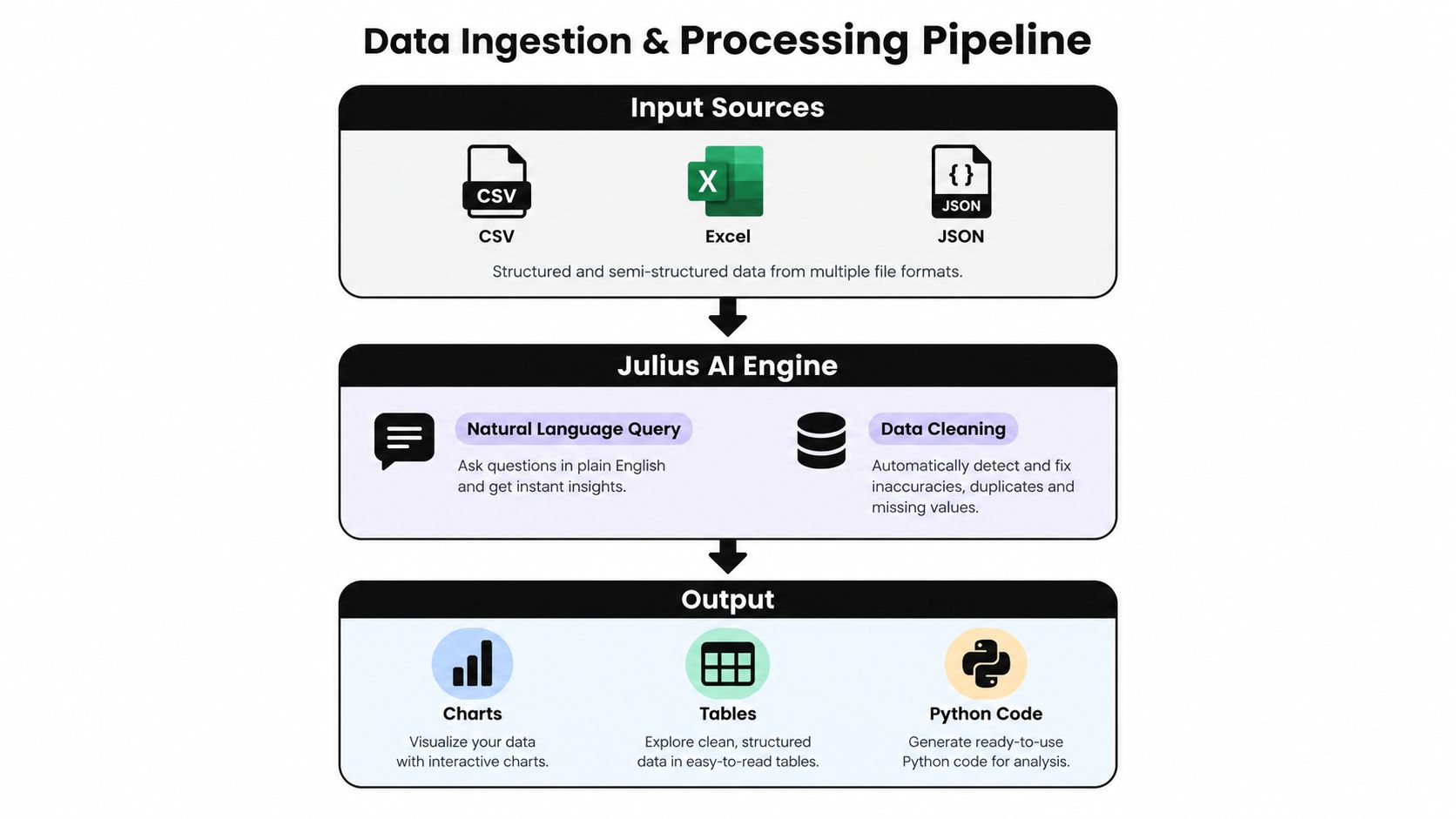
Before evaluating a data-analysis tool, separate ingestion from inference. A system may accept many formats and still misunderstand the unit of observation, encode categories incorrectly, or choose a method that doesn't fit the design. Julius AI's strength is the breadth of its entry points and the speed of its first-pass interaction.
Independent coverage describes support for spreadsheets, documents, images, PDFs, and text files, alongside direct connections to databases and cloud storage. Higher tiers are described as adding connections such as PostgreSQL, Snowflake, and BigQuery, together with scheduled reports and custom agents. The same review records outputs including charts, statistical analysis, reports, presentations, websites, images, and video, so the product operates as a broad data workspace rather than a spreadsheet-only assistant. See this Julius AI feature overview for supported inputs and outputs.
A sensible first-pass workflow
A researcher can approach Julius AI in a controlled sequence rather than opening with a broad request.
- Inspect the source. Ask the system to describe columns, data types, row counts qualitatively, missingness, duplicate records, and suspicious values. Don't begin with a causal claim before understanding the table.
- State the unit of analysis. Tell it whether each row represents a participant, visit, sample, plot, firm, transaction, or time period. This context can prevent an apparently reasonable aggregation from answering the wrong question.
- Request transformations explicitly. Ask for filters, recoding, joins, aggregation, or derived variables one step at a time. Save the resulting tables or code when possible.
- Explore visually. Use distributions, group comparisons, and relationship plots to identify structure and potential outliers.
- Treat tests as provisional. A returned p-value or model coefficient still needs a design-based interpretation, assumption checks, effect-size reasoning, and sensitivity analysis.
This process is more defensible than asking, “What are the key insights?” A broad prompt gives the system latitude to decide what matters. A staged prompt gives the researcher more opportunities to catch a mistaken variable interpretation.
Where ingestion creates analytical risk
File flexibility doesn't remove schema ambiguity. A column called score may represent a standardized value, a survey total, or an ordinal response. A date may be stored as text. A missing value may mean “not measured,” “not applicable,” or “zero.” Julius AI can help surface these issues, but the researcher must supply domain meaning and confirm the resulting representation.
For teams exploring data integration solutions, the practical criterion is therefore not the number of connectors. It's whether the resulting dataset has a documented provenance, stable definitions, and a clear record of transformations. Julius AI is well suited to asking fast questions across heterogeneous inputs. It shouldn't be assumed that a successful upload proves that the data is analysis-ready.
Accuracy and the Hidden Cost of Verification
The most important weakness in this Julius AI review isn't that the system sometimes needs correction. Every AI analysis tool needs correction. The issue is that conversational systems can make a result look finished before the researcher has seen enough of the reasoning to know what requires correction.
Independent reviews and user feedback repeatedly flag misinterpretation of ambiguous prompts, incorrect or inconsistent outputs, and manual double-checking of calculations and interpretations. Reviewers also describe run-to-run variability, especially with sparse or complex datasets. A fresh query can generate fresh code, which means the same analytical request may not behave like a fixed, auditable template. These concerns are discussed in the Julius AI reliability review on Trustpilot.
Why variability matters
Reproducibility isn't just a preference for tidy notebooks. It determines whether a lab can distinguish a genuine data pattern from an unstable computational path. If a prompt produces a different transformation or model specification on a later run, the researcher needs to compare the generated code, inputs, assumptions, and outputs rather than relying on the conversational answer.
The verification burden becomes heavier in several situations:
- Sparse data: A model can produce a confident-looking summary from very little information, while the estimate remains unstable or highly sensitive to individual observations.
- Ambiguous language: “Effect,” “trend,” “significant difference,” and “relationship” can refer to different estimands and methods.
- Complex structure: Longitudinal observations, clustered samples, nested designs, and repeated measures need more than a generic comparison.
- Publication pressure: A manuscript requires a defensible account of exclusions, transformations, model choices, diagnostics, and limitations.
A useful result can still be wrong. A polished chart can still use the wrong denominator. A regression can still omit a confounder. A forecast can still be evaluated with inappropriate validation. Julius AI speeds the creation of these artifacts, but speed doesn't validate them.
A verification protocol
Researchers can reduce risk by treating every substantive answer as a draft that enters a checking pipeline:
- Rephrase the question with the outcome, predictors, population, comparison, and time frame.
- Ask for the exact calculation or code behind the result.
- Check the data subset used for the analysis, including filters and missing-value handling.
- Recalculate critical values independently in a notebook, statistical package, or second implementation.
- Inspect assumptions and diagnostics rather than accepting a test name as evidence of appropriateness.
- Record the final specification so another researcher can repeat the work.
This is why the tool is better viewed as an accelerator for first-pass insight than as a system of record. The analysis of trusting AI-generated data work makes the same practical point: the human analyst remains responsible for validation, interpretation, and scientific judgment.
The hidden cost isn't necessarily the time spent generating a chart. It's the time spent proving that the chart answers the intended question.
Comparing Chat Interfaces to Agentic Analytics
A chat interface and an agentic analytics workflow solve related but different problems. Chat asks the user to direct the system repeatedly. Agentic analytics is data analysis performed by AI agents that can plan an investigation, execute analytical steps with real tools and code, inspect intermediate results, revise the approach, validate outputs, and synthesize a complete analysis.
That distinction matters because an answer is an output, while an analysis is an investigation. Julius AI is attractive when the user already knows the next question and wants a quick response. PlotStudio AI is positioned around a more persistent workflow, where the system can inspect data, plan steps, execute Python locally, review intermediate outputs, adjust its approach, and save the work as a reproducible Analysis Page.
The following comparison focuses on research workflow requirements rather than general convenience.
Julius AI vs PlotStudio AI for Research Workflows
| Feature | Julius AI | PlotStudio AI |
|---|---|---|
| Interaction model | Conversational prompts and follow-up questions | Planned, multi-step investigation |
| Data analysis | Charts, summaries, regression outputs, basic tests, forecasting, and simple machine-learning models | Python-based analysis with plots, statistics, methodology, and saved outputs |
| Execution model | Generates analysis code through the conversational workflow | Runs Python locally and exposes the generated code |
| Methodology visibility | Depends on the generated response and the user's checking process | Analysis Pages preserve plans, code, charts, statistics, and interpretations |
| Reproducibility | Can vary across runs, especially with sparse or complex data | Designed around saved analyses, inspectable code, and exportable work |
| Planning | User generally steers the next prompt | Plan Mode lets the user review, edit, and approve the analysis plan |
| Persistence | Conversation and workspace capabilities depend on the product workflow and plan | Analysis Pages, workspace insights, and @-mentions preserve analytical context |
| Data governance | Uploaded files and outputs are stored in the United States, with encryption in transit and at rest | Local execution keeps research data on the user's device, with bring-your-own-key support |
| Best fit | Fast exploratory questions and first-pass visualizations | Research workflows requiring visible methodology and repeatable investigation |
The contrast isn't a claim that one interface should replace the other. A lab may prefer conversational exploration for an early data audit, then move the important work into a notebook or structured analysis environment. The decision depends on whether the main bottleneck is asking the first question or preserving the entire chain of reasoning.
What changes under pressure
Suppose a clinical researcher asks for a treatment comparison across repeated visits. A chat-first workflow may return a group summary or basic test quickly. The researcher must then establish whether the observations are independent, how missing visits were handled, whether baseline adjustment is needed, and whether the reported uncertainty matches the study design.
An agentic workflow can make those steps explicit by planning the investigation, executing code, inspecting intermediate tables, and retaining the analytical artifacts. That still doesn't eliminate domain judgment. It does, however, make the work easier to audit because the researcher can inspect the method rather than reconstruct it from a long conversation.
For readers searching for a definition of agentic analytics, the operational distinction is simple. Chat is excellent for directed exploration. Agentic analytics is more appropriate when the system must pursue a multi-step objective and leave behind evidence of how it reached the result.
Data Security Mechanics and Pricing Tiers
Security decisions should begin with mechanics, not broad labels. Julius AI's documentation states that uploaded files and outputs are stored in the United States. It also states that information is encrypted in transit and at rest, access is limited to authorized personnel under exceptional circumstances, and customer information isn't shared between customers. Researchers can review the product's privacy and data-security documentation before deciding whether that model fits participant data, proprietary experiments, or institutional requirements.
Storage location and encryption answer only part of the governance question. A lab also needs to consider institutional approval, contractual terms, access controls, retention, export procedures, and whether the workflow permits data to leave a controlled environment. A secure transfer doesn't automatically make a dataset suitable for an external service.
The free tier in practical use
Julius AI's current pricing page says the Free plan includes 250 messages per month, access to Plus models, saved prompts, Advanced Reasoning, 16 GB of RAM, and 7-day file storage. Those details make the entry tier useful for evaluation, but the message cap can constrain repeated exploratory work, especially when a single project requires many follow-up questions. The retention window also matters if a researcher expects to return to an uploaded dataset later. See the current Julius AI pricing details.
The correct interpretation isn't just “free to try.” It's “available for a bounded exploratory workflow.” A long-running project should account for prompt iteration, repeated checks, file retention, and the cost of moving beyond the entry tier.
For labs comparing tools across budgets, a resource such as affordable AI for small teams can help frame the broader procurement question, but price alone shouldn't decide a research workflow. A cheaper tool that leaves every result difficult to verify may cost more analyst time than a tool with stronger persistence and transparency.
Questions for a principal investigator
Before adoption, ask:
- Where does the data reside? Confirm the storage jurisdiction and whether it satisfies the institution's policy.
- Who can access it? Review personnel access, workspace permissions, and sharing behavior.
- How long is it retained? Check whether the retention period aligns with the project's working cycle.
- What can be exported? Preserve code, data transformations, figures, and narrative results outside the chat.
- How does usage scale? Estimate the number of prompts and repeated analyses, rather than evaluating only the initial trial.
Julius AI's security mechanics are more informative than a generic privacy promise. Its usage structure is also clear enough to expose a practical trade-off: an accessible entry point can still be a poor fit for continuous, iterative research unless the team plans for retention and capacity.
Final Verdict and Ideal Use Cases
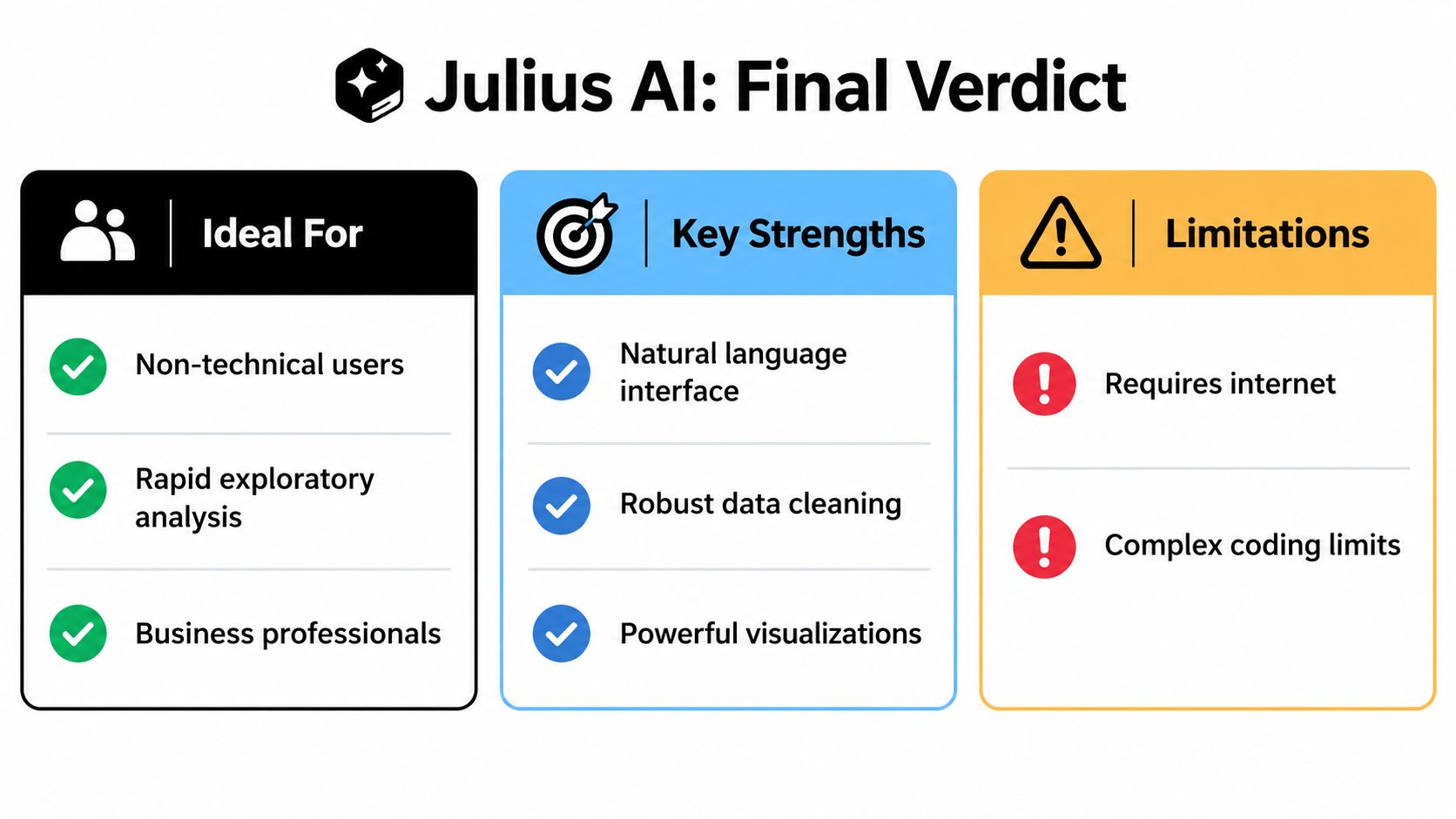
Julius AI succeeds when the question is exploratory, the dataset is reasonably understandable, and the user values conversational speed over a fully documented pipeline. It can help an individual analyst inspect files, generate visual summaries, request basic statistical procedures, and turn an initial question into a concrete direction for further work.
That doesn't make it a substitute for methodological review. Independent coverage identifies reliability and verification under analytical pressure as an underserved issue in Julius AI discussions. Reviewers note that ambiguous prompts can be misinterpreted, results can be incorrect or inconsistent, and calculations and interpretations may need manual checking. The independent Julius AI review focused on academic analysis is particularly relevant for researchers who need publication-grade defensibility.
Choose Julius AI when
Julius AI is a reasonable choice for:
- Rapid exploratory analysis: You need an initial view of distributions, relationships, categories, or trends.
- Accessible data questions: A non-programmer needs to interrogate spreadsheets or mixed documents in plain language.
- First-pass visualization: You want to test possible figures before building a formal analysis.
- Individual work: One analyst can personally inspect and verify every important result.
- Low-consequence exploration: The output informs the next question rather than serving as the final evidence.
The strongest use case is not “AI replaces the analyst.” It's “AI reduces the time needed to find out what deserves closer analysis.”
Choose a Julius AI alternative when
A Julius AI alternative becomes more appropriate when your work requires:
- Repeatable longitudinal analysis: The same specification must be rerun as new observations arrive.
- Complex econometric or clinical models: Method selection, assumptions, diagnostics, and sensitivity checks must remain visible.
- Team-based research: Several people need shared definitions, stable workflows, and a persistent analytical record.
- Publication preparation: Reviewers may ask how variables were transformed, which records were excluded, and how figures were produced.
- Sensitive data handling: The lab needs on-device execution or a deployment model aligned with institutional data sovereignty.
For those requirements, PlotStudio AI offers local Python execution, multi-step analysis, Plan Mode, inspectable code, statistical outputs, and saved Analysis Pages that can be exported as Jupyter notebooks or PDF reports. It should still be evaluated against the lab's methods, governance, and validation requirements. No interface removes the need for a researcher to question a result.
Frequently asked questions
What are the best AI tools for researchers?
The best tool depends on the task. Julius AI is suited to conversational exploration and fast first-pass outputs. A structured analytics environment is more suitable when researchers need visible methodology, reproducible code, persistent analyses, and independent verification.
What are the top AI tools for academic research?
Academic research usually requires more than document summarization. For data work, compare tools by their handling of missingness, assumptions, model diagnostics, code visibility, exportability, and repeatability. Julius AI can support early exploration, but publication-oriented work needs a verification workflow around it.
What is the best AI tool for research data analysis?
There isn't one universal choice. Julius AI fits quick questions over uploaded files and connected sources. Researchers handling repeated measures, longitudinal data, complex models, or sensitive datasets should prioritize tools that preserve the analysis plan, execute inspectable code, and save the complete result.
Is Julius AI accurate enough for a research paper?
It can contribute to exploratory work, but its outputs shouldn't enter a paper without checking. Reviewers report occasional misinterpretation, inconsistent results, and errors that require manual verification. Recalculate important statistics, inspect the generated method, and preserve the final reproducible workflow.
Can Julius AI replace a statistician?
No. It can reduce mechanical work and help users investigate data, but it doesn't replace design judgment, domain knowledge, model criticism, or responsibility for interpretation. The more consequential the result, the more important independent review becomes.
The final decision is therefore a workflow decision. Choose Julius AI when fast, conversational exploration is the main need and a human can verify the result. Choose a more structured Julius AI alternative when the analysis must survive collaboration, replication, peer review, or institutional scrutiny.
If you need to test a more auditable research workflow, download and try the analysis platform, then compare its saved plans, generated Python, charts, and exports with the way your lab currently verifies AI-assisted results. Researchers can also review the available academic option before starting a larger project.