The best SPSS alternatives are jamovi, JASP, R and PSPP, and the right one depends on how you work. Pick jamovi if you want SPSS-style menus on a Mac or PC at no cost. Pick JASP if you need Bayesian tests or APA-ready tables. Pick R if you want full modeling power and can write code. Pick PSPP only to run old SPSS syntax. If you would rather describe an analysis in plain English, PlotStudio AI does that and is free to try.
The problem is cost and lock-in. IBM sells SPSS Statistics as a subscription, and the base tier starts at about $99 per user per month, roughly $1,188 a year. Many researchers lose access when a university license ends, and Mac users often find that campus machines and lab licenses do not follow them home.
This article ranks five replacements by what they do, who they suit and what they cost. Our team builds PlotStudio AI, so it comes first, with its limits stated plainly. A comparison table at the end helps you choose by budget, platform and the SPSS tasks you actually perform.
1. PlotStudio AI
PlotStudio AI fits researchers who would rather ask questions in plain English than click through menus or write code. It is free to try, paid after that, and it runs on Macs with Apple Silicon.
How it works
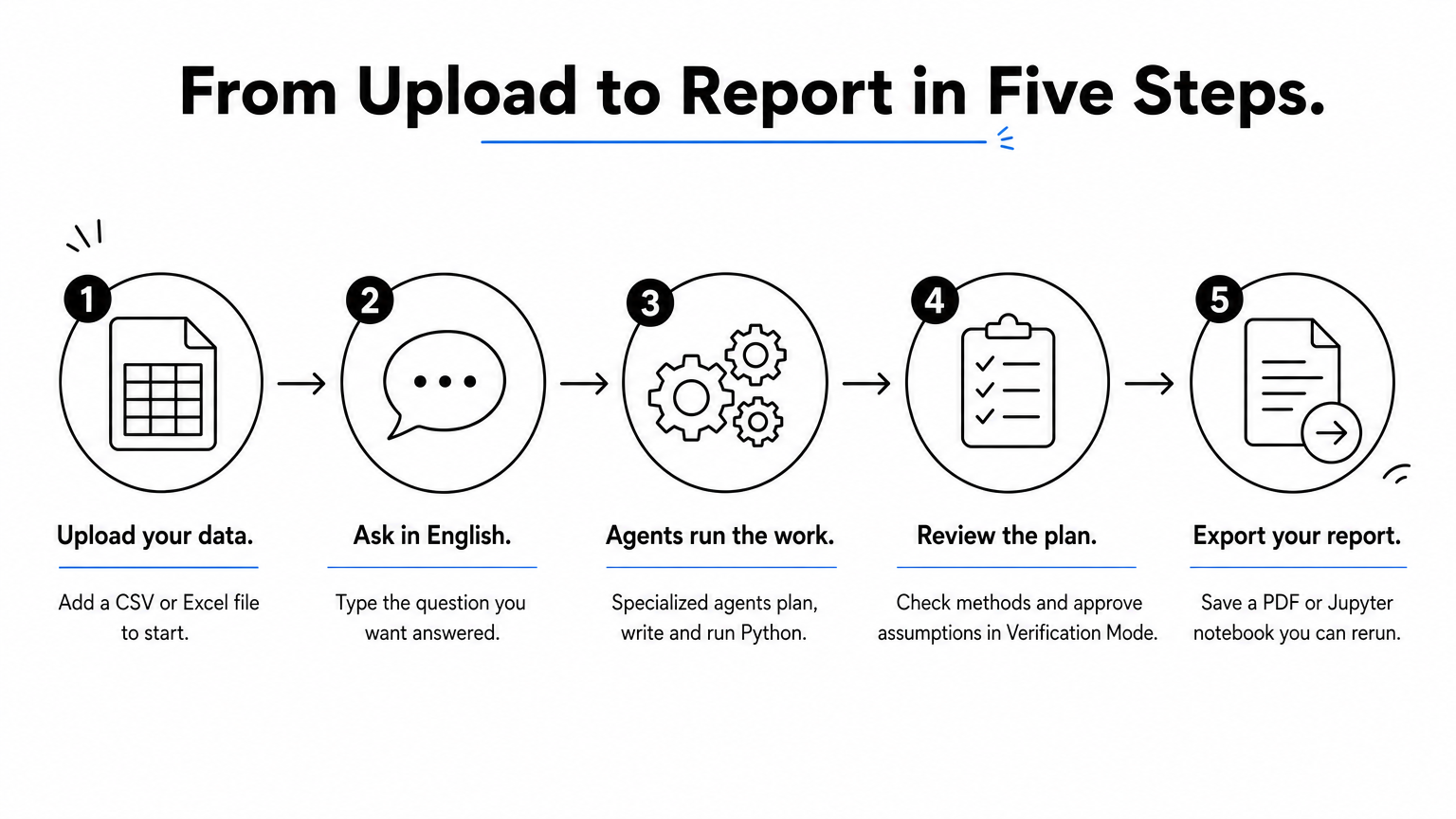
You upload a CSV or Excel file and type a question. A team of specialized AI agents plans the analysis, writes and runs Python on your machine, corrects its own errors and interprets the result. Every question becomes a saved analysis page with tables, charts, statistical tests and a written interpretation.
Before anything runs, Verification Mode lets you review the plan, edit the methods and approve the assumptions. You can then export a PDF report or a Jupyter notebook that reproduces the results with Run All. Domain methods such as Cox proportional hazards apply automatically when your field calls for them.
PlotStudio swaps SPSS menus for plain-English questions and keeps the code visible so you can check the work.
Who it suits
Researchers who want publication-style figures and a written interpretation without learning R or Python get the most from it. It also suits people whose data should stay on their machine, because analysis runs locally. AI calls still go from your computer to the model provider, so check your institution's rules before using regulated patient data.
Skip it if you need SPSS menus or syntax, or a tool that stays free forever. It is an assistant, not a substitute for judgment, so you still own the method choices and must review every result.
Cost, platform and limits
These are the numbers to weigh:
- Trial: 30 free credits, no credit card, no API key.
- Paid: $39.99/mo with your own OpenAI API key, or $69.99/mo with 300 managed credits.
- Academic: $14.99/mo (own key) or $29.99/mo (managed) after approval.
- Platform: macOS with Apple Silicon.
2. jamovi
jamovi is the easiest free replacement if you work in menus, and it runs on Mac, Windows and Linux. Most students can switch without relearning how to analyze data.

How it works
jamovi is free, open-source software with a spreadsheet-style data view and a point-and-click interface built to feel like SPSS. It opens SPSS .sav files, so existing datasets load directly. Results appear beside your settings and update as you change them.
The built-in analyses cover t-tests, ANOVA, regression, correlation and factor analysis. A library of add-on modules adds further methods, so the tool can grow as your questions get harder.
jamovi is the shortest path out of SPSS: the same habits with no license fee.
Who it suits
Students, instructors and researchers running standard tests will find it covers nearly everything in a methods course. It is a safe first choice for Mac users leaving SPSS because it supports macOS and the interface is familiar.
Look elsewhere for very large datasets or complex modeling, where its advanced coverage is thin.
Cost, platform and limits
Here is the summary:
- Price: free and open-source.
- Platform: Mac, Windows, Linux.
- Limits: limited advanced functionality compared with SPSS or R.
3. JASP
JASP is the best free pick when you need Bayesian and frequentist tests side by side or tables formatted for APA style. It is free and open-source.
How it works
JASP, short for Jeffreys's Amazing Statistics Program, uses a clean point-and-click interface that feels familiar to SPSS users. You choose an analysis, drop variables into boxes and read the output beside your settings. It opens .sav files, and its output is formatted to APA standards.
Classic tests such as t-tests, ANOVA, linear regression and reliability analysis sit next to their Bayesian versions. That pairing is rare in free software and saves you from switching tools mid-paper.
JASP is the pick when your reviewers expect Bayesian results or APA-ready tables.
Who it suits
Psychology, education and social science researchers get the most value. It also works well for teaching, since the interface is simple and the output is ready to paste into a manuscript draft.
It is less flexible than R for data wrangling, and it is not built around commercial survey workflows with weighting and banners.
Cost, platform and limits
The short version:
- Price: free and open-source.
- Platform: Mac, Windows, Linux.
- Limits: weaker data preparation than R, narrower than SPSS for niche procedures.
4. R with RStudio
R is the most powerful free alternative, and it rewards the time you invest in it. It is a free programming language for statistics, and RStudio Desktop is the free editor most people use with it.

How it works
You write scripts instead of clicking menus. The haven package reads SPSS .sav files, psych covers many familiar SPSS procedures, and ggplot2 builds figures. Because every step lives in a script, anyone can rerun your analysis and get the same numbers.
The package library is enormous, so custom models, simulations and unusual designs are possible. The cost is a learning curve. Expect weeks before you feel as fast as you were in SPSS menus.
R gives you more statistical power than SPSS, but you pay for it in learning time.
Who it suits
Academics, methodologists and data scientists who need custom models or auditable workflows should start here. It is a good long-term investment if you will keep analyzing data for years.
Avoid making R your first step if a deadline is a week away. A menu-based tool will get you results sooner.
Cost, platform and limits
Key facts:
- Price: free.
- Platform: Mac, Windows, Linux.
- Limits: steep learning curve, no point-and-click interface in base R.
5. PSPP
PSPP is worth choosing only when you have SPSS syntax files to run or a course that needs basic tests. It is free software from the GNU project, built to mimic SPSS closely.
How it works
PSPP copies SPSS's layout, with Data View and Variable View tabs and similar option and output windows. Its syntax and data files are compatible with SPSS, so old .sps scripts often run unchanged. You can work through menus or a terminal.
The menus offer descriptive statistics, crosstabs, t-tests, one-way ANOVA, chi-square tests, correlations, linear regression, factor analysis, reliability analysis and ROC curves. It does not go much beyond that list.
PSPP is a syntax runner and a basic-tests tool, not a full SPSS replacement.
Who it suits
Instructors teaching intro statistics and analysts holding legacy SPSS scripts will find it useful. Anyone who needs Bayesian methods, advanced modeling or polished output should pick jamovi, JASP or R instead.
Mac support is the weakest in this group, so confirm that a current Mac build exists before you commit.
Cost, platform and limits
At a glance:
- Price: free, licensed under GPLv3 or later.
- Platform: cross-platform, but check the current Mac download.
- Limits: far fewer procedures than SPSS, limited output formatting.
6. How to choose by budget, platform and task
Choose by what you do in SPSS today, not by feature counts. If you run standard tests, take jamovi. If you need Bayesian output, take JASP. For custom models, take R. For plain-English analysis, take PlotStudio AI.
Compare price, platform and interface
| Tool | Price | Mac | Interface | Best for |
|---|---|---|---|---|
| PlotStudio AI | 30 free credits, then from $39.99/mo ($14.99/mo academic) | Yes, Apple Silicon | Plain-English questions | Figures and written interpretation without coding |
| jamovi | Free | Yes | Point and click | Coursework and standard tests |
| JASP | Free | Yes | Point and click | Bayesian tests, APA tables |
| R with RStudio | Free | Yes | Code | Custom models, reproducible work |
| PSPP | Free | Check for a current build | Menus and SPSS syntax | Running old syntax files |
Consider a five-person lab. On SPSS Statistics base at $99 per user per month, it pays 5 × $1,188 = $5,940 a year. The same lab pays $0 for jamovi, JASP, R or PSPP. On PlotStudio's academic BYOK plan, five approved members pay 5 × $14.99 × 12 = $899.40 a year, plus their own API usage. Stata and SAS are paid products, so they sit outside this list.
Match the tool to what you do now
- Menus for coursework: jamovi.
- Bayesian tests or APA tables: JASP.
- Custom models and rerunnable scripts: R with RStudio.
- Existing .sps files: PSPP.
- Plain-English requests, figures and written results: PlotStudio AI.
Move your data across
Export your dataset from SPSS as .sav or CSV. jamovi and JASP open .sav files directly, R reads them through the haven package, and PlotStudio works from CSV or Excel. As listed here, all five run on your own computer rather than in a browser tab.
Before you switch for good, run one analysis you already trust in SPSS and again in the new tool. Compare the numbers and the assumptions. A match builds confidence, and a mismatch shows you what to learn first.
Test any replacement on one familiar analysis before you move a whole project.
Which SPSS alternative should you start with?
Start with jamovi if you want a free, familiar tool on a Mac. Choose JASP for Bayesian work and APA tables, R for custom models and reproducible scripts, and PSPP for legacy syntax. None of them copies SPSS completely, so match the tool to your real workload.
If you would rather skip menus and code, and you want figures, statistical tests and a written interpretation from a plain-English question, you can start PlotStudio AI's free trial with 30 credits and no credit card. Whichever tool you choose, keep checking the methods and results yourself.