A survival analysis sample size calculator works in two moves. It first finds the number of events your log-rank test needs, then converts that number into subjects using your accrual and follow-up plan. For a hazard ratio of 0.7, 80% power, a two-sided alpha of 0.05 and 1:1 allocation, you need 247 events. With a 24-month control median, 12 months of accrual and 36 months of total study time, that means about 480 patients.
The problem is that most people size a survival study the way they size a t-test, by counting patients. That fails because censored patients add follow-up time but no information about the hazard ratio. Many online calculators also hide their assumptions, so you get a number without knowing whether it fits your trial. Reviewers and ethics boards ask for those assumptions.
This guide walks through the method in four steps: set your design inputs, calculate events with the Schoenfeld formula, convert events into subjects, and verify the result in a calculator or in R. Every figure is worked through with one running example. PlotStudio AI supports survival analysis such as Kaplan-Meier curves and Cox models, and that analysis is only as good as the study design behind it.
Why survival studies are sized by events, not patients
Why events drive power

The log-rank test and the Cox model learn about the treatment effect only when an event happens. A censored patient adds follow-up time but no event, so power depends on the total number of events. A trial of 300 patients with 100 events is less informative than a trial of 200 patients with 150 events.
Recruiting more patients and following them longer are both just ways to produce events. That is why sample size for survival analysis always starts with events and ends with subjects.
Power in a survival study comes from events, so calculate events first and subjects second.
What to have ready before you start
Gather these five items first. Each one feeds a number in the steps below.
- A defined primary endpoint, such as time to death, progression or relapse.
- A planned comparison of two groups with the log-rank test or a Cox model.
- Expected control-arm survival, as a median or a survival rate at a fixed time, taken from prior literature or a pilot.
- The smallest hazard ratio that would matter clinically.
- The accrual period and follow-up time you can realistically afford.
Step 1. Set your design inputs
Choose alpha, power, and allocation
Use a two-sided alpha of 0.05 and 80% power as the default, and move to 90% when the question is pivotal or budget allows. Keep allocation at 1:1 unless you have a reason not to. Unequal allocation costs events: a 2:1 split needs about 12.5% more events than 1:1 for the same power.
Check whether a tool expects a one-sided or two-sided alpha. A mismatch changes the answer, and it is the most common reason two calculators disagree.
Fix the hazard ratio you want to detect
Choose the smallest effect worth detecting, not the optimistic estimate from a small pilot. If you only have medians and assume exponential survival, the hazard ratio is the control median divided by the treatment median. A 24-month control median and a 34.3-month treatment median give HR = 24 / 34.3 = 0.7. If you have survival rates at a fixed time, use HR = ln(S_treatment) / ln(S_control). Here that is 50% against 61.6% at two years, which also gives 0.7.

This is the running example for the rest of the guide:
| Input | Value |
|---|---|
| Two-sided alpha | 0.05 |
| Power | 80% |
| Allocation | 1:1 |
| Control median survival | 24 months |
| Hazard ratio | 0.7 |
| Accrual period | 12 months |
| Total study length | 36 months |
| Expected dropout | 10% |
The hazard ratio is the input that moves your sample size most, so set it to the smallest effect you would act on.
Step 2. Calculate the required events
Apply the Schoenfeld formula
The Schoenfeld formula gives the total number of events for a two-group log-rank comparison. Here p1 and p2 are the proportions of subjects in each arm, so both are 0.5 with 1:1 allocation.
d = (z(1 - alpha/2) + z(power))^2 / (p1 * p2 * ln(HR)^2)
For the running example, z(0.975) = 1.96 and z(0.80) = 0.84, so the numerator is 2.80² = 7.85. The denominator is 0.25 × ln(0.7)² = 0.25 × 0.1272 = 0.0318. That gives 7.85 / 0.0318 = 246.8, so you need 247 events in total, about 124 per arm.
See how events change with the hazard ratio
Events grow quickly as the effect shrinks. This table uses a two-sided alpha of 0.05 and 1:1 allocation, with every value rounded up.
| Hazard ratio | 80% power | 90% power |
|---|---|---|
| 0.50 | 66 | 88 |
| 0.60 | 121 | 162 |
| 0.70 | 247 | 331 |
| 0.75 | 380 | 508 |
| 0.80 | 631 | 845 |
Moving from HR 0.5 to HR 0.8 multiplies the required events almost tenfold. Check the row for your own hazard ratio before you commit to a design. The formula assumes proportional hazards, so it is a poor fit when the survival curves are expected to cross.
Required events scale with 1 / ln(HR)², so a modest change in the hazard ratio changes the trial size dramatically.
Step 3. Convert events into subjects
Estimate the probability of an event
Events only happen to patients who are followed long enough. Divide the required events by the average probability that a patient has an event by the end of the study. With exponential survival and uniform accrual, that probability for each arm is:
P(event) = 1 - [exp(-λ(L - A)) - exp(-λL)] / (λA)
λ = ln(2) / median survival, A = accrual months, L = total study months
For the control arm, λ = ln(2) / 24 = 0.0289, which gives P = 0.577. The treatment arm has a median of 24 / 0.7 = 34.3 months, so λ = 0.0202 and P = 0.453. The average across arms is 0.515.
Work through the example and add dropout
Divide the events by the average probability: 247 / 0.515 = 479.6, which rounds up to 480 patients, or 240 per arm. If you expect 10% to drop out without data, divide by 0.90. That gives 533.3, so recruit 534 patients, 267 per arm.
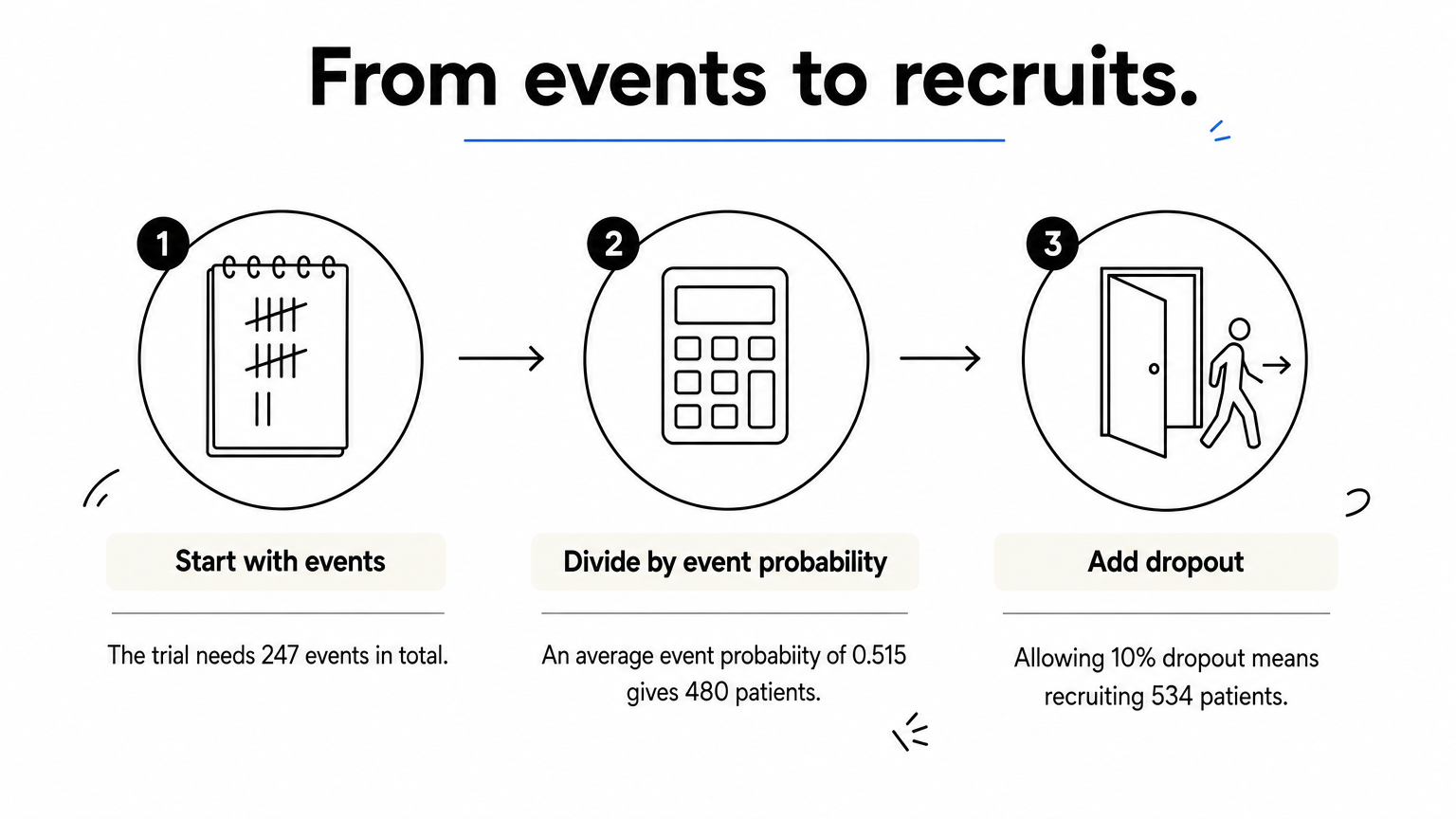
Follow-up length is your main lever. Longer follow-up raises the event probability and lowers the headcount, but it costs calendar time. A shorter study needs more patients to reach the same 247 events.
Subjects needed equal required events divided by the average event probability, then inflated for dropout.
Step 4. Check it in a calculator or R
Use an online calculator
Free browser-based power analysis software for the log-rank test, often labeled "time-to-event" or "logrank", take the same inputs as above. Enter your alpha, power, hazard ratio, allocation ratio, accrual and follow-up. Compare the event count with your hand calculation. Small differences of a few events are normal because tools use slightly different approximations. A large gap usually means a one-sided versus two-sided mismatch, or a different definition of follow-up time.
Calculate sample size for survival analysis in R
A power calculation for survival analysis in R takes only a few lines of base R, and it reproduces the whole example:
events_needed <- function(hr, alpha = 0.05, power = 0.80, p1 = 0.5) {
  z <- qnorm(1 - alpha / 2) + qnorm(power)
  ceiling(z^2 / (p1 * (1 - p1) * log(hr)^2))
}

p_event <- function(median_months, accrual, total) {
  lambda <- log(2) / median_months
  1 - (exp(-lambda * (total - accrual)) - exp(-lambda * total)) / (lambda * accrual)
}

hr <- 0.7
d  <- events_needed(hr)                  # 247
pc <- p_event(24, 12, 36)                # 0.577
pt <- p_event(24 / hr, 12, 36)           # 0.453
n  <- ceiling(d / mean(c(pc, pt)))       # 480
ceiling(n / 0.90)                        # 534 with 10% dropout
For designs with interim looks or non-exponential survival, the gsDesign, rpact and powerSurvEpi packages handle more cases. Read each function's documentation for its alpha convention.
Sanity-check before you commit
Run a short checklist before you finalize the number:
- Recalculate with a hazard ratio slightly closer to 1 and see whether the study is still feasible.
- For a Cox model with covariates, aim for at least 10 events per predictor as a common minimum.
- Write down every assumption: alpha, power, HR, medians, accrual, follow-up and dropout.
- Keep the plan consistent with the analysis you will actually run.
Once the data arrive, PlotStudio's Verification Mode lets you review and approve the planned test or Cox model before it executes. The method you powered is then the method that runs.
A sample size is only defensible when every assumption behind it is written down and tested against a slightly worse scenario.
Plan events first, then recruit
Sample size for survival analysis follows one chain: choose a hazard ratio you care about, compute events with the Schoenfeld formula, then divide by the event probability and inflate for dropout. The running example shows the full path from 247 events to 480 patients to 534 recruited. Your own numbers will differ, but the steps do not.
When your study is done, you need to analyze it as carefully as you planned it. You can try PlotStudio AI free with 30 credits and no credit card to build Kaplan-Meier curves and Cox models from your own dataset.