
To do survival analysis with R, arrange your data with one row per subject, a follow-up time column, and a 0/1 event column. Wrap the two columns in Surv(), fit a Kaplan-Meier curve with survfit(), plot it, compare groups with survdiff(), and model covariates with coxph(). The survival package that does the heavy lifting ships with R. Add ggsurvfit for plots and gtsummary for tables, and you have a complete workflow.
The hard part is rarely the model. Survival data are awkward because some subjects have not had the event when the study ends. Averaging times or running logistic regression on them throws that information away and biases the answer. Most real errors come earlier, in the data: an event column coded backwards, times in mixed units, or dates that never became dates.
This guide walks through seven steps on the lung dataset that comes with the survival package (228 patients with advanced lung cancer). You will prepare the data, build the Surv() object, plot Kaplan-Meier curves, read survival estimates, run a log-rank test, fit a Cox model, and check its assumptions. We build PlotStudio AI, a desktop research workspace that runs these same analyses from plain-English questions, so we know where researchers get stuck. The code below is plain R you can run today.
What you need before running survival analysis in R
Before you write any code, settle three decisions: when the clock starts, what counts as the event, and who is censored. Then install a handful of packages. Skipping the decisions is the most common reason a survival analysis has to be redone.
Define the event, the clock, and censoring
Survival analysis models the time from a defined start to a defined event. The event can be death, relapse, device failure, or any one-time outcome. The start, called time zero, might be diagnosis, surgery, or enrollment.
Subjects who have not had the event when follow-up ends are right-censored. They dropped out, were lost to follow-up, or were still event-free at the study's end. Do not delete them and do not treat them as events. Each one tells you the person survived at least that long, and the methods below use exactly that information.
Write down three answers before you open R:
- Time zero: the date or moment each subject enters the analysis.
- Event: the single outcome you are timing, such as death from any cause.
- Censoring rule: the last date you can say the subject was event-free.
Define time zero, the event, and the censoring rule before you code, because every later step depends on them.
Install the packages
You need one core package and a few helpers. The code below uses the native pipe |>, which requires R 4.1 or newer.
| Package | What you use it for |
|---|---|
survival |
Surv(), survfit(), survdiff(), coxph(), cox.zph() |
ggsurvfit |
Kaplan-Meier plots built on ggplot2, with risk tables |
survminer |
ggsurvplot(), ggforest(), ggcoxzph() |
gtsummary |
Publication-style tables from Cox models |
lubridate and dplyr |
Date parsing and data cleaning |
install.packages(c("survival", "ggsurvfit", "survminer",
                   "gtsummary", "lubridate", "dplyr"))

library(survival)
library(dplyr)
library(lubridate)
library(ggsurvfit)
library(survminer)
library(gtsummary)
Step 1. Prepare your data
Survival data need one row per subject, a time column, an event indicator, and your covariates. Getting this structure and the event coding right prevents the errors that are hardest to spot later, because R will happily fit a model to a flipped event column.

Get the structure right
Each row is a subject. Three kinds of columns matter, and the table shows how to keep them straight.
| Column type | What it holds | Example |
|---|---|---|
| Time | Follow-up from time zero to event or censoring, in one unit | time = 306 (days) |
| Event | Whether the event was observed | status = 1 (event), 0 (censored) |
| Covariates | Variables you compare or adjust for | sex, age, ph.ecog |
Surv() accepts the event as TRUE/FALSE, 0/1, or 1/2. With 1/2 coding, 2 means the event. The lung data use 1 for censored and 2 for dead, which is easy to misread, so recode the event to 0/1 and check the counts.
lung_df <- lung |>
  mutate(
    status = if_else(status == 2, 1, 0),
    sex = factor(sex, levels = c(1, 2), labels = c("Male", "Female"))
  )

table(lung_df$status)   # 63 censored (0), 165 died (1)
summary(lung_df$time)   # all times must be positive
colSums(is.na(lung_df[, c("time", "status", "sex", "age", "ph.ecog")]))
The check should show 63 censored and 165 deaths, which matches the 228 patients. It should also show one missing ph.ecog value, which matters in Step 6.
Calculate follow-up time from dates
Real datasets usually have a start date and an end date, not a time column. Convert both to proper dates with ymd(), mdy(), or dmy(), then subtract. The example below uses three hypothetical patients.
patients <- tibble(
  id = 1:3,
  surgery_date = c("2022-03-14", "2022-06-02", "2022-09-21"),
  last_contact = c("2024-01-09", "2023-02-17", "2024-05-30"),
  died = c(1, 1, 0)
) |>
  mutate(
    surgery_date = ymd(surgery_date),
    last_contact = ymd(last_contact),
    time_days = as.numeric(last_contact - surgery_date),
    time_months = time_days / 30.4375
  )
Pick one time unit and keep it for the whole analysis. Divide days by 365.25 for years or by 30.4375 for months. Then scan for zero or negative times, which usually mean an end date before the start date, and fix them at the source.
Step 2. Create the Surv object and fit the model
Surv() packages time and event into one outcome object, and survfit() turns it into a Kaplan-Meier estimate. Use ~ 1 for a single overall curve and ~ sex for one curve per group. Everything later in this guide builds on these two functions.
What Surv() does
Surv(time, status) pairs each follow-up time with its event flag. Printing it shows the idea: censored times carry a plus sign.
Surv(lung_df$time, lung_df$status)[1:6]
# 306  455  1010+  210  883  1022+
Subjects 3 and 6 are censored at 1010 and 1022 days. You will rarely call Surv() on its own. It sits on the left side of a formula, exactly where the outcome goes in lm() or glm().
For data in start-stop format, such as time-varying covariates or recurrent events, use the three-argument form Surv(tstart, tstop, event). The rest of this guide uses the simple single-time form.
Fit the Kaplan-Meier estimate
The Kaplan-Meier estimator multiplies the conditional probabilities of surviving each event time. At time 0 survival is 1, and it steps down at every observed event. Censored subjects leave the risk set without causing a step.
km_all <- survfit(Surv(time, status) ~ 1, data = lung_df)
km_all

km_sex <- survfit(Surv(time, status) ~ sex, data = lung_df)
summary(km_sex, times = c(100, 200, 300))
The printed object gives the number of subjects, events, median survival, and its 95% confidence interval. Use summary() when you need the full table. These are its columns:
| Column | Meaning |
|---|---|
time |
Distinct event time, or the time you requested |
n.risk |
Subjects still under observation just before that time |
n.event |
Events at that time |
survival |
Estimated probability of surviving past that time |
lower 95% CI, upper 95% CI |
Confidence limits for the survival probability |
Surv()defines the outcome andsurvfit()estimates the curve, so every Kaplan-Meier analysis in R starts with these two calls.
Step 3. Plot the Kaplan-Meier curve
The cleanest way to plot a Kaplan-Meier curve in R is survfit2() piped into ggsurvfit(). It returns a ggplot2 object, so every standard ggplot2 option works on it. survminer offers a one-call alternative.
Plot with ggsurvfit
survfit2() is the ggsurvfit version of survfit(). It remembers the data environment so labels and risk tables render correctly.
km_plot <- survfit2(Surv(time, status) ~ sex, data = lung_df) |>
  ggsurvfit(linewidth = 1) +
  add_confidence_interval() +
  add_risktable() +
  add_quantile(y_value = 0.5, linetype = "dotted") +
  scale_ggsurvfit() +
  labs(
    x = "Days since enrollment",
    y = "Overall survival probability"
  )

km_plot
The curve starts at 1 and steps downward. Small tick marks show censored subjects, and the shaded bands are 95% confidence intervals. add_risktable() puts the numbers at risk under the x-axis, and add_quantile() draws a dotted line at 0.5 so readers can see the median where it crosses each curve.
Plot with survminer
If you prefer one function that adds the log-rank p-value for you, ggsurvplot() does it. Pass the original data frame as well as the fit.
ggsurvplot(
  km_sex,
  data = lung_df,
  pval = TRUE,
  conf.int = TRUE,
  risk.table = TRUE,
  xlab = "Days since enrollment",
  legend.labs = c("Male", "Female")
)
For a quick look during exploration, base R's plot(km_sex, col = c("blue", "red")) also works.
Make the figure ready for a manuscript
A Kaplan-Meier figure is usually judged on a few details. Check this list before you export:
- Label both axes with units, such as "Days since enrollment".
- Show the numbers at risk below the curves.
- Mark censored subjects, and say so in the legend or caption.
- Keep the confidence bands light enough that the curves stay readable.
- Use colors that stay distinguishable in grayscale print.
- State the test and its p-value in the caption.
ggsave("km_by_sex.png", km_plot, width = 7, height = 5, dpi = 300)
Journals set their own size, font, and format rules, so check the author guidelines before you finalize.
A Kaplan-Meier plot is only publishable once it shows numbers at risk, marks censoring, and labels time units.
Step 4. Read survival at a time point and the median
Two numbers summarize most Kaplan-Meier curves: the probability of surviving past a chosen time, and the median survival time. Both must come from the Kaplan-Meier estimate. Shortcuts that ignore censoring give wrong answers in a predictable direction.
Estimate survival at a given time
Ask summary() for the time you need. Because lung records days, one year is 365.25.
summary(km_all, times = 365.25)
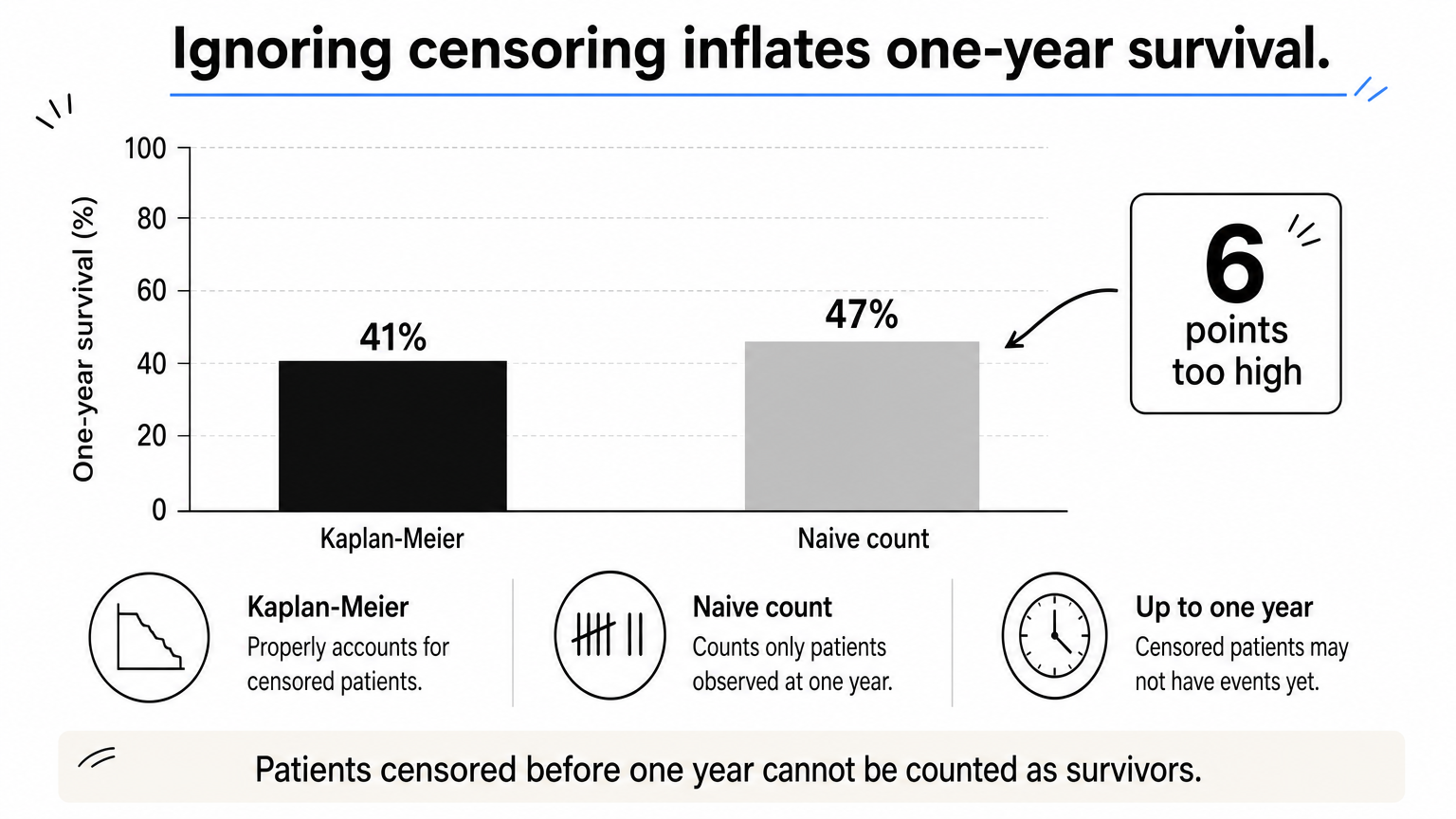
The output gives 41% survival at one year (0.409), with a 95% confidence interval of 34.5% to 48.6%. Of the 228 patients, 121 had died by then and 65 were still at risk.
Now compare that with the naive calculation, which treats everyone who has not died as a survivor:
1 - 121 / 228 # 0.47
That gives 47%, six points too high. Of the 228 patients, 42 were censored before one year, so we do not know whether they survived to day 365. The naive method counts them as if we did.
Estimate the median survival time
Median survival is the time at which the curve crosses 0.5. Use the median, not the mean, because survival times are skewed and censored.
km_all    # median 310 days, 95% CI 285 to 363
km_sex    # medians per group
Overall median survival is 310 days. By sex it is 270 days for men and 426 days for women. If the curve never drops below 0.5, R reports NA for the median, which means the data cannot yet support one.
Dropping the censored patients biases the median in the opposite direction:
lung_df |>
  filter(status == 1) |>
  summarize(naive_median = median(time))   # 226
| Method | One-year survival | Median survival |
|---|---|---|
| Kaplan-Meier (correct) | 41% | 310 days |
| Naive (ignores censoring) | 47% | 226 days |
Ignoring censoring inflates survival at a time point and shrinks the median, so always take both from
survfit().
Step 5. Compare groups with the log-rank test
The log-rank test asks whether two or more survival curves differ over the whole follow-up period. Run it with survdiff(), using the same formula you gave survfit(). It is the standard first test, but it reports only a p-value and no effect size.
Run survdiff
lr <- survdiff(Surv(time, status) ~ sex, data = lung_df)
lr

pchisq(lr$chisq, df = length(lr$n) - 1, lower.tail = FALSE)
The test compares observed and expected events in each group. Men had 112 deaths against about 91.6 expected, and women had 53 against about 73.4 expected. The chi-square statistic is 10.3 on 1 degree of freedom, giving p = 0.001. Men died more often than the pooled rate predicts, and women less often.
What the log-rank test cannot tell you
A significant log-rank result says the curves differ. It does not say by how much. For the size of the difference, you need the hazard ratio from a Cox model, which is Step 6.
The test weights all follow-up times equally and has the most power when one group's hazard stays consistently above the other's. If the curves cross, it can miss a real difference. The rho argument changes the weighting, and survdiff(..., rho = 1) gives more weight to early events. Choose the version before you look at the data, because picking the test that gives the smallest p-value is a form of p-hacking.
The log-rank test tells you whether survival curves differ, and the Cox model in the next step tells you by how much.
Step 6. Fit a Cox proportional hazards model
The Cox model estimates how covariates change the hazard, which is the instantaneous event rate among subjects still at risk. Fit it with coxph(), using the same Surv() outcome. Its main output is the hazard ratio, which gives you an effect size with a confidence interval.

Fit and read a single-covariate model
cox_sex <- coxph(Surv(time, status) ~ sex, data = lung_df)
summary(cox_sex)
The coefficient for female sex is -0.531, so the hazard ratio is exp(-0.531) = 0.59, with a 95% confidence interval of 0.42 to 0.82 and p = 0.001. Because the reference level is male, this means women had a hazard of death about 41% lower than men at any point in follow-up. The interval excludes 1, which agrees with the log-rank test.
Here is how to read any hazard ratio:
| Hazard ratio | Interpretation |
|---|---|
| Below 1 | Lower hazard than the reference group (or per unit increase) |
| Exactly 1 | No association with the event rate |
| Above 1 | Higher hazard than the reference |
A hazard ratio is a ratio of instantaneous rates, not a ratio of risks. Describing HR = 0.59 as "41% less likely to die" overstates what the model says.
Add covariates
Adjusting for other variables works like any regression. Add them to the right side of the formula.
cox_multi <- coxph(Surv(time, status) ~ sex + age + ph.ecog, data = lung_df)
summary(cox_multi)
R drops rows with missing values and says so. Here one patient has no ph.ecog score, so the model uses 227 patients. A common rule of thumb is to keep at least 10 events per covariate, so 165 deaths comfortably supports three predictors. In summary(), read the exp(coef) column for hazard ratios and the lower .95 and upper .95 columns for their intervals.
Report the results
gtsummary turns the model into a formatted table, and ggforest() draws a forest plot of the hazard ratios.
tbl_regression(cox_multi, exp = TRUE)

ggforest(cox_multi, data = lung_df)
Always report the hazard ratio, its 95% confidence interval, the number of subjects and events analyzed, and any rows dropped for missing data.
The hazard ratio and its confidence interval are the Cox model's answer, so report both and never the p-value alone.
Step 7. Check the proportional hazards assumption
The Cox model assumes each covariate's hazard ratio stays constant over time. Test it with cox.zph() and look at the residual plots. A model that fails this check can still run without errors, but its single hazard ratio may misrepresent the data.
Test with cox.zph
zph <- cox.zph(cox_multi)
zph

ggcoxzph(zph)
The output has one test per covariate and a global test. Each test checks whether the covariate's effect changes with time. A p-value below 0.05 suggests a violation. In the Schoenfeld residual plots, a line that trends away from flat tells the same story.
Do not rely on the p-value alone. With a large sample, tiny and harmless departures become significant, and with a small sample serious ones can pass unnoticed. Use the test and the plot together, and consider how large the departure is.
What to do when it fails
If a covariate violates the assumption, you have several options. Pick the one that fits your research question:
- Stratify on the offending variable with
strata(). This gives each level its own baseline hazard, but you no longer get a hazard ratio for that variable. - Add a time interaction with
tt(), which lets the effect change with time. - Split follow-up into periods and report a separate hazard ratio for each.
- Switch the summary measure, for example to restricted mean survival time, which does not require proportional hazards.
coxph(Surv(time, status) ~ age + ph.ecog + strata(sex), data = lung_df)
Cox models also assume that censoring is unrelated to the outcome. If sicker patients drop out sooner than healthy ones, your estimates will be biased, and no diagnostic in this step will detect it. Think about why subjects were censored and describe it in your methods.
A Cox model is only trustworthy after
cox.zph()and the residual plots agree that the hazard ratio stays constant over time.
Putting the workflow together
The workflow comes down to a few repeatable moves. Prepare one row per subject with a 0/1 event, build Surv(), fit survfit(), plot and label the curve, read survival from the Kaplan-Meier estimate rather than a shortcut, test groups with survdiff(), quantify them with coxph(), and verify the proportional hazards assumption before you report a hazard ratio.
If you would rather skip the setup, PlotStudio AI runs Kaplan-Meier and Cox analyses on your own machine from plain-English questions. It lets you review the analysis plan before it runs, and you can try it with 30 free credits and no credit card. You remain responsible for the choices that matter, such as defining the event and checking assumptions.