The best AI for research depends on the stage you are in, because no single tool finds papers, checks evidence, and analyzes your data equally well. A good pick has three traits: you can trace its claims to a source, it fits one clear task, and its free tier is usable. Use PlotStudio AI to analyze your own datasets and build figures. Use Elicit for literature reviews, Consensus for quick evidence checks, and Semantic Scholar for free paper discovery. Use Perplexity, ChatGPT, or Gemini for broad questions and background reports.
The problem is that most "best AI" lists mix tools that do different jobs. A paper-finding engine and a statistics workspace are not rivals, and a general chatbot can invent a citation that looks real. Researchers lose time when they pick the wrong tool for the stage or trust output they did not verify.
This article covers six tools, ordered by where they sit in a project, from your own data to the literature to general-purpose models. Each entry uses the same format: how it works, who it suits, and what it costs. PlotStudio AI is our own product, so we say plainly what it does not do. A final section shows how to combine the tools on a budget and verify what they produce.
1. PlotStudio AI for analyzing your own data
PlotStudio AI is the right pick when your research starts from a dataset rather than a reading list. You upload a CSV or Excel file, ask questions in plain English, and get statistical tests, charts, and a written interpretation. It does not search the literature, and it is not meant to.
PlotStudio handles the data side of research: it runs the statistical tests, builds the charts, and writes the interpretation.
How it works
Specialized AI agents plan the investigation, write Python, run it, fix execution errors, and interpret the results. Every question produces a permanent analysis page with tables, charts, tests, and interpretation, and later questions build on earlier findings.
- A data quality score at upload (Clean, Usable, or Needs Cleaning) and a cleaning plan
- Verification Mode, where you review and edit the plan, methods, and assumptions before anything runs
- Domain methods such as Cox proportional hazards and IV/2SLS, applied where they suit the data
- PDF reports with embedded charts and equations, or a Jupyter notebook that reproduces the results with Run All
Who it suits and what it costs
It suits clinical, biomedical, public health, and social science researchers, plus graduate students who need analysis and figures without writing code. Statisticians can inspect the generated code and control the methodology. Analysis runs on your machine and uploaded datasets are not stored on PlotStudio's servers. Information sent to the model provider still follows that provider's policies, so confirm IRB and institutional rules for patient data.
The free trial gives 30 credits with no credit card and no API key. Approved academic users pay $14.99 a month with their own API key (regular price $39.99) or $29.99 a month with managed credits (regular price $69.99). The figures it produces still need your review against journal requirements. It assists your judgment and does not replace it.
2. Elicit for literature reviews and data extraction
Elicit is the best fit when you must compare many papers on the same attributes. It searches more than 138 million papers and fills structured tables with methods, sample sizes, and outcomes, which is the slowest part of a systematic review.

Elicit turns a stack of papers into a comparison table you can audit.
How it works
You enter a research question and Elicit returns relevant papers. You then add custom columns such as "sample size," "dosage," or "funding source," and it reads each paper to fill the cells. It also supports automated reports, a saved library, alerts, and uploading your own PDFs.
- Columns are filled from the paper text, with links back to the source
- If a detail is not in the paper, the cell stays empty instead of being guessed
- Reports summarize the extracted evidence across the table
Who it suits and what it costs
It suits PhD students building a literature review, clinical researchers, and anyone preparing a systematic or scoping review. If you only need one quick answer, a lighter tool is faster. The Basic plan is free but limited to 2 automated reports a month and a small number of table columns at a time. Pro is listed at $49 per user per month billed annually.
Spot-check extracted cells against the original paper, especially numbers. Extraction errors are rare but they compound when you build a meta-analysis on them.
3. Consensus for quick evidence-based answers
Consensus is the best choice for a specific question such as "Does X affect Y?" It searches a database of more than 200 million papers and shows where the evidence leans instead of returning only a list of links.

Consensus tells you where the evidence leans, not what you should cite.
How it works
The tool extracts claims from papers and summarizes them. Its Consensus Meter shows how many studies lean yes, no, possibly, or mixed on your question. You can click through to each study to read the source.
- Works best with narrow, answerable questions
- Weaker for broad topics like "tell me about the history of X"
- Deeper analyses are limited on the free tier
Who it suits and what it costs
It suits students testing a claim before they commit to a full search, and clinicians or educators who want a fast read on the evidence. Treat the meter as a snapshot, not a meta-analysis. It does not weigh study quality the way a formal review does.
There is a usable free tier, with monthly caps on deeper searches and paper-chat features. Paid plans exist, so check the current plan page before you budget. As a workflow, test your claim here, then move to Elicit or Semantic Scholar to build the full evidence base.
4. Semantic Scholar for free paper discovery
Semantic Scholar is the best free AI for finding research papers. It indexes more than 233 million papers and costs nothing, which makes it the default starting point for a reading list.
Semantic Scholar gives you a free, large index with citation signals, so start here before paying for anything.
How it works
Search results carry short TLDR summaries and signals such as influential citations. You can save papers to folders, get recommendations based on what you saved, and set alerts for new work in your field. It is especially strong in computer science and biomedicine.
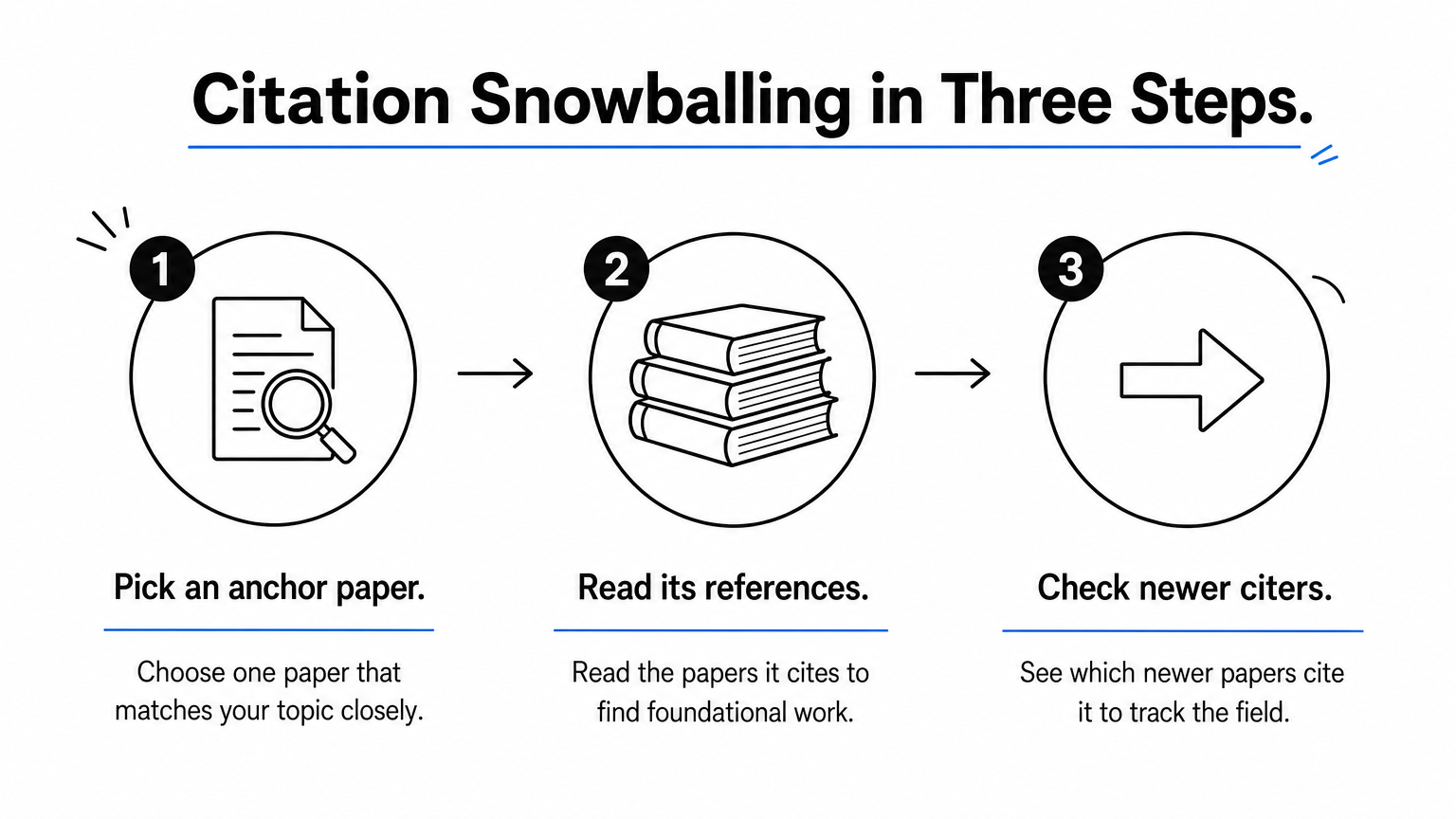
A simple method is citation snowballing:
- Pick one anchor paper that matches your topic closely.
- Read the papers it cites to find foundational work.
- Check which newer papers cite it to see where the field went.
Who it suits and what it costs
It suits everyone who does literature work, from undergraduates to faculty, because it is free and covers a very wide range of fields. The limit is that it supports discovery, not synthesis. It will not extract data across papers or produce a comparison table, so pair it with Elicit when you reach that step.
Use the TLDRs to screen quickly, but never cite from them. Open the paper, confirm the finding, and then cite the paper itself. You can also cross-check a title in Google Scholar to confirm the publication details.
5. Perplexity for fast cited web answers
Perplexity is the best general AI for orienting yourself in a new topic. It answers questions in plain language with footnoted sources from the live web, so it replaces many early Google searches.
Perplexity is a fast first stop for orientation, not a source for your bibliography.
How it works
You ask a question and get a short cited answer. An Academic focus mode narrows sources toward scholarly material, and a Deep Research mode runs many searches to write a longer report. Follow-up questions keep the context, which makes it easy to clarify terminology before you search a database.
- Good for definitions, adjacent topics, and finding starting sources
- It can cite a news article next to a journal paper, so judge the weight of each source
- It is a general answer engine, not a dedicated scholarly index
Who it suits and what it costs
It suits anyone entering an unfamiliar field, including market researchers and analysts who need current web information alongside journal articles. It is a poor fit for building a formal reference list, because the sources vary in quality and you must vet each one yourself.
A free plan is available, and Pro costs $20 a month or $200 a year. For most students the free plan covers orientation, and the paid plan only pays off if you rely on Deep Research mode daily.
6. ChatGPT and Gemini Deep Research for reports
ChatGPT and Gemini are the best AI models for research when you need a long, multi-source report. Their Deep Research modes read dozens of sources and write a structured brief, but neither is a scholarly database. ChatGPT is a strong generalist and not the best AI for research on its own.
General models write the report fastest, and they also invent citations most often, so verify every reference.
How it works
The two behave differently. Gemini shows a research plan before it starts, so you can approve or edit the angle. ChatGPT usually asks clarifying questions first, then pivots as it finds new threads, and its reports read more like a consultant's brief with denser reasoning.
- Gemini output tends to be cleaner and easier to skim
- ChatGPT output tends to be denser in reasoning and synthesis
- Both can attach a real-looking citation to a claim the source does not make
Who it suits and what it costs
They suit background reports, competitor or market scans, and questions that cross fields. They suit literature review poorly, because you cannot see which papers were excluded. Availability and limits for Deep Research change by plan, so check the current plan pages for free usage before you pay.
Avoid uploading sensitive or IRB-governed data to a cloud chatbot unless your institution's policy allows it. For that kind of data, a tool that runs analysis locally is the safer route.
How to choose the right AI for your research
Choose by task first and price second. Match the tool to the stage of your project, then add a paid plan only where a free tier actually blocks you.
One tool per research stage beats one tool for everything.
Match the tool to your stage
The table sets the six tools side by side, with best use and cost for each.
| Tool | Best for | Free option | Paid |
|---|---|---|---|
| PlotStudio AI | Analyzing your own data, figures | 30-credit trial, no card | Academic from $14.99/mo (BYOK) or $29.99/mo (managed), after approval |
| Elicit | Literature review tables | Basic plan | Pro listed at $49/user/mo, billed annually |
| Consensus | Yes/no evidence questions | Free tier with monthly caps | Paid plans available |
| Semantic Scholar | Finding papers | Fully free | None |
| Perplexity | Cited web answers | Free plan | Pro $20/mo or $200/yr |
| ChatGPT / Gemini | Deep Research reports | Limited, varies by plan | Paid plans |
A budget example for a thesis chapter
A graduate student writing an empirical chapter can run a lean stack with Semantic Scholar and Elicit Basic, both free, plus PlotStudio's Academic BYOK plan at $14.99 a month. That is $14.99 a month in subscriptions, plus whatever API usage your own key generates. Add Perplexity Pro at $20 and switch to managed credits at $29.99, and the monthly total becomes $49.99 with no key to manage.
The lean version covers the whole path from finding papers to a figure in your manuscript. Upgrade only when a free limit slows you down.
Verify before you cite
Every tool here can be wrong, so build checks into your routine:
- Open the original paper for any claim you plan to cite.
- Confirm numbers, sample sizes, and limitations in the primary source.
- Review the statistical methods an AI chose before you trust its results.
- Follow your institution's and target journal's rules on disclosing AI use.
Pick by task, then verify
Choose the best AI for research by matching it to your stage. Use Semantic Scholar and Consensus to find and test evidence, Elicit to compare studies, Perplexity or a Deep Research model for background, and PlotStudio AI when your own dataset needs analysis and figures. Whatever you use, the researcher stays responsible for the conclusions, so verify sources and methods yourself.
If your bottleneck is turning a dataset into tested results and manuscript-ready figures, start with PlotStudio's free trial and run it on a dataset you already know well. You will see the plan, the code, and the interpretation, and you can judge whether it fits your workflow before you pay.