
The fastest route to SAS survival analysis is three procedures in order. Structure your data with one row per subject, a follow-up time, and a censoring flag. Run PROC LIFETEST to get Kaplan-Meier estimates, curves, and log-rank tests. Then run PROC PHREG to fit a Cox proportional hazards model and read the hazard ratios. Check the proportional hazards assumption before you trust those ratios. The six steps below give you working code for each part.
Time-to-event data breaks ordinary methods. Some patients are still alive when the study ends, so you know only that their survival time is longer than some value. Linear regression cannot handle that, and logistic regression throws away the timing. Most SAS mistakes come from small details: the wrong censoring code in parentheses, a date treated as a duration, or a mean survival time reported when the longest observation is censored. The output also arrives as a wall of tables that nobody labels for you.
This guide uses WHAS500, a published teaching dataset of 500 patients from the Worcester Heart Attack Study. It records follow-up time after a heart attack, death or censoring, age, BMI, heart rate, and gender. Each step shows the code, how to read the output, and the mistake to avoid. The last step shows how to report results and cross-check them in PlotStudio AI, a research analysis workspace that also runs Kaplan-Meier and Cox models.
What you need before running survival analysis in SAS
You need a dataset with one row per subject, a time variable, a censoring variable, and a SAS version with ODS Graphics. That is enough for the two procedures in this guide. The rest of this section explains the layout and which procedure to use for which question.
The data layout SAS expects
The standard layout has a time variable (days from the start of follow-up to the event or to the last contact), a status variable that says whether the event happened, and the covariates. By convention, 1 means the event occurred and 0 means the subject was censored. WHAS500 follows this: lenfol is follow-up length, fstat is 1 for death and 0 for censored, and the covariates are age, bmi, hr, and gender.
Right-censoring means the event had not happened by the last time you saw the subject, so you only know the true time is greater than the recorded one. You keep these subjects. Dropping them biases survival estimates downward, and treating the censoring time as an event time is just as wrong.
Here is a seven-subject dataset you can paste into SAS. We reuse it in Step 2 to check the Kaplan-Meier arithmetic by hand.
data toy;
  input id $ days status;
  datalines;
A 4 1
B 6 0
C 3 0
D 5 1
E 3 0
F 3 1
G 2 1
;
run;
Every survival model needs two columns per subject: how long you watched, and whether the event happened in that time.
Which procedure does what
Use PROC LIFETEST to describe survival and compare groups, and PROC PHREG to adjust for several predictors at once. The choice between a Kaplan-Meier analysis and a Cox model is mostly a choice between describing and adjusting.
| Task | Procedure | Core statements |
|---|---|---|
| Kaplan-Meier estimates, curves, medians | PROC LIFETEST | TIME |
| Log-rank and other group tests | PROC LIFETEST | STRATA |
| Cox regression, hazard ratios | PROC PHREG | MODEL, CLASS |
| Parametric models, left or interval censoring | PROC LIFEREG | MODEL |
| Semiparametric models for interval-censored data | PROC ICPHREG | MODEL |
Kaplan-Meier cannot estimate the effect of a continuous variable like age, and it cannot adjust one factor for another. A Cox model does both. Most papers report both, with the curves for the main comparison and the model for adjusted effects.
What this guide leaves out
This guide covers right-censored data with one row per subject. Left-censored and interval-censored data need LIFEREG or ICPHREG, because the Cox model in PHREG does not handle them. Time-varying covariates need a counting-process layout with start and stop times per row, which PHREG accepts and LIFETEST does not.
SAS remains common in clinical trial reporting, which is why these two procedures turn up in so many submission programs. Turn on ODS Graphics with ods graphics on; before the plotting code below.
Step 1. Code time and censoring correctly
Before you run any procedure, make sure your time variable is a duration, your status variable is numeric, and you know which value means censored. Ten minutes here saves you from a model that runs cleanly and answers the wrong question.
Build time and event from dates
If your raw data has dates, compute the duration yourself. The time ends at the event date for subjects who had the event and at the last contact date for everyone else.
data study;
  set raw;
  if not missing(death_date) then do;
    days   = death_date - enroll_date;
    status = 1;
  end;
  else do;
    days   = last_contact_date - enroll_date;
    status = 0;
  end;
  if days < 0 then put "Check subject: " id= days=;
run;
Dates in SAS are day counts, so subtracting them gives days. Divide by 365.25 if you want years. The log line flags impossible negative durations, which usually mean a typo in a date or an enrollment date later than the last contact.
Run three quick checks
Check the status coding, the event count, and the range of times and covariates. A censoring variable coded 1 and 2, or with stray missing values, will quietly change what LIFETEST treats as an event.
proc freq data=whas500;
  tables fstat gender;
run;

proc means data=whas500 n nmiss min median max;
  var lenfol age bmi hr;
run;
The fstat frequencies give your event count and censoring percentage. A Cox model needs enough events, not just enough subjects. A common rule of thumb is about 10 events per predictor, so 500 patients with few deaths still supports only a small model. In WHAS500, follow-up runs up to 2,358 days, and the longest observation is censored. That matters in Step 2.
Remember that the number in parentheses marks censoring. In time lenfol*fstat(0), a value of 0 means censored, and every other value counts as an event. Writing fstat(1) by accident flips the analysis.
The value in parentheses after the status variable is the censored value, not the event value.
Step 2. Estimate survival with PROC LIFETEST
To get a Kaplan-Meier estimate in SAS, name the time variable and the censoring variable on a TIME statement in PROC LIFETEST. SAS prints the product-limit table and draws the survival curve by default.

Run the Kaplan-Meier estimate
This is the minimum code for a Kaplan-Meier curve in SAS with a confidence band and a number-at-risk table.
ods graphics on;
proc lifetest data=whas500 plots=survival(atrisk cb) outsurv=km_est;
  time lenfol*fstat(0);
run;
The cb keyword adds a confidence band for the whole curve, and atrisk prints the number still under observation beneath the plot. outsurv=km_est saves the estimates to a dataset you can reuse for custom figures. Add nelson to the PROC statement to get Nelson-Aalen cumulative hazard estimates in the same table. To pull survival at fixed times, such as one, two, and three years, add timelist=365 730 1095.
Read the output and check it by hand
The product-limit table has one row per observed time. The Survival column is the probability of surviving past that time from the start of follow-up. It is not the conditional probability for the interval. Rows marked with an asterisk are censored observations. They never lower the estimate, but they shrink the number left at risk.
You can verify the logic on the toy dataset from earlier. Run proc lifetest data=toy; time days*status(0); run; and compare it to this hand calculation.
| Time | At risk | Events | Censored | Conditional survival | Cumulative survival |
|---|---|---|---|---|---|
| 2 | 7 | 1 | 0 | 6/7 = 0.857 | 0.857 |
| 3 | 6 | 1 | 2 | 5/6 = 0.833 | 0.714 |
| 4 | 3 | 1 | 0 | 2/3 = 0.667 | 0.476 |
| 5 | 2 | 1 | 0 | 1/2 = 0.500 | 0.238 |
| 6 | 1 | 0 | 1 | not defined | 0.238 |
Each cumulative value is the previous one times the conditional probability. At time 3, two subjects were censored, so only 3 remain at risk at time 4. The curve first falls below 0.5 at time 4, so SAS reports a median survival time of 4. WHAS500 shows the same pattern with real numbers. The first two intervals each have 8 deaths, which gives 0.9840 after day 1 and 0.9680 after day 2.
Report the median, not the mean
The quartile table gives the time by which 25%, 50%, and 75% of subjects have had the event, each with a confidence interval. Report the median survival time with its interval. SAS also prints a mean, but it is restricted to the largest observed time. When the longest observation is censored, as in WHAS500, that mean is biased downward. If a quartile shows a dot, the curve never dropped that low during follow-up.
To describe how long you followed people, run the same code with the censoring logic flipped: time lenfol*fstat(1);. That is the reverse Kaplan-Meier method, and its median is a defensible median follow-up time.
A Kaplan-Meier curve is a running product of conditional probabilities, and censored subjects only change who is left in the denominator.
Step 3. Compare groups with the log-rank test
To compare survival across groups in SAS survival analysis, add a STRATA statement to PROC LIFETEST. SAS then draws one curve per group and prints tests of whether the curves differ.

Add a STRATA statement
This code compares men and women in WHAS500, coded 0 and 1, and prints the p-value on the plot.
proc lifetest data=whas500 plots=survival(atrisk test);
  strata gender / test=(logrank wilcoxon);
  time lenfol*fstat(0);
run;
The default tests are the log-rank, Wilcoxon, and likelihood ratio tests. In the WHAS500 output, the log-rank chi-square is 7.7911 with 1 degree of freedom (p = 0.0053). The Wilcoxon chi-square is 5.5370 (p = 0.0186). Both reject equal survival, and the plot shows the women's curve below the men's.
For a continuous variable, list the cut points in the STRATA statement and SAS builds the groups for you. For example, strata bmi(15,18.5,25,30,40); creates five BMI categories. Cutting a continuous variable throws away information, so use this for exploration and move to Cox for the real estimate.
Choose the right test
The tests differ only in how they weight the gap between observed and expected events at each time.
| Test | Weight at each event time | Most sensitive to |
|---|---|---|
| Log-rank | 1 | Differences later in follow-up |
| Wilcoxon | Number at risk | Differences early in follow-up |
| Tarone-Ware | Square root of number at risk | Between the two |
| Peto-Peto | Pooled survival estimate | Early differences, robust to censoring patterns |
| Fleming-Harrington | S(t) raised to p, times 1 − S(t) raised to q | Whatever region you choose with p and q |
Pick the test before you look at the p-values, and make the log-rank test your default. If your question is about early events, choose Wilcoxon or Peto-Peto in advance. If the tests disagree, report both and describe where the curves separate. The Wilcoxon test can be distorted when the censoring pattern differs between groups, so look at the censoring summary table too.
The likelihood ratio test is parametric and assumes constant hazards, so ignore it unless you have a reason to believe survival is exponential.
Do not stop at the group comparison
A significant log-rank test says the curves differ. It does not say why. In WHAS500, gender and age are positively correlated (r = 0.27 in the correlation output), so women in this sample are older on average. Age also relates to survival, so the gender gap may partly reflect age. Only a model that includes both, which is the next step, can separate them.
The log-rank test tells you whether curves differ, and only a regression model tells you whether they differ after accounting for something else.
Step 4. Fit a Cox model with PROC PHREG
To run a Cox proportional hazards model in SAS, use PROC PHREG with the same time and censoring syntax as LIFETEST, followed by an equals sign and your predictors. PHREG estimates how each predictor multiplies the hazard without assuming any shape for the baseline hazard.
Write the model statement
This model adjusts the gender effect for age, BMI, and heart rate, and asks for confidence limits on the hazard ratios.
proc phreg data=whas500;
  model lenfol*fstat(0) = gender age bmi hr / ties=efron risklimits;
  hazardratio 'Age, per 10 years' age / units=10;
run;
Here gender is a 0/1 variable, so it enters directly and the hazard ratio compares 1 (female) with 0 (male). For a categorical variable with three or more levels, declare it first, for example class stage(ref="I") / param=ref;, so SAS builds indicator variables against the reference level you choose.
The ties=efron option sets how PHREG handles subjects who share an event time. The default is Breslow, which is less accurate when ties are common, and Efron is a widely used better choice. The HAZARDRATIO statement reports the effect for a unit you choose, which is more useful than the per-year effect for age.
Read the three output blocks
First, the model fit statistics compare a model with no covariates to yours. In the UCLA seminar's simpler gender-and-age model on WHAS500, −2 log L falls from 2455.158 to 2313.140. That difference of 142.018 is the likelihood ratio chi-square on 2 degrees of freedom.
Second, the global null test (likelihood ratio, score, and Wald) asks whether any predictor matters. Small p-values here are expected and not very informative.
Third, the Analysis of Maximum Likelihood Estimates table is the one you report. Each row has a coefficient, a standard error, a p-value, and a hazard ratio. The ratio is the coefficient exponentiated.
Turn estimates into hazard ratios
A hazard ratio above 1 means a higher hazard of the event, and a ratio below 1 means a lower one. The percent change is (HR − 1) × 100. Suppose a model returned a coefficient of 0.04 for age per year. The hazard ratio per year is exp(0.04) = 1.041, a 4.1% higher hazard for each extra year. Per 10 years the coefficient becomes 0.40, and exp(0.40) = 1.49, a 49% higher hazard. These numbers illustrate the arithmetic and are not WHAS500 results.
The HR is the same at every time point, which is what "proportional" means. If it is not constant, one number cannot describe the effect, and Step 5 explains how to find out.
A hazard ratio is the exponentiated coefficient, and it applies at every moment of follow-up only if the hazards really are proportional.
Step 5. Test the proportional hazards assumption
Test the assumption with the ASSESS statement in PHREG, then confirm any suspicious predictor with a time interaction. A Cox model that violates proportionality still produces a hazard ratio, but the number is an average over time that may describe no real moment.
Run the built-in assessment
The ASSESS statement compares each predictor's cumulative martingale residuals with what you would see if the assumption held, and gives a supremum test with a simulated p-value.
ods graphics on;
proc phreg data=whas500;
  model lenfol*fstat(0) = gender age bmi hr / ties=efron;
  assess ph / resample seed=2026;
run;
Look at both the plots and the p-values. In each plot, the observed path should stay within the band of simulated paths. A small p-value for one predictor suggests its effect changes over time. With 500 subjects and plenty of events, trivial departures can reach significance, so judge the size of the departure as well.
Confirm with a time interaction
A second check multiplies a predictor by a function of time and tests that term. PHREG lets you define it with a programming statement inside the procedure.
proc phreg data=whas500;
  model lenfol*fstat(0) = gender age bmi hr age_logt / ties=efron;
  age_logt = age*log(lenfol);
run;
If the age_logt coefficient is significant, the age effect drifts with time. Repeat the check for each predictor you worry about.
Decide what to do about a violation
You have three practical options.
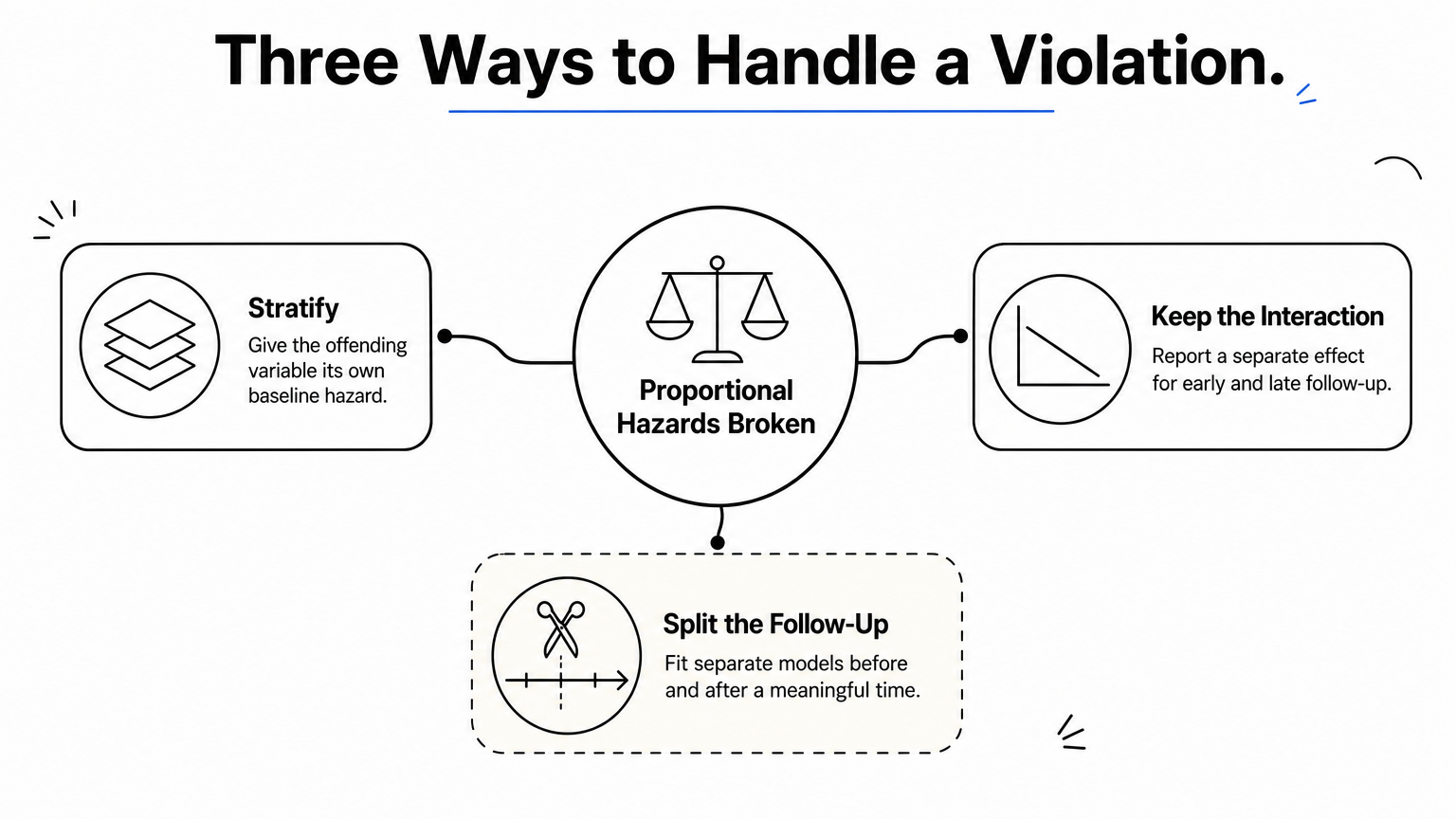
- Stratify on the offending variable. A STRATA statement in PHREG gives each level its own baseline hazard, at the price of no hazard ratio for that variable.
- Keep the interaction and report the time-varying effect, such as separate ratios for early and late follow-up.
- Split the follow-up at a clinically meaningful time and fit separate models.
Stratification works when the variable is a nuisance, and the interaction works when its changing effect is itself the finding.
proc phreg data=whas500;
  strata gender;
  model lenfol*fstat(0) = age bmi hr / ties=efron;
run;
Test proportional hazards before you publish a hazard ratio, because the ratio is only one number and the assumption says it is the same at every time.
Step 6. Report hazard ratios and Kaplan-Meier figures
Report one table of hazard ratios with confidence intervals, one Kaplan-Meier figure with a number-at-risk table, and the number of events behind both. Reviewers look for those three items first.
Build the results table
Send the PHREG estimates to a dataset instead of copying numbers from the output window.
ods output ParameterEstimates=cox_est;
proc phreg data=whas500;
  model lenfol*fstat(0) = gender age bmi hr / ties=efron risklimits;
run;

proc print data=cox_est noobs;
  var Parameter HazardRatio HRLowerCL HRUpperCL ProbChiSq;
run;
Present each ratio with its 95% interval and say what one unit means: "per 10 years of age" reads better than "per year". Alongside the table, report total subjects, events, and the percentage censored from the LIFETEST summary.
Export a clean figure
Set the size and format before the plot runs, then choose where the image lands.
ods graphics / reset width=6.5in height=4.5in imagefmt=png;
ods listing gpath="C:\figures" image_dpi=300;
Use a width that fits the journal's column, keep the at-risk table, and label the axis with units, such as days since admission. Journal requirements for resolution, fonts, and file type vary, so check the target journal's instructions. SAS graphics are fully customizable through the template language, but many researchers export the estimates in km_est and style the final figure in a plotting tool.
Cross-check in PlotStudio AI
A second implementation catches data-handling errors that a single script never will. PlotStudio AI is a desktop research workspace where you upload the same dataset, describe the question in plain English, and get a Kaplan-Meier curve, a Cox model, and generated Python you can inspect. Verification Mode lets you review and edit the plan before anything runs, and the analysis runs on your own machine. You can then export a PDF report or a Jupyter notebook. If the log-rank statistic or the hazard ratios differ from your SAS output, look first at censoring codes and tie handling. PlotStudio supports the analysis, but it does not replace your judgment about assumptions and interpretation.
Before you publish a survival analysis, reproduce the key numbers a second way, because most discrepancies trace back to the data and not the statistics.
Run it on your own data
SAS survival analysis comes down to a repeatable sequence. Code time and censoring carefully, estimate survival with PROC LIFETEST, compare groups with a test chosen in advance, adjust with PROC PHREG, test proportional hazards, and report ratios with intervals next to a clear Kaplan-Meier figure.
Start with the seven-subject dataset, confirm the hand calculation matches SAS, and then switch to your own data. If you want an independent check of your curves and hazard ratios, you can try PlotStudio AI with no credit card and compare its results with your SAS output.