The best statistical analysis software depends on how you work, not on one universal winner. Choose PlotStudio AI if you want to ask questions in plain English and still inspect the Python behind every result. Choose SPSS for menu-driven analysis, Stata for econometrics and epidemiology, SAS for regulated enterprise work, and JASP if you need a free tool with a clean interface. A good pick fits your field's methods, your comfort with code, your budget, and what your journal or employer expects to see.
Most people searching for software for statistics hit the same wall. There are dozens of packages, prices hide behind "request a quote," and forum advice assumes you already write code. This guide compares five statistics software packages by what they do, who they suit, and what they cost, so you can decide once and start analyzing.
We build PlotStudio AI, so it leads the list, and we say where it falls short. Minitab, R and jamovi come up where they fit best.
1. PlotStudio AI
PlotStudio AI is the pick for researchers who want statistical analysis without writing code, but who still want to see exactly what was done.
What it does
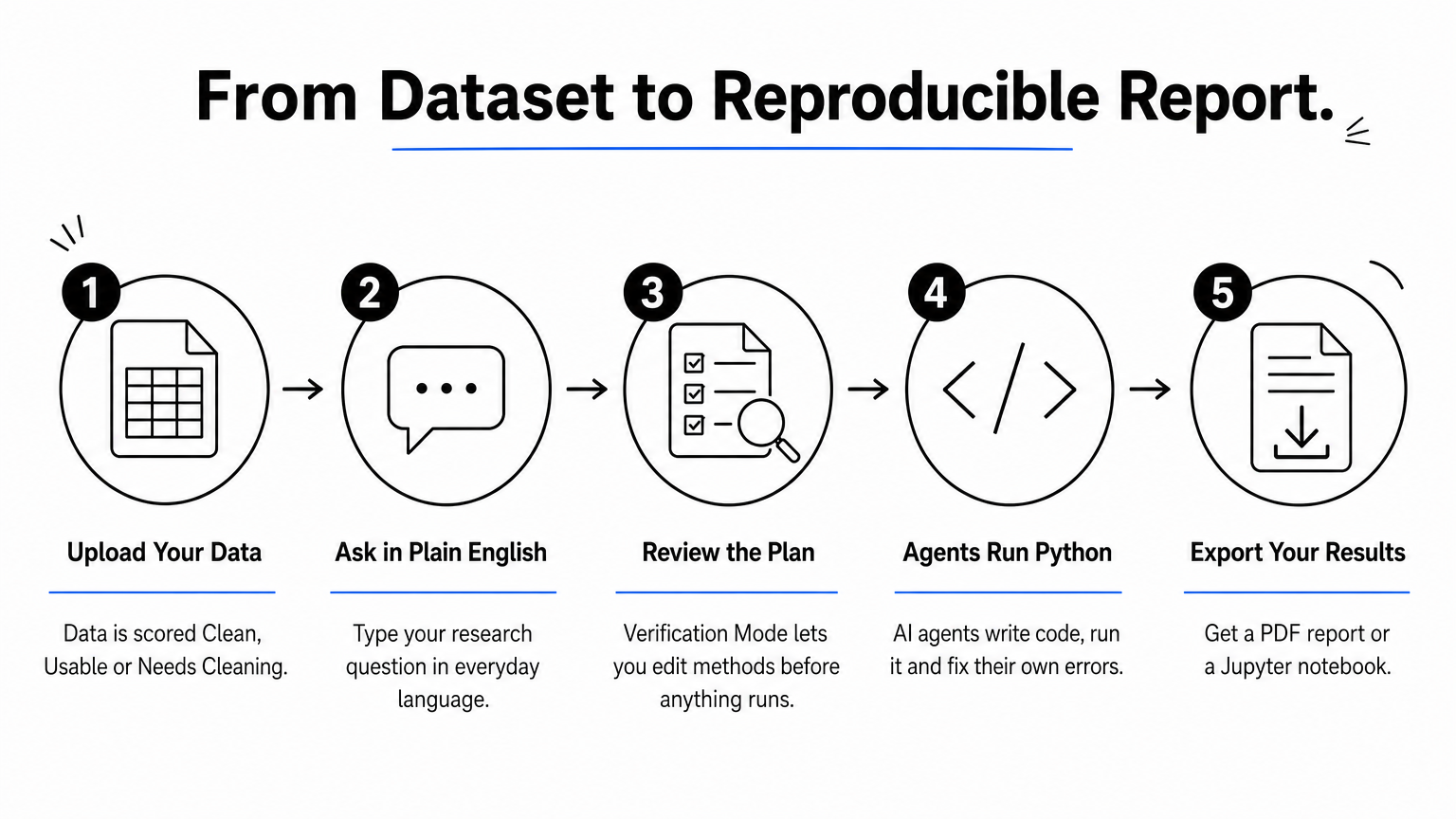
You upload a dataset and ask a question in plain English. Specialized AI agents plan the analysis, write Python, run it and correct their own errors, then interpret the output on a permanent analysis page with tables, charts and statistical tests.
- Scores uploaded data as Clean, Usable or Needs Cleaning and writes a cleaning plan.
- Verification Mode lets you review, edit and approve methods and assumptions before anything runs.
- Applies domain methods such as Cox proportional hazards and IV/2SLS.
- Exports PDF reports or a Jupyter notebook that reproduces results with Run All.
You get an assistant that shows its code and reasoning, not a black box that hands you p-values.
Who it suits
It suits graduate students, clinical researchers and analysts who know their research question better than they know Python. General chatbots can run basic tests, but they leave you to track every decision yourself. PlotStudio keeps each analysis page and builds new work on earlier findings.
Analysis runs on your machine, and AI calls go straight from it to the model provider. If you handle patient or IRB-governed data, you still need to confirm your ethics and institutional rules. It also complements Stata, SPSS or R rather than replacing every specialized procedure, and you stay responsible for the choice of method.
Cost and limits
You can start free, and the plans below cover the rest:
- Free trial: 30 credits, no credit card, no API key.
- Managed Credits: $69.99/month with 300 credits.
- Bring Your Own Key: $39.99/month with your own OpenAI API key.
- Academic plans after approval: $29.99/month (managed) or $14.99/month (BYOK).
A PhD student on Academic BYOK pays $14.99 a month, or $179.88 over twelve months, plus their own API usage. Check the download page to confirm your operating system.
2. IBM SPSS Statistics
SPSS Statistics is the safest choice if you want to run common tests through menus and your department already uses it.
What it does
SPSS lets you run t-tests, ANOVA, regression, factor analysis and nonparametric tests from dialog boxes, and it records each action as syntax you can rerun. It is common in psychology, education, health and social science, which means plenty of tutorials and colleagues who can help.
If your field already runs on SPSS, the best feature is that everyone can read your output.
Who it suits
Students and applied researchers who want results fast, without learning a programming language, get the most from SPSS. If your work is quality improvement or Six Sigma, Minitab is the similar menu-driven package built for that job.
Cost and limits
SPSS is licensed commercially, so check IBM's site for current subscription tiers. You can't get SPSS for free permanently, but IBM offers a time-limited trial, and many universities license it for students. If you need a free alternative, PSPP, jamovi and JASP cover the basics. The main limits are graphics that need manual polishing and a slower path to advanced modeling than code-based tools.
3. Stata
Stata is the strongest pick when your work is econometrics, epidemiology or biostatistics and you want every step reproducible.

What it does
Stata combines a command language with a point-and-click interface. Its do-files record the whole analysis, so you or a reviewer can rerun it later. It handles panel data, survival analysis, regression families and survey data in one environment, which is why it is a standard in economics and public health.
Do-files turn a statistical analysis into a script a reviewer can rerun in seconds.
Who it suits
Economists, epidemiologists and clinical researchers who are willing to learn a compact command syntax benefit most. The learning curve is steeper than SPSS, but commands are consistent across methods, so skills transfer quickly. Teams that need identical results across machines also like its stability.
Cost and limits
Stata is sold in several editions (BE, SE and MP) as perpetual or annual licenses, with reduced pricing for students. See stata.com for current prices. Its limits are a proprietary format, a smaller community than R, and graphs that take tuning to reach journal standards.
4. SAS/STAT
SAS/STAT is the choice for large organizations, pharma and regulated settings where validated, documented procedures matter more than convenience.
What it does
SAS/STAT includes more than 100 prewritten procedures, from ANOVA and linear regression to Bayesian inference and model selection for massive data. SAS says it has almost five decades of development behind it and documents its code for corporate and governmental compliance. It runs on major platforms and reads nearly any data source.
SAS earns its place where auditors, not preferences, decide which software you use.
Who it suits
Biostatisticians, clinical trial teams and analysts in banking or government usually end up here. Is SAS or SPSS better? SAS wins on scale, validation and programmability. SPSS wins on ease of learning. Pick by workload, not reputation.
Cost and limits
SAS prices are quote-based, so expect to contact sales. SAS also offers a free OnDemand for Academics option for learning and teaching. The limits are a program-heavy workflow, high cost outside academia, and a steep start for beginners.
5. JASP
JASP is the best free statistical analysis software for beginners who want a clean interface and clear output without paying for a license.
What it does
JASP is open source, supported by the University of Amsterdam, and runs on Windows, Mac and Linux. It offers standard analyses in both frequentist and Bayesian form, updates results live as you change options, and copies APA-formatted tables straight into Word. It integrates with the Open Science Framework.
JASP gives you SPSS-style ease without the license fee, and Bayesian analysis built in.
Who it suits
Students, psychologists and anyone teaching statistics will find it approachable. Two other free packages are worth knowing:
| Tool | Interface | Best for |
|---|---|---|
| JASP | Drag-and-drop, live results | Beginners, Bayesian analysis |
| jamovi | SPSS-like GUI, built on R | Spreadsheet-style workflows |
| R | Code-based | Custom and cutting-edge methods |
Cost and limits
All three are free. JASP's method library is narrower than SAS or Stata, and for advanced modeling you will eventually outgrow it. R has no ceiling, but expect to write code from day one.
Choosing your statistical software
Match the tool to your method, your coding comfort and your budget. Use SPSS or JASP for point-and-click work, Stata for reproducible econometrics and epidemiology, SAS where validation is mandatory, and PlotStudio AI when you want plain-English analysis with inspectable code. Most researchers end up combining two tools.
If you want to see how AI-assisted analysis works on your own data, you can try PlotStudio AI free with 30 credits and no credit card.