The most popular advice is to pick correlation analysis software by the coefficient menu and the chart gallery. That ranking falls apart once a reviewer asks what left the computer and whether the number can be rerun. PlotStudio AI is a desktop app for agentic analytics and research data analysis: agents plan the work, run Python locally, and leave the code visible.
Correlation Analysis Software Options at a Glance
Computing a correlation coefficient is trivial. Defending it in front of a reviewer is not. Correlation analysis software spans spreadsheet functions, statistical suites, open-source languages, visual dashboards, and AI data analysis apps, and the differences that matter show up in three places: where the data runs, how much method detail the output exposes, and whether the result can be rerun.
Agentic analytics is data analysis performed by AI agents that plan an investigation, execute the steps with real code, inspect intermediate results, revise the approach, and synthesize the findings. An answer is an output. An analysis is an investigation.
| Category | Example tools | Best fit | Code needed | Where computation runs |
|---|---|---|---|---|
| Agentic AI analysis apps | PlotStudio AI | Multi-step investigation with inspectable Python | Not required, code visible | Python runs locally; model calls reach the provider |
| Spreadsheet functions | Excel CORREL and Data Analysis ToolPak; Google Sheets CORREL | Quick Pearson r on small tables | Not required | Desktop or cloud, depending on product |
| Statistical suites | SPSS, Stata, SAS | Journal-standard tests with reproducible syntax | Low to moderate | Installed locally or licensed cloud |
| Open-source languages | R (cor, cor.test); Python (SciPy, pandas, statsmodels) | Full control over methods and custom pipelines | High | Local machine or hosted notebook |
| Visual BI tools | Tableau, Power BI | Exploring relationships in dashboards | Low | Desktop client or vendor-hosted service |
| General AI chat assistants | ChatGPT, Claude | Explaining methods and drafting code | Low | Vendor cloud |
None of these rows is a ranking. A spreadsheet CORREL returns a single coefficient and nothing around it. Suites and languages return tests, intervals, and syntax or code that can be rerun line by line. Dashboards earn their place when the job is exploration rather than a methods appendix. Chat assistants draft plausible code, but that code still has to be executed and checked in another tool before it counts as evidence.
Published health-science work still leans on established packages. A 2025 systematic review of 175 South African health-science articles found STATA in 41% of studies, SPSS in 30%, SAS in 17%, and R in 13%. Journal-facing syntax still carries weight even when an AI layer drafts the first pass.
On the agentic row, PlotStudio AI keeps the coefficient inside a permanent analysis page that holds the tables, charts, statistical tests, and written interpretation together, while a QA agent verifies assumptions, checks for data leakage, and flags statistical issues before results ship. Teams whose governance rules restrict outside model calls can connect their own Azure OpenAI instance for full data sovereignty. If the next decision is which test family joins the same workflow, the ANOVA test software guide covers that choice. When the deliverable is a figure rather than a coefficient, find the right data visualization tool before locking a charting stack.
Match your situation to one row before you score features. A classroom table, a thesis appendix, and a patient file do not share a winner.
Eight Criteria and Governance Checks for Correlation Software
Treat the next table as a gate for any tool that will touch research data. Walk it in order. One red flag outweighs several strong signals, because a missing audit trail cannot be repaired by a nicer plot.
| Criterion | What to verify | Strong signal | Red flag |
|---|---|---|---|
| Statistical coverage | Coefficients, tests and intervals reported | Pearson, Spearman and Kendall with CIs and stated assumptions | Only r, with no p-value or interval |
| Data profiling | Schema, types, missingness and distributions checked before tests | Automatic audit with per-column missingness and outlier flags | Analysis starts with no inspection |
| Cleaning | How duplicates, type errors and missing values are handled | Logged decisions with before-and-after counts | Silent row dropping |
| Reproducibility | Whether exact code, versions and seeds can be rerun | Inspectable code and exportable notebook | Result only, no code |
| Verification | Whether the plan and assumptions are checked before results ship | Reviewable plan and assumption checks | No plan visible |
| Privacy and deployment | Where data and prompts travel | Local execution, documented model provider, institutional endpoint option | Undisclosed upload path |
| Integrations | Import and export formats and links to other tools | CSV and Excel in; notebook and PDF out | Locked output format |
| Outputs | What a reviewer receives | Scatterplots, coefficient tables, methods text and saved record | A single number in a chat reply |
Statistical coverage means Pearson, Spearman, and Kendall with intervals and stated assumptions, not a bare r. Profiling means schema, types, missingness, and distributions before any test. Cleaning means logged decisions and before-and-after row counts. Silent row dropping is a methods failure, not a convenience.
Reproducibility is inspectable code, package versions, seeds, and an exportable notebook. Verification is a reviewable plan before results appear. Integrations are CSV and Excel in, notebook and PDF out. Outputs a reviewer can use are scatterplots, coefficient tables, methods text, and a saved record. A single number in a chat reply fails that bar. A practical audit pattern is laid out in the data analysis audit trail guide.
What leaves the computer
Privacy is its own check, and feature lists rarely answer it. A 2025 University of Michigan survey of 260 students, staff, and faculty gave university-provided AI tools a mean privacy rating of 3.25, against 2.44 for commercial tools. The same survey found commercial tools preferred for accuracy and efficiency, while institutional tools scored better on ethical standards, transparency, and privacy. Convenience does not clear a governance barrier.
Practical rule: Save the generated code, rerun it offline, and compare the output. If it cannot be rerun, treat that as a governance gap.
Local execution keeps the computation on the machine. PlotStudio AI runs analysis on the user's machine, not on PlotStudio's servers. Model calls still travel. PlotStudio AI uses AI models provided by OpenAI to generate code, analysis, narratives, and visualizations. Enterprise teams can connect their own Azure OpenAI instance for full data sovereignty. The provider, a bring-your-own-key setup, or an institutional endpoint is what decides the governance answer. GDPR, HIPAA, and data-residency rules decide which rows in the first table are even permissible.
Weight the checklist by context. A classroom exercise can favor fast outputs. A clinical file favors privacy and reproducibility. Do not average the scores. Fail the tool on the criterion your protocol cannot waive.
Choosing Pearson, Spearman or Kendall for Your Data
The decision is which coefficient the variables actually support. Software that offers every name on a menu still leaves that call to you.
| Method | Use when | Key assumption | Main sensitivity |
|---|---|---|---|
| Pearson r | Continuous variables with a linear relation | Approximately bivariate normal for inference | Outliers, nonlinearity, range restriction |
| Spearman rho | Monotonic relation, ordinal or non-normal data | Monotonic relation | Heavy ties reduce resolution |
| Kendall tau-b | Small samples or many tied ranks | Independent observation pairs | Interpretation as pair concordance; slower on large data |
| Partial correlation | Association after adjusting for covariates | Correct covariate set and linearity | Omitted confounders, collinearity, clustered data |
| Point-biserial | One binary and one continuous variable | Continuous variable roughly normal within groups | Unequal group sizes and variances |
Pearson r fits continuous variables with an approximately linear relation. Inference that quotes a p-value assumes approximate bivariate normality, and outliers or a restricted range move r hard. Spearman rho fits monotonic relations, ordinal scales, and non-normal data. Heavy ties flatten its resolution, so a 1–5 scale with the bulk of responses piled on 4 and 5 is a weaker instrument than it looks. Kendall tau-b fits small samples and many tied ranks. Read it as a difference in concordant and discordant pairs, not as a standardized slope.
Partial correlation estimates association after covariates are held fixed, and only when that covariate set is the right one. It does not repair clustered schools or repeated measures. Those designs need a mixed model. Point-biserial correlation applies when one variable is binary. Coded 0 and 1, it matches Pearson on the same columns, so unequal group sizes and variances are the main threat, not a separate formula.
A worked choice
Say 120 employees rate weekly training satisfaction on a 1–5 scale and you also have hours trained. The rating is ordinal, so Spearman is the coefficient to plan, reported with a confidence interval and with N = 120, not a naked rho. If you later adjust for tenure, partial correlation is a second, pre-written step, not a silent swap after you see the first number.
The same logic breaks for other shapes of data. Time series, genomic panels, and geospatial layers are not "pick r or rho" problems. PlotStudio AI supports domain-specific statistical methods including GARCH volatility models, RSI and MACD momentum indicators, and Bollinger Bands for financial timeseries, survival curves for clinical trial data, FDR correction across 20K genes for genomics, and spatial autocorrelation for geospatial data. Check that the tool covers the model family the domain requires. The statistical test selection guide is the place to settle the neighboring test before you lock a coefficient.
A Correlation Workflow From Upload to Reportable Result
A coefficient computed on an unprofiled file is a draft, not a result. The figure below is the short path. The numbered list is the version you can defend.
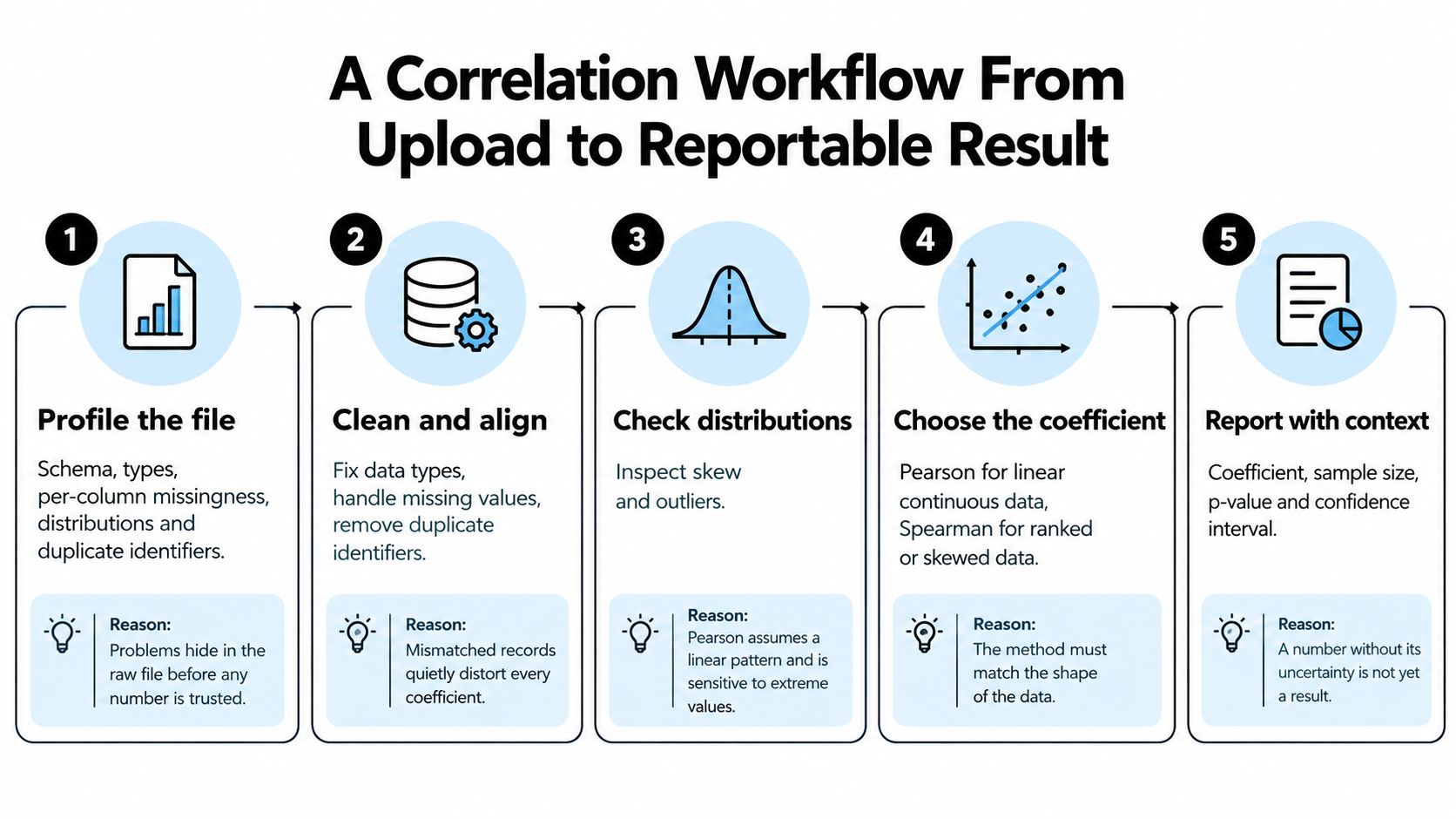
- Profile the file. Check schema, types, per-column missingness, distributions, and duplicate identifiers, because problems hide in the raw file before any number is trusted. PlotStudio AI's profiler runs this audit on upload, covering schema, types, missingness, distributions, and a quality score.
- Classify missingness. Label each variable MCAR, MAR, or MNAR, choose pairwise or listwise deletion on purpose, and report N for every pair, because a smaller N changes both the interval and the claim.
- Plot every pair. Use a scatterplot and a rank plot to look for nonlinearity, clusters, ceiling effects, and influential points, because a linear summary can hide a curve.
- Write the method into the plan. Set Pearson, Spearman, Kendall, partial, or point-biserial using the rules above before anything runs, so the result cannot pick its own test.
- Report the interval. Give the coefficient, a 95% confidence interval (Fisher z for Pearson, bootstrap for Spearman or Kendall), and the p-value, because a point without a width is not yet a result.
- Correct a matrix. If you test a whole set of pairs, apply Benjamini-Hochberg and state the adjusted threshold, because uncorrected pairs manufacture false positives.
- Run sensitivity checks. Compare Pearson with Spearman, remove influential points only with a stated reason, and split subgroups that were named in advance.
- Save the run. Keep the code, package versions, and random seed, then export a notebook or PDF that includes the methods text.
Steps 1, 5, 6, and 8 are what software can automate. Steps 2, 4, and 7 still need the researcher's judgment, including whether a flagged column is a real leak or a legitimate covariate. A QA pass can flag unverified assumptions or leakage, such as a derived column that encodes the outcome. PlotStudio AI's QA agent verifies assumptions, checks for data leakage, and flags statistical issues other agents might have missed. You still decide which flag matters.
If profiling is the step your current stack skips, the data profiling software guide spells out what an upload audit should show. Export is part of the same close: PlotStudio AI offers one-click PDF export with embedded charts, formatted tables, and rendered LaTeX equations, plus a Jupyter notebook with the code and outputs.
A short walkthrough of reading a scatter and its coefficient is worth watching before you automate the same checks.
Why a Correlation Coefficient Is Not Yet a Finding
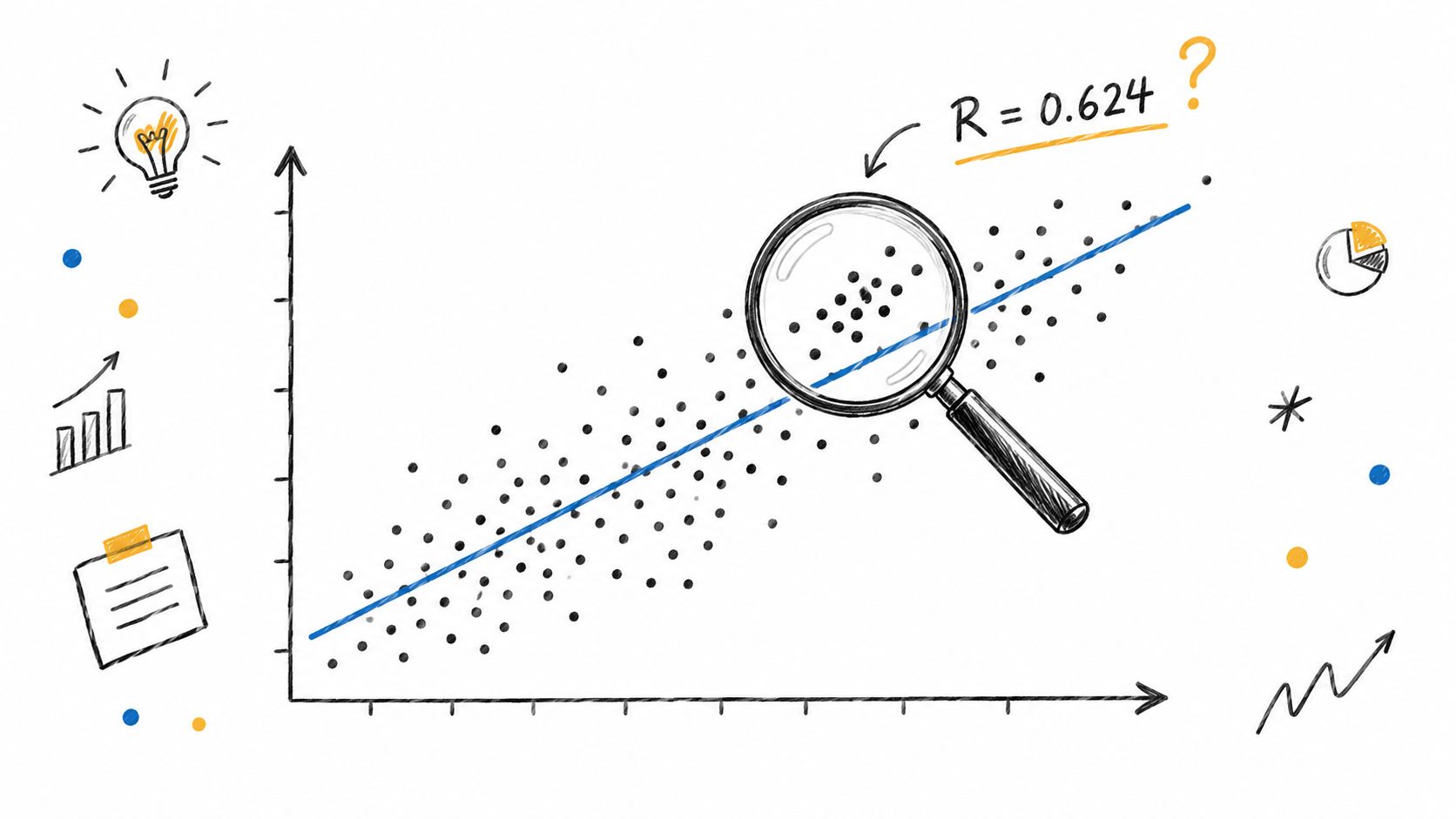
Any cutoff that treats "r above 0.5" as a finding is a shortcut, not a standard. A 2025 study of 226 undergraduate and postgraduate students reported a correlation of R = 0.624 between over-reliance, institutional factors, ethical concerns, and negative learning outcomes. Respondents associated heavier AI reliance with less critical-thinking engagement and less motivation to read and analyze materials. That association does not show that AI caused poorer outcomes. It is the trap in miniature.
Confounding lets a third variable, such as prior grades, drive both measures, so r describes a shared cause. Selection bias keeps only completers or volunteers, so r describes who stayed. Nonlinearity lets a near-zero r hide a strong curve. Measurement error in either variable attenuates r toward zero. Restricted range shrinks r when the sample is a narrow slice of the population. Non-random missingness biases the remaining pairs when deletion follows the outcome. Dependence from repeated measures or clustered schools inflates the effective sample size and makes p-values look sharper than they are. Multiplicity means a matrix of 100 pairs will produce false positives by chance if you never adjust.
A coefficient summarizes a sample under assumptions. The checks are what test that summary.
What a reviewer should see
State whether the analysis is exploratory or confirmatory. Label subgroups that were pre-specified. Use association language unless a causal design supports a causal verb. How large an association is, once those labels are honest, is a separate reading, covered in the effect size interpretation guide.
Software should surface these caveats in plain language and let you review the plan before the run. PlotStudio AI includes Verification Mode, which lets you review the plan before any analysis runs, ask questions, propose your own methodology, edit it, see a diff of every edit, and undo a change with one click. The coefficient can stay in the table. The finding is the checked argument around it.
Frequently Asked Questions About Correlation Software
What should correlation software check before a finding?
It should profile the file, diagnose missingness and outliers, show scatterplots that reveal a nonlinear shape, report confidence intervals, run subgroup and sensitivity checks, warn on multiplicity, handle clustered or repeated-measures data, and keep association wording separate from causation. A tool that skips those checks is returning a calculation, not a result you can defend.
Which tool is best for research data?
Governance and skill decide it. SPSS, Stata, or SAS suit journal-standard syntax. R or Python suit custom pipelines you will own. PlotStudio AI suits multi-step analysis when you want visible Python without writing the first draft yourself. There is no single best package for every protocol.
Is Spearman always safer than Pearson?
No. Spearman fits monotonic relations and ordinal scales. When the relation is linear, the measures are continuous, and the data are clean, Pearson uses more of the information in the values. Choose by the shape of the relation and the measurement level, not by a habit of "always rank it."
Can AI-written correlation code be trusted without review?
No. Inspect the code, rerun it on the saved inputs, and check a sample of results against a manual calculation before you report them. Visible code is an advantage only if someone on the team reads it.
Pick Correlation Software by Role Before You Commit
Commit to the deliverable first, then the tool. The cards below are a fast sort. The scenarios under them are the version with a real file attached.
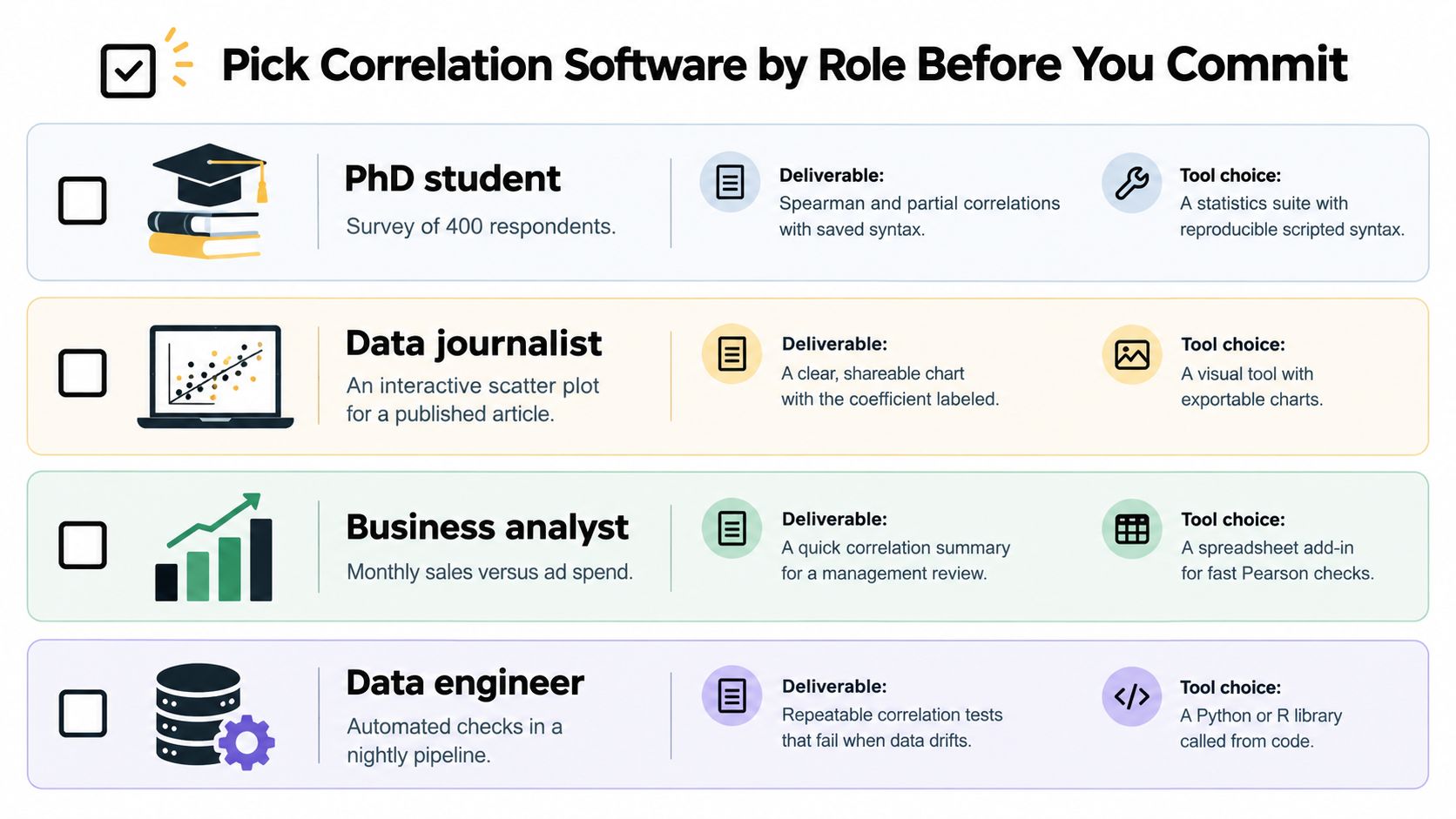
A PhD student with a survey of 400 respondents needs Spearman and partial correlations plus saved syntax for the thesis appendix. R or SPSS fits. An AI assistant can draft that syntax, and the student still checks it before it enters the appendix.
A clinical researcher correlating biomarkers in patient records needs local execution, an institutional endpoint when one exists, and a missingness audit before any pair is reported. A cloud chat that uploads the file is the wrong row, even if the coefficient comes back faster.
A data analyst can use an AI analysis app for a fast first pass that still leaves a trail. Josh, a Manufacturing Data Analyst at Haffner Energy, brought a real fault log to a demo to test whether one of two machines caused more defects. PlotStudio AI cleaned the data, ran significance testing, controlled for operator and shift, and broke the result down by fault type. The finding stayed an association with the obvious confounders named, which is what a defensible result looks like at that stage.
A product manager checking whether engagement moves with churn can start in a spreadsheet or a dashboard when the question is direction. The moment the decision depends on confounder control, the same question needs a documented analysis, not a CORREL cell.
When an AI data analysis app is the row
Pick this row when the job is multi-step analysis rather than a single coefficient: a methodology you can inspect and edit before execution, Python that runs on your own machine, visible code behind every step, and an export you can attach to a report. PlotStudio AI fits that row and can be considered a Julius AI alternative for analysts who want the first draft written for them. It is designed for business analysts, data scientists, product managers, researchers and academics, consultants and freelancers, and teams without a data team, and its Verification Mode shows the planned methodology before any analysis runs. Results export to PDF or a Jupyter notebook with the code and outputs. The free trial requires no credit card.
Download PlotStudio AI from plotstudio.ai and run one correlation you already know the answer to. Seeing the plan, the local Python, and the export on a known answer tells you more than any feature list before you trust it with a new file.