The best statistics software for Mac OS X depends on how much you want to code. For free point-and-click work, pick JASP or jamovi. For full control and scripting, use R with RStudio. For a paid app built only for the Mac that needs no programming, choose Wizard. If you would rather describe an analysis in plain English and get figures, tests and a written interpretation back, PlotStudio AI is the pick for researchers on Apple Silicon Macs.
Finding the right tool is harder than it should be. Many statistics programs are built for Windows first, and the Mac versions lag behind or ship with bugs. Apple renamed OS X to macOS years ago, yet search results still mix both names. Some of them even show Stats, which is a menu bar system monitor and has nothing to do with data analysis.
This list covers five programs that run on a Mac, with what each does well, where it falls short, and what it costs. We build PlotStudio AI, so it comes first, and we say plainly where the free tools beat it.
1. PlotStudio AI
PlotStudio AI is an AI research workspace for the desktop that runs statistical tests, builds charts and writes the interpretation. It suits researchers who need results and figures without writing code.

How it works on a Mac
You load a CSV or Excel file and ask a question in plain English. A team of AI agents plans the investigation, writes Python, runs it on your machine and corrects its own errors. Every question produces a permanent analysis page with tables, charts, statistical tests and interpretation. Later questions build on earlier pages instead of starting from zero.
Control stays with you. In Verification Mode you review the plan before it runs, edit the methods and approve the assumptions. You can inspect the generated code and export a PDF report or a Jupyter notebook that reproduces the results. Analysis runs locally, and PlotStudio's servers never receive your dataset. Prompts still go from your machine to the model provider, so check your institution's rules before using clinical or patient data.
You describe the question, and the plan, the code and the assumptions stay visible for you to check.
Price and who it suits
PlotStudio fits graduate students, clinical researchers and academics who need publication-style figures and a documented method. It supports the researcher and does not replace judgment, so you still verify the output. The Mac download targets Apple Silicon. One worked example: Bring Your Own Key at $39.99 a month is $479.88 a year, and the academic version at $14.99 is $179.88.
- Free Trial: 30 credits, no credit card, no API key
- Managed Credits: $69.99 a month with 300 credits included
- Bring Your Own Key: $39.99 a month with your own OpenAI API key
- Academic plans after approval: $29.99 a month (managed) or $14.99 a month (BYOK)
2. JASP
JASP is a free, open-source statistics program from the University of Amsterdam. It is the strongest free statistical analysis software for Mac if you want an SPSS-like experience.
How it works on a Mac
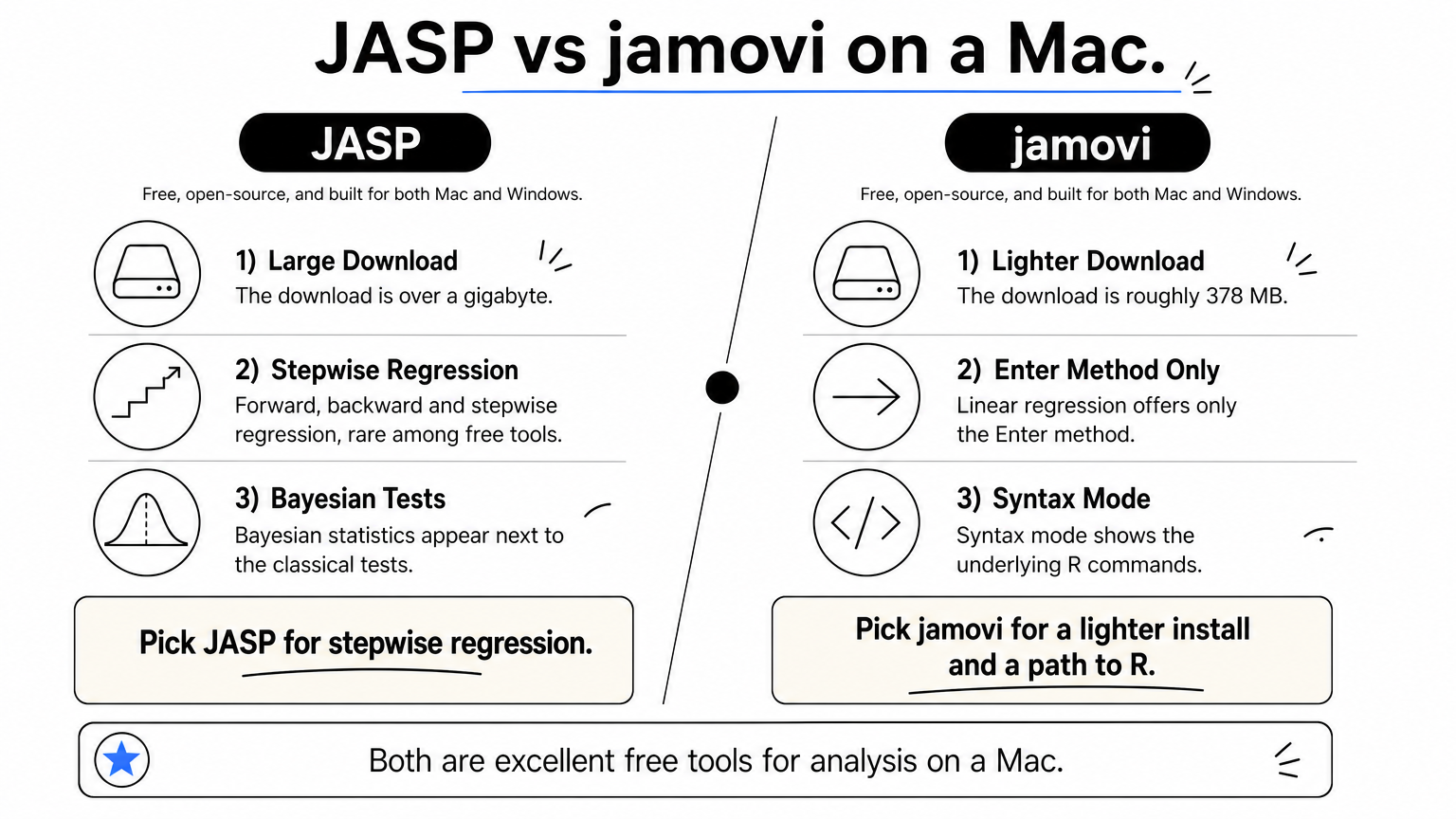
JASP is a graphical front end for R. You click through menus, and results appear instantly as formatted tables and plots. It feels native on macOS, with the standard Mac file dialog available through Browse. It imports SPSS, Minitab, Stata and spreadsheet files, and supports forward, backward and stepwise regression, which is rare among free tools. Bayesian statistics appear next to the classical tests, which can confuse beginners.
Independent testing found its numbers identical to SPSS, PSPP and jamovi. The cost is size, since the download is over a gigabyte. Recoding data is clumsy, and t-tests need a grouping variable with exactly two values.
JASP gives you SPSS-style output and regression options at no cost, as long as you can spare the disk space.
Price and who it suits
JASP is free and open source. It suits students, teachers and researchers who learned on SPSS and want a clean Mac interface. Pick it for t-tests, ANOVA, regression and Bayesian alternatives. Skip it if your project needs heavy data wrangling.
- Price: free
- Learning curve: low
- Main limits: large install, awkward recoding
3. jamovi
jamovi is another free, open-source package built on R, with a spreadsheet-style interface. It is lighter than JASP and easier to use for repeatable work.
How it works on a Mac
You work in a spreadsheet and pick analyses from menus. Results are tidy, and a right-click copies a table that pastes into Word already formatted. Syntax mode shows the underlying R commands, so you can learn R gradually or script the same steps again. Data, analyses and options save in one file, which makes your work easy to share. It imports SPSS, SAS, Stata and spreadsheet files, and a free cloud version runs in the browser. The download is roughly 378 MB.
The gaps are real. Linear regression offers only the "Enter" method, value labels are not supported, and date and time variables are missing. If you want the layout of 1990s SPSS, the free PSPP clone exists, but its Mac version has bugs and development is slow.
jamovi trades JASP's regression options for a smaller install and a cleaner path from clicking to R.
Price and who it suits
jamovi is free. It suits classes, small studies and researchers who want to move toward R without starting on a blank script. Use JASP instead if you need stepwise regression.
- Price: free (desktop and cloud)
- Learning curve: low
- Main limits: Enter-only regression, no date variables
4. R with RStudio
R is a free, open-source statistical programming language, and RStudio is the editor most people use with it. It gives you the widest range of methods on a Mac, if you are willing to write code.
How it works on a Mac
You install R from the official site, add RStudio Desktop, and write scripts. Every analysis is a line of code, so your work is fully reproducible and easy to rerun on new data. Thousands of community packages cover methods that no menu-driven program includes. JASP and jamovi both sit on top of R, so the code you eventually write follows the same logic they use.
The price is time. A first t-test takes minutes in JASP and an afternoon in R if you have never coded. Package versions can break old scripts, and errors are terse. Plan a few weeks before you feel fast.
R has no ceiling on what you can analyze, but you pay for that freedom in learning time.
Price and who it suits
R and RStudio Desktop are free. They suit statisticians, data scientists and graduate students who will analyze data for years and need scripted, shareable workflows. If you only need a few tests this semester, start with a point-and-click tool.
- Price: free
- Learning curve: steep
- Main limits: coding required, package maintenance
5. Wizard
Wizard is a paid statistics app made only for the Mac. It suits people who want a polished, native interface and no programming or typing.

How it works on a Mac
You click a variable and see a picture of it, with the appropriate test chosen from context. Wizard covers t-tests, log-rank tests, regression and models such as logistic and proportional hazards. It imports CSV, Excel, Numbers, R workspaces and databases including SQLite, MySQL and PostgreSQL. Results export as PDF or PNG, and models export as interactive spreadsheets.
The free trial never expires, but it does not report p-values and cannot save or export, so you only really evaluate the interface. Wizard Pro adds SAS, SPSS and Stata imports for people moving between programs. It runs only on macOS, which also means collaborators on Windows cannot open it.
Wizard is the cleanest Mac-only interface here, but you pay before you can see a p-value.
Price and who it suits
Wizard is listed at $99.99 on the App Store, and Wizard Pro at $249.99. It fits business users, teachers and researchers who value speed and a pleasant interface over scripting. Choose a free tool first if budget is tight.
- Wizard: $99.99 one-time purchase
- Wizard Pro: $249.99, adds SAS, SPSS and Stata imports
- Main limits: Mac only, trial lacks p-values and export
Choosing the right Mac statistics tool
Start with your skills and your budget. JASP and jamovi cover most coursework and small studies for free. R with RStudio is the long-term choice if you will code. Wizard rewards people who want a polished Mac app and will pay once for it.
If your priority is going from a dataset to publication-style figures and a documented method without learning Python or R, try PlotStudio AI free. The trial gives you 30 credits and needs no credit card or API key.