
The best AI chatbot for research is the one that fits the job in front of you. Perplexity and ChatGPT's deep research mode suit sourced web and market research. Claude suits long papers and careful writing. NotebookLM and Elicit suit literature reviews. Gemini and Copilot suit people who already work inside Google or Microsoft tools. If your question sits inside a dataset, PlotStudio AI fits better than any general chatbot.
Most chatbots will answer anything, and that is the problem. They invent citations, skip over method choices, and cannot tell you whether your test was appropriate for your data. Researchers end up with five browser tabs and no clear way to trust the output. This guide sorts eight options by task, with pricing, limits, and a way to check what each one tells you.
We put PlotStudio AI first because it is our product, and we describe it as what it is: a desktop analysis workspace, not a general chatbot. Prices below are list prices at the time of writing. Plans change often, so confirm on each vendor's page before you pay.
1. PlotStudio AI: best for analyzing your own data
PlotStudio AI is the right choice when your research question lives in a dataset, not in a stack of papers. You upload a CSV or Excel file, ask questions in plain English, and the app plans the analysis, runs Python on your machine, and returns figures, tables, and an interpretation. It is a desktop analysis workspace rather than a general chatbot, and that difference is the point.

What it does for research
A team of specialized agents plans the investigation, writes the Python, executes it, fixes its own errors, and interprets the results. When you upload a file, it scores data quality as Clean, Usable, or Needs Cleaning and writes a cleaning plan. Every question then produces a permanent analysis page with tables, charts, statistical tests, and interpretation, and later questions build on those earlier findings.
Control is what separates it from a chat window. In Verification Mode you review the plan, ask questions about it, edit the methodology, and approve the methods and assumptions before anything runs. You see a diff of every edit and can undo it in one click. Domain methods such as Cox proportional hazards and instrumental variables apply where the field calls for them, and you can export a PDF report or a Jupyter notebook that reruns the same results.
A chatbot gives you an answer; a research workspace shows you the code, the method, and the assumptions behind it.
Who it suits
It fits researchers whose main output is figures and statistics: clinical, biomedical, public health, and social science researchers, plus graduate students working on a dissertation. Typical jobs include:
- Group comparisons, regression, and survival analysis with Kaplan-Meier curves
- Publication-ready figures such as box plots, violin plots, and correlation heatmaps
- Cleaning a messy survey or clinical export before analysis
- A reproducible record of every analytical step for co-authors or reviewers
Analysis and Python execution run locally, and PlotStudio does not store your datasets on its servers. Your prompts still go from your machine to the model provider, so confirm your IRB and institutional rules before you use patient data.
Pricing and limits
- Free trial: 30 credits, no credit card, no API key
- Managed Credits: $69.99/month with 300 credits
- Bring Your Own Key: $39.99/month with your own OpenAI API key
- Academic plans after approval: $29.99/month (managed) or $14.99/month (bring your own key)
It will not search the literature or find papers for you, and the scientific judgment stays with you. A figure that looks publication-ready is not the same as a correct analysis, and every journal sets its own requirements. It also complements SPSS, Stata, and R rather than replacing them. Check the download page for supported operating systems.
2. ChatGPT: best all-round chatbot for research
ChatGPT is the best starting point if you want one chatbot for scoping, reading, drafting, and quick analysis. It does no single research task better than every specialist, but it does most of them well enough that many researchers keep it open all day.
What it does for research
Its deep research mode asks clarifying questions first, then spends up to about 20 minutes browsing and returns a long report with sources. That makes it a strong first pass for market research, competitor scans, and "what does the field say about X" questions. Regular chats can also search the web, read uploaded PDFs, and look at screenshots of charts or tables.
Projects keep chats, files, and a standing instruction set together, so you stop re-uploading the same papers. ChatGPT can also run code on a spreadsheet you upload and draw a quick chart. Read the code it writes. You need to know which test it picked, and the same question can produce different code on a second run.
Use ChatGPT to get oriented fast, then move to a specialist tool when the answer has to be defensible.
Who it suits
It suits people whose research is broad and varied:
- Market researchers building a first-pass landscape report
- Students scoping a topic before a proper literature search
- Anyone drafting survey questions, interview guides, or summaries
Pricing and limits
- Free plan with limited model access
- Go: $8/month, with ads
- Plus: $20/month, with more models and higher message limits
Its biggest weakness is citation quality. Sources can be real but mismatched to the claim, or occasionally invented. Consumer plans may use your conversations for model training unless you change the data controls, so look at those settings before you paste in unpublished work.
3. Claude: best for long papers and careful writing
Claude is the best choice when the work is reading long documents and producing clear, structured prose. Researchers favor it for thesis chapters, policy analysis, and any task where you hand it a full paper and ask pointed questions.
What it does for research
Claude has a large context window, so you can load several papers or a long report and ask it to compare arguments across them. It keeps track of detail in long PDFs better than many alternatives, and it tends to push back on weak reasoning if you ask it to. A prompt like "critique this argument and flag unsupported claims" gets useful friction rather than flattery.
Projects hold your source documents and instructions in one place. Artifacts let you build small interactive outputs, such as a budget model or a chart you can tweak in the side panel. Connectors link it to other work apps if you want it to pull from your own files.
Give Claude the documents and ask it to argue with you; it is stronger at reasoning over text you supply than at finding new sources.
Who it suits
It fits people who write for a living or for a degree:
- Graduate students drafting and revising chapters
- Analysts summarizing long reports or transcripts
- Policy and legal researchers comparing dense documents
Pricing and limits
- Free plan with limited usage
- Pro: $17/month billed annually
- Max: $100/month for heavy use
- Team and Enterprise plans with admin controls on request
Long documents burn through usage caps quickly, so plan your sessions. Its web research is less central to the product than Perplexity's, so treat it as a reader and writer of material you provide, not as a source finder.
4. Perplexity: best for cited web research
Perplexity is the best chatbot for quick, sourced answers from the live web. It behaves like a search engine that writes a paragraph, with links to the sources placed next to each claim.
What it does for research
Citations are on by default, so you can click through from any statement to the page behind it. It offers three depths. Search gives a direct answer with linked sources. Research mode runs more searches and returns a longer report. Labs uses a search as the starting point for finished outputs such as slides or dashboards.
Spaces let you collect files, links, and instructions for a topic and share them with collaborators. Paid plans let you choose among several underlying models, which helps when one model handles your topic poorly.
A citation proves a source exists, not that the source says what the answer claims, so open the link before you rely on it.
Who it suits
It works best for fact-finding and current-events research:
- Market and competitor research that needs recent sources
- Fast background reading on an unfamiliar topic
- Journalists and analysts checking claims against primary pages
Pricing and limits
- Free tier with a generous daily allowance
- Pro: about $17 to $20/month, depending on billing period
Reasoning depth on complex, multi-step analysis is weaker than Claude or ChatGPT, and it is better at factual lookups than open-ended thinking. Summaries can also overstate what a source says, and web sources vary in quality. For scholarly work, pair it with a tool that searches papers.
5. Gemini: best for Deep Research inside Google tools
Gemini is the best pick if your files, email, and calendar already live in Google Workspace. Its Deep Research feature also produces some of the most readable report-style output of the general chatbots.
What it does for research
Deep Research starts by writing an editable research plan. You adjust it, confirm, and Gemini then works through the plan and returns a report with expandable source sections. From the finished report you can create a web page, an infographic, or an audio overview, which helps when you need to share findings with people who will not read a long document.
With Workspace apps switched on in settings, Gemini can search Gmail, find calendar events, and work with Docs and Drive. In practice, those integrations mostly retrieve and summarize data rather than carry out complex actions. Gems let you save custom instructions for recurring tasks, such as "summarize papers in this template".
Gemini pays off when your sources are already in Google's tools; outside them, it is one good option among several.
Who it suits
It suits teams and students who work in Google's ecosystem:
- University users with Workspace for Education accounts
- Small teams sharing research notes in Docs and Sheets
- Anyone who wants an editable plan before a long research run
Pricing and limits
- Free access to basic features
- Google AI Plus: $4.99/month
- Google AI Pro: $19.99/month
Response quality can be inconsistent from one prompt to the next, so rerun important questions and compare. Check which Gemini features your institution has enabled, since administrators can restrict them.
6. Microsoft Copilot: best inside Microsoft 365
Microsoft Copilot is the best option when your research material sits in Word, Excel, Outlook, and Teams. Its value comes from reaching your own files and meetings, not from beating the others at open-ended questions.
What it does for research
Copilot is built into Word, Excel, PowerPoint, Outlook, and Teams, and it draws on your files, email, and calendar through Microsoft Graph. You can ask it to summarize last week's email threads, pull action items from a meeting, or explain a spreadsheet without leaving the app. Copilot Vision can look at your screen to help troubleshoot or draft replies.
The free core chat includes web search and citations, so it also works as a general research assistant. Inside Excel it turns plain-language questions into formulas and summaries. Check its calculations on a sample, because spreadsheet logic errors are easy to miss.
Copilot is strongest as an assistant to the work already in your Microsoft files, not as a standalone research engine.
Who it suits
It fits people in Microsoft-first organizations:
- Corporate researchers and analysts living in Excel and Teams
- Operations and finance teams summarizing documents and meetings
- Students whose university supplies Microsoft 365
Pricing and limits
- Free core chat with web search and citations
- Microsoft 365 Personal: $9.99/month; Family: $12.99/month; Premium: $19.99/month
- Business licensing: $30 per user per month on top of eligible Microsoft 365 plans
It is tied to the Microsoft ecosystem, and features differ by app, so expect to explore. Its research depth trails dedicated tools like Perplexity, and the business license cost adds up across a team.
7. NotebookLM: best for chatting with your own sources
NotebookLM is the best tool when you want answers drawn only from documents you choose. You upload papers, notes, and transcripts, and it answers questions grounded in that material, pointing to the passages it used.
What it does for research
You build a notebook from your sources, then ask questions, request summaries, or generate study guides and audio overviews. Because answers come from your uploads, it is far less likely to invent facts than a chatbot answering from general training. The citations point back into your documents, so checking a claim takes seconds.
That grounding is also its limit. It knows only what you give it. It will not find new papers, and it will not tell you what is missing from your reading list. Use another tool for discovery, then load the papers you decide to keep.
NotebookLM trades breadth for trust: narrow your sources, and you narrow the room for invented answers.
Who it suits
It fits anyone synthesizing a defined set of documents:
- Thesis and dissertation writers managing a literature review
- Lab groups building a shared reading notebook
- Consultants digesting client documents and interview notes
Pricing and limits
- Free to start, which covers most individual use
- Higher limits through Google's paid AI plans
Each notebook has source and size limits, so split large projects into several notebooks. It is a reading and synthesis tool, not a statistics tool, so it will not run your analysis. Check Google's current limits page for exact numbers.
8. Elicit: best for literature reviews and evidence tables
Elicit is the best fit for scholarly literature work. It is less a general chatbot than a research assistant built around academic papers, and it turns a research question into a structured set of studies.

What it does for research
You ask a research question, and Elicit searches scholarly papers and summarizes the findings of each one. Its strongest feature is data extraction into tables: sample size, population, method, and outcomes pulled from many papers into columns you can scan and compare. This replaces hours of copying details by hand when you screen a body of literature.
It supports parts of the systematic review process, such as screening and extraction. Still, a formal review needs your own protocol and inclusion decisions. Extraction can contain errors, so read the original paper for any number you plan to cite.
Let Elicit build the first evidence table, then verify every cell you intend to cite against the paper itself.
Who it suits
It suits people who need to survey published evidence:
- Graduate students writing literature reviews
- Clinical and public health researchers scanning trial and cohort studies
- Research staff preparing background sections for grants
Pricing and limits
- Free plan available
- Paid plans for higher limits and extraction features
Pricing changes, so check Elicit's own page. It covers published scholarly literature only, so it will not help with market research, grey literature, or your own raw data. For that data, a tool like PlotStudio is the better step after the review.
How to choose the right chatbot for your research
Choose by task first and price second. Most researchers end up with two or three tools, each assigned to a stage of the work, rather than one chatbot that does everything.
Match the tool to the task
| Research task | Best pick | Why |
|---|---|---|
| Current web and market research | Perplexity, ChatGPT deep research | Live search with linked sources |
| Finding and comparing papers | Elicit | Searches scholarly literature, builds evidence tables |
| Reading a stack of PDFs | NotebookLM, Claude | Grounded in your documents, long context |
| Statistics and figures from your data | PlotStudio AI | Runs code locally, shows methods, exports notebooks |
| Drafting and editing | Claude, ChatGPT | Strong prose and structured revision |
| Already in Google or Microsoft | Gemini, Copilot | Reaches your files and meetings |
Compare prices side by side
| Tool | Free option | Paid price from |
|---|---|---|
| PlotStudio AI | 30-credit trial, no card | $39.99/month ($14.99 academic BYOK) |
| ChatGPT | Yes | $8/month (Go), $20 (Plus) |
| Claude | Yes | $17/month billed annually |
| Perplexity | Yes | About $17 to $20/month |
| Gemini | Yes | $4.99/month (Plus), $19.99 (Pro) |
| Copilot | Core chat free | $9.99/month (Personal) |
| NotebookLM | Free to start | Through Google's paid plans |
| Elicit | Yes | Paid plans, see vendor |
A worked example for one dissertation
Take a graduate student with a literature review and one survey dataset. Perplexity's free tier handles background searches, and NotebookLM's free tier holds the chosen papers. Claude Pro at $17 a month, billed annually, handles chapter drafting. PlotStudio's academic managed plan, once approved, costs $29.99 a month and covers the survey analysis and figures.
- Total with academic approval: $17 + $29.99 = $46.99 per month
- Total at regular PlotStudio pricing: $17 + $69.99 = $86.99 per month
Drop the paid chatbot and the monthly bill falls to the $29.99 plan alone. Most students can add tools only when a specific task needs them.
How to check what a research chatbot tells you
Treat every chatbot answer as a lead, not a finding. AI chatbots are legal to use, but your institution, journal, or ethics board may set rules for how you use them, and the accuracy of what you publish remains your responsibility.
Verify every citation
Run this check before any claim reaches your draft:
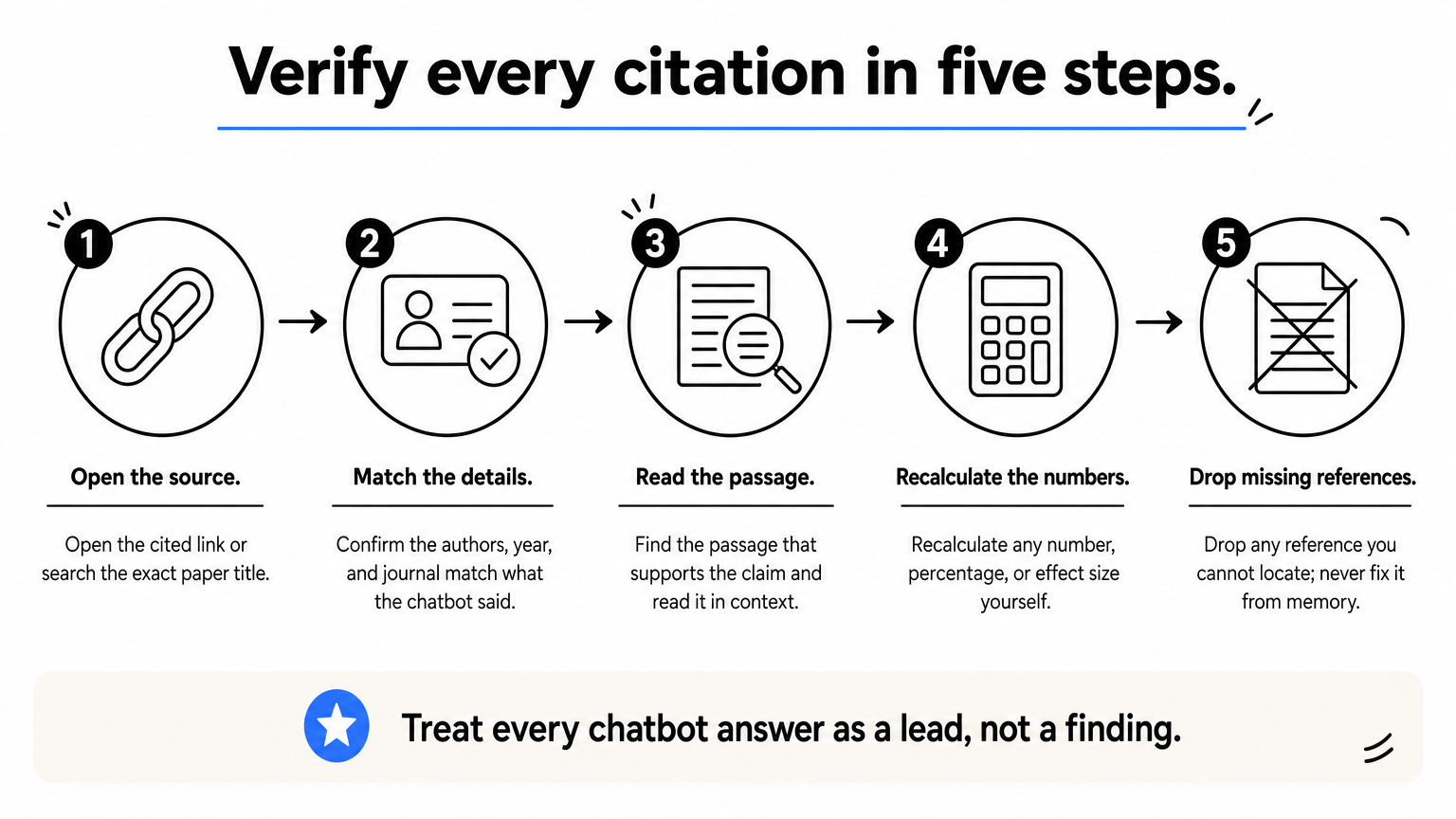
- Open the cited link or search the exact paper title.
- Confirm the authors, year, and journal match what the chatbot said.
- Find the passage that supports the claim and read it in context.
- Recalculate any number, percentage, or effect size yourself.
- Drop any reference you cannot locate. Do not "fix" it from memory.
Ask the chatbot for the quote it relied on. If it cannot produce one that exists in the source, discard the claim.
Protect sensitive data
Do not paste patient records, unpublished results, or participant identifiers into a consumer chatbot. Check whether the provider trains on your conversations and how to switch that off. For regulated data, prefer tools that process files locally and send the least information possible to a model provider.
Even with local processing, prompts and summaries can still reach a model provider. Verify your IRB approval, data use agreements, and institutional policy before you upload anything sensitive.
Know your institution's rules
Many journals and universities now require you to disclose AI use, and some restrict it in peer review or grant writing. Read your target journal's author guidelines and your institution's policy before you submit. When a tool produces your figures or statistics, keep the code or notebook so a reviewer can see exactly what ran.
Choosing your research chatbot
No single chatbot wins every research task. Perplexity and ChatGPT cover sourced web research, Claude and NotebookLM handle long documents, Elicit builds literature tables, and Gemini and Copilot work best when your files already live in their ecosystems. Whichever you pick, check every citation and keep control of your methods.
If your work centers on statistics and figures from your own data, a general chatbot leaves gaps in method transparency and reproducibility. You can start a free PlotStudio AI trial with 30 credits and no credit card, and see the plan, the code, and the figures behind each answer before you commit.